
Connecting to Flight Core V2 stalls and fails with one of our flight core V2s
-
Good afternoon,
We are running into an issue with a Flight Core V2 that a client ordered.
In our setup, the Flight Core V2 is connected to a VOXL2 as an external FCU.
Whenever I connect to the Flight Core V2 through the VOXL2 via Ethernet or the Doodle Radio on QGroundControl, the connection stalls in the middle. Then I get this error message:
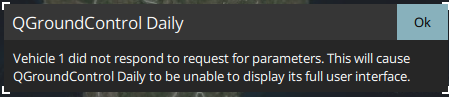
This connectivity issue also occasionally happens when connected over microusb, but it is not consistent like ethernet or doodle. Sometimes it connects fine on microusb.
This Flight Core V2 is using the Modalai Flight Core V2 firmware provided here:
http://voxl-packages.modalai.com/dists/fc-v2/sdk-0.9/But we also tried modalai's 1.13.2 firmware as well.
After every firmware flash, we would reset params to factory defaults.
What I've Tried:
We have a few flight core v2s we have in-house that do not have the same issues, and they are on the exact same firmware version.
-
Swapped the flight core v2 with a working one and tested. Could not replicate the issue. This working one had a yellow JST while the one that had issues had a white JST on J12. Tried a working one we have that has a white JST and also could not replicate the issue.
-
Swapped the non-working one's SD card with the working one's SD card. Could not replicate the issue on the working one.
Why I think this is possibly a kernel/hardware issue:
I flashed the exact same firmware on the flight core v2s we have in-house and made the parameters the exact same as well. However, I could never recreate the issue with the ones in-house.
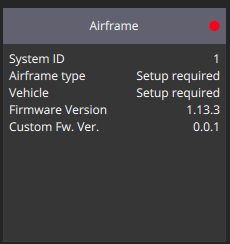
Firmware Version Information:
VOXL2 - SDK 1.0
FCV2 -
-

Reading along? Create a free ModalAI Forum account to join in.
With an account you can reply, ask your own question, get an email when a ModalAI engineer answers, and mark the reply that solved it. Your place in each thread is saved between visits.
Questions about VOXL, Flight Core, ESCs and ModalAI drones are answered here by the engineers who build them.
Register Login