
Coordinate system in AR0144 Tracking Camera
-
Hi guys,
I have a quick question regarding the coordinate frame orientation of the AR0144 tracking camera. As far as I understand it, the camera coordinate system is defined such that the z-axis points out of the lens, the x-axis to the right and the y-axis downward when looking through the camera.
What I am currently unsure about is the originally intended orientation of the tracking camera frame itself. I created a small sketch showing the two possible orientations I could think of. Which one is the correct one, the left or the right figure?
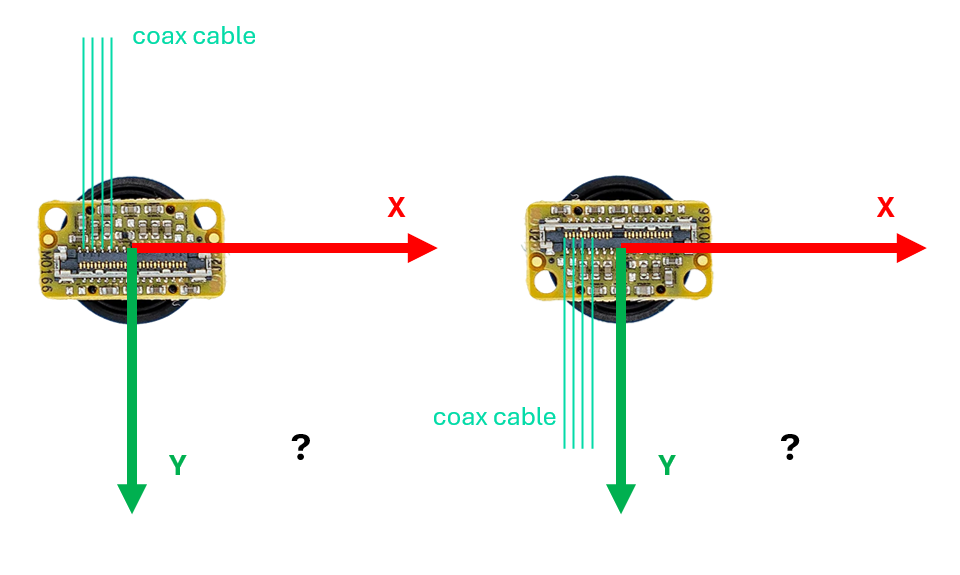
Additionally, I was wondering whether en_rotate in the voxl-camera-server.conf modifies the camera extrinsics, i.e. whether it applies a rotation to the underlying camera coordinate frame such that the extrinsics would need to be configured accordingly (for example upside down), or if it purely affects the image stream orientation without altering the extrinsic calibration at all.
Thanks a lot in advance!
-
Hi guys,
I have a quick question regarding the coordinate frame orientation of the AR0144 tracking camera. As far as I understand it, the camera coordinate system is defined such that the z-axis points out of the lens, the x-axis to the right and the y-axis downward when looking through the camera.
What I am currently unsure about is the originally intended orientation of the tracking camera frame itself. I created a small sketch showing the two possible orientations I could think of. Which one is the correct one, the left or the right figure?
Additionally, I was wondering whether en_rotate in the voxl-camera-server.conf modifies the camera extrinsics, i.e. whether it applies a rotation to the underlying camera coordinate frame such that the extrinsics would need to be configured accordingly (for example upside down), or if it purely affects the image stream orientation without altering the extrinsic calibration at all.
Thanks a lot in advance!
Hello @Dronodev ,
The other side of the M0166 PCB has a picture of a tiny figure which shows the nominal "up" orientation. You will see the little guy in the image below (coax cables are going up):
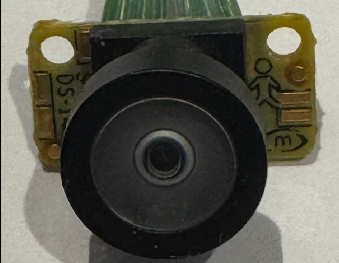
So if you flip the camera around to point away from you, then reference frame will be (right-handed):
- X : right
- Y : down
- Z : out of the camera lens
So your first diagram (on the left) is correct.
Here is specifically what
en_rotateflag invoxl-camera-server.confdoes for AR0144 camera:- it sets the camera configuration / register such that the image is read out backwards (rotated 180 degrees) from camera to VOXL2
- no rotation is done in software (
voxl-camera-server)
If you enable the rotation this way, you will need to either re-do the camera calibration or rotate your intrinsics manually, which I guess is trivial.
In terms of extrinsics (in
/etc/modalai/extrinsics.conffile), you will need to update the camera rotation by 180 degrees along the Z-axis, ifen_rotateflag is used (assuming you had it already configured for the non-rotated configuration).Alex
-
Hello @Dronodev ,
The other side of the M0166 PCB has a picture of a tiny figure which shows the nominal "up" orientation. You will see the little guy in the image below (coax cables are going up):
So if you flip the camera around to point away from you, then reference frame will be (right-handed):
- X : right
- Y : down
- Z : out of the camera lens
So your first diagram (on the left) is correct.
Here is specifically what
en_rotateflag invoxl-camera-server.confdoes for AR0144 camera:- it sets the camera configuration / register such that the image is read out backwards (rotated 180 degrees) from camera to VOXL2
- no rotation is done in software (
voxl-camera-server)
If you enable the rotation this way, you will need to either re-do the camera calibration or rotate your intrinsics manually, which I guess is trivial.
In terms of extrinsics (in
/etc/modalai/extrinsics.conffile), you will need to update the camera rotation by 180 degrees along the Z-axis, ifen_rotateflag is used (assuming you had it already configured for the non-rotated configuration).Alex
@Alex-Kushleyev Thanks for the help !

Reading along? Create a free ModalAI Forum account to join in.
With an account you can reply, ask your own question, get an email when a ModalAI engineer answers, and mark the reply that solved it. Your place in each thread is saved between visits.
Questions about VOXL, Flight Core, ESCs and ModalAI drones are answered here by the engineers who build them.
Register Login