
Issues building Yolov8 trainer
-
Hello
We having issues building the docker image. Attached is a picture of the errors we are encountering.
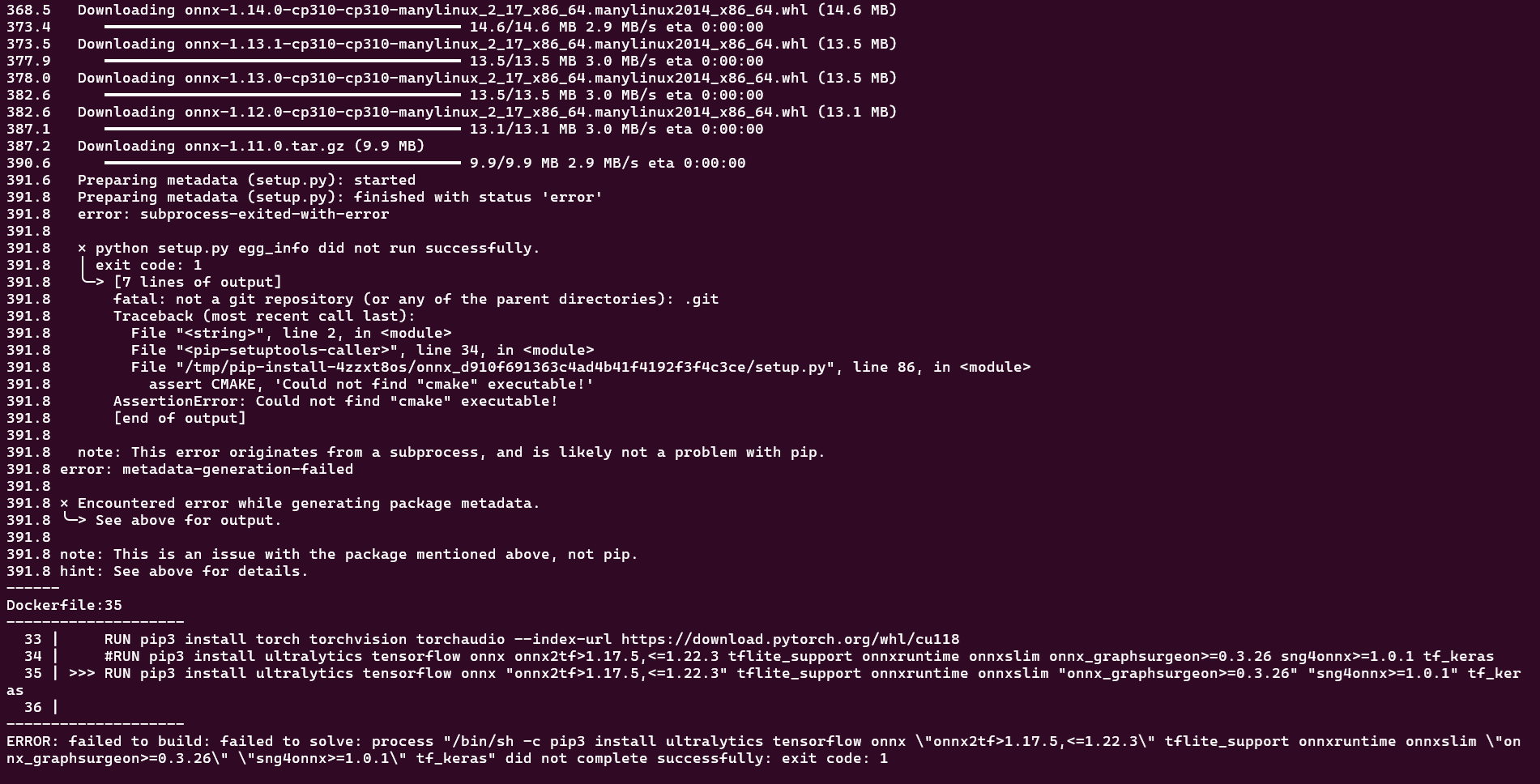
We have tried install the dependencies individually with little luck. Any assistance would be greatly appreciated
Thank you
-
Hello
We having issues building the docker image. Attached is a picture of the errors we are encountering.
We have tried install the dependencies individually with little luck. Any assistance would be greatly appreciated
Thank you
Hi Jeremy,
i just replicated this issue and was able to build the container by making the following changes to the docker file. Try adding these on your end and see if this resolves the issue.
FROM nvidia/cuda:11.8.0-cudnn8-devel-ubuntu22.04 WORKDIR /app RUN echo '@@@@@@@@@@@@@@@@@@@@@@@@@@@@@@@@@@@@@@@@@@@@@@@@@@@@@@@@@@@@@@@@@@@@@@' RUN echo '@@@@@@@@@@@@@@@@@@@@@@@@@@@@@@@@@@@@@@@@@@@@@@@@@@@@@@@@@@@@@@@@@@@@@@' RUN echo '@@@@@@@@@@@@@@@@@@@@@@@@@, ,&@@@@@@@@@@@@@@@@@@@@@' RUN echo '@@@@@@@@@@@@@@@@@@& %@@@@@@@@@@@@@@@@@@@@( .@@@@@@@@@@@@@@@' RUN echo '@@@@@@@@@@@@@@( ,@@@@@@@@@@@@@@@@@@@@@@@@@@@@@@@@# @@@@@@@@@@@' RUN echo '@@@@@@@@@@@. @@@@@@@@@@/ ,%@@@@@@%* (@@@@@@@@@. %@@@ @@@@@@@@' RUN echo '@@@@@@@@% @@@@@@@@@@@ @&, *@& *@@@@@@@@@@ @@ %@@@@@@@@' RUN echo '@@@@@@, %@@@ @@@@@@@@@@@@@ @@@@@& @@@@@& @@@@@@@@@@@ *# @@@@@@' RUN echo '@@@@@ %@@@@@ *@@@@@@@@@@@@@ @@@@@& @@@@@% @@@@@@@@@@@* @@@@ @@@@@' RUN echo '@@@@@@. ., @@@@@@@@@@@@@ @@@@@& @@@@@% @@@@@@@@@@. @@@@@@@' RUN echo '@@@@@@@@@ @@& @@@&@@@@@@@@ @@@@@@.,@@@@@& @@@@@@@@ @@@@@@@@@' RUN echo '@@@@@@@@@@@@( %@@% (@@@@@@@@@@@@@@@@@@@@@@@@@@, *@@@@@@@@@@@@' RUN echo '@@@@@@@@@@@@@@@@@&. ,@@@@. .%@@@@@@@@@@@@@/ %@@@@@@@@@@@@@@@@' RUN echo '@@@@@@@@@@@@@@@@@@@@@@@@@@@@@@@@@@@(,. .(@@@@@@@@@@@@@@@@@@@@@@@@@' RUN echo '@@@@@@@@@@@@@@@@@@@@@@@@@@@@@@@@@@@@@@@@@@@@@@@@@@@@@@@@@@@@@@@@@@@@@@' RUN apt-get update && apt-get install -y \ git \ wget \ curl \ unzip \ python3 \ python3-pip \ build-essential \ cmake \ libgl1-mesa-glx \ libglib2.0-0 \ libusb-1.0-0 \ && rm -rf /var/lib/apt/lists/* RUN pip3 install torch torchvision torchaudio --index-url https://download.pytorch.org/whl/cu118 RUN pip3 install cmake RUN pip3 install protobuf==3.20.3 RUN pip3 install onnx #RUN pip3 install ultralytics tensorflow onnx onnx2tf>1.17.5,<=1.22.3 tflite_support onnxruntime onnxslim onnx_graphsurgeon>=0.3.26 sng4onnx>=1.0.1 tf_keras RUN pip3 install ultralytics tensorflow "onnx2tf>1.17.5,<=1.22.3" tflite_support onnxruntime onnxslim "onnx_graphsurgeon>=0.3.26" "sng4onnx>=1.0.1" tf_keras -
Hi Jeremy,
i just replicated this issue and was able to build the container by making the following changes to the docker file. Try adding these on your end and see if this resolves the issue.
FROM nvidia/cuda:11.8.0-cudnn8-devel-ubuntu22.04 WORKDIR /app RUN echo '@@@@@@@@@@@@@@@@@@@@@@@@@@@@@@@@@@@@@@@@@@@@@@@@@@@@@@@@@@@@@@@@@@@@@@' RUN echo '@@@@@@@@@@@@@@@@@@@@@@@@@@@@@@@@@@@@@@@@@@@@@@@@@@@@@@@@@@@@@@@@@@@@@@' RUN echo '@@@@@@@@@@@@@@@@@@@@@@@@@, ,&@@@@@@@@@@@@@@@@@@@@@' RUN echo '@@@@@@@@@@@@@@@@@@& %@@@@@@@@@@@@@@@@@@@@( .@@@@@@@@@@@@@@@' RUN echo '@@@@@@@@@@@@@@( ,@@@@@@@@@@@@@@@@@@@@@@@@@@@@@@@@# @@@@@@@@@@@' RUN echo '@@@@@@@@@@@. @@@@@@@@@@/ ,%@@@@@@%* (@@@@@@@@@. %@@@ @@@@@@@@' RUN echo '@@@@@@@@% @@@@@@@@@@@ @&, *@& *@@@@@@@@@@ @@ %@@@@@@@@' RUN echo '@@@@@@, %@@@ @@@@@@@@@@@@@ @@@@@& @@@@@& @@@@@@@@@@@ *# @@@@@@' RUN echo '@@@@@ %@@@@@ *@@@@@@@@@@@@@ @@@@@& @@@@@% @@@@@@@@@@@* @@@@ @@@@@' RUN echo '@@@@@@. ., @@@@@@@@@@@@@ @@@@@& @@@@@% @@@@@@@@@@. @@@@@@@' RUN echo '@@@@@@@@@ @@& @@@&@@@@@@@@ @@@@@@.,@@@@@& @@@@@@@@ @@@@@@@@@' RUN echo '@@@@@@@@@@@@( %@@% (@@@@@@@@@@@@@@@@@@@@@@@@@@, *@@@@@@@@@@@@' RUN echo '@@@@@@@@@@@@@@@@@&. ,@@@@. .%@@@@@@@@@@@@@/ %@@@@@@@@@@@@@@@@' RUN echo '@@@@@@@@@@@@@@@@@@@@@@@@@@@@@@@@@@@(,. .(@@@@@@@@@@@@@@@@@@@@@@@@@' RUN echo '@@@@@@@@@@@@@@@@@@@@@@@@@@@@@@@@@@@@@@@@@@@@@@@@@@@@@@@@@@@@@@@@@@@@@@' RUN apt-get update && apt-get install -y \ git \ wget \ curl \ unzip \ python3 \ python3-pip \ build-essential \ cmake \ libgl1-mesa-glx \ libglib2.0-0 \ libusb-1.0-0 \ && rm -rf /var/lib/apt/lists/* RUN pip3 install torch torchvision torchaudio --index-url https://download.pytorch.org/whl/cu118 RUN pip3 install cmake RUN pip3 install protobuf==3.20.3 RUN pip3 install onnx #RUN pip3 install ultralytics tensorflow onnx onnx2tf>1.17.5,<=1.22.3 tflite_support onnxruntime onnxslim onnx_graphsurgeon>=0.3.26 sng4onnx>=1.0.1 tf_keras RUN pip3 install ultralytics tensorflow "onnx2tf>1.17.5,<=1.22.3" tflite_support onnxruntime onnxslim "onnx_graphsurgeon>=0.3.26" "sng4onnx>=1.0.1" tf_keras@Robbie-McCue worked, thanks so much!

Reading along? Create a free ModalAI Forum account to join in.
With an account you can reply, ask your own question, get an email when a ModalAI engineer answers, and mark the reply that solved it. Your place in each thread is saved between visits.
Questions about VOXL, Flight Core, ESCs and ModalAI drones are answered here by the engineers who build them.
Register Login