
ESC Calibration failing
-
Hello,
we are trying to calibrate a m0138 ESC using a VOXL2 mini. We have upgraded the ESC firmware using the provided scripts. We were able to run the script on m0 successfully and motors spun all the way to the max rpm set in the config file (see attached log). However, the calibration failed to spin the motors all the way up to the max pwm value for second motor (it keeps resetting to 0 , ramps up again and never exceeds about %15-20). attached is output log of the failed test as well.
we also tested a version which we updated the number of poles and kv to match our actuators and we seemed to experience similar issue.
Below are some of printouts of the python scripts and also specifications for the actuator we are using:
 ./voxl-esc-board-detect.py
Detected Python version : 3.6.9 (default, Mar 10 2023, 16:46:00)
[GCC 8.4.0]
Found voxl-esc tools bin version: 1.9
VOXL Platform: M0104
Detected RB5 Flight, VOXL2 M0054 or M0104!
INFO: Scanning for ESC firmware: /dev/slpi-uart-2, baud: 2000000
Sending library name request: libslpi_qrb5165_io.so
Sending initialization request
INFO: ESC(s) detected on port: /dev/slpi-uart-2, baud rate: 2000000
INFO: Detected protocol: firmware
INFO: Additional Information:
INFO: ---------------------
ESC detected: ModalAi 4-in-1 ESC (M0138-1)
ESC detected: ModalAi 4-in-1 ESC (M0138-1)
ESC detected: ModalAi 4-in-1 ESC (M0138-1)
ESC detected: ModalAi 4-in-1 ESC (M0138-1)
---------------------
./voxl-esc-verify-params.py Detected Python version : 3.6.9 (default, Mar 10 2023, 16:46:00) [GCC 8.4.0] Found voxl-esc tools bin version: 1.9 VOXL Platform: M0104 Detected RB5 Flight, VOXL2 M0054 or M0104! INFO: Scanning for ESC firmware: /dev/slpi-uart-2, baud: 2000000 Sending library name request: libslpi_qrb5165_io.so Sending initialization request INFO: ESC(s) detected on port: /dev/slpi-uart-2, baud rate: 2000000 INFO: Params from ID 0 match ../voxl-esc-params/FPV_RevB/m0138_xing2_1855_5x4x3.xml INFO: Params from ID 1 match ../voxl-esc-params/FPV_RevB/m0138_xing2_1855_5x4x3.xml INFO: Params from ID 2 match ../voxl-esc-params/FPV_RevB/m0138_xing2_1855_5x4x3.xml INFO: Params from ID 3 match ../voxl-esc-params/FPV_RevB/m0138_xing2_1855_5x4x3.xml INFO: Success! Params in all ESCs are valid and identical../voxl-esc-scan.py Detected Python version : 3.6.9 (default, Mar 10 2023, 16:46:00) [GCC 8.4.0] Found voxl-esc tools bin version: 1.9 VOXL Platform: M0104 Detected RB5 Flight, VOXL2 M0054 or M0104! INFO: Scanning for ESC firmware: /dev/slpi-uart-2, baud: 2000000 Sending library name request: libslpi_qrb5165_io.so Sending initialization request INFO: ESC(s) detected on port: /dev/slpi-uart-2, baud rate: 2000000, protocol: firmware INFO: ESC Information: INFO: --------------------- ID : 0 Board : version 42: ModalAi 4-in-1 ESC (M0138-1) UID : 0x203030335546571500280020 Firmware : version 39.20, hash 9c6233d6 Bootloader : version 184, hash e1c038de ID : 1 Board : version 42: ModalAi 4-in-1 ESC (M0138-1) UID : 0x20303033554657150044001F Firmware : version 39.20, hash 9c6233d6 Bootloader : version 184, hash e1c038de ID : 2 Board : version 42: ModalAi 4-in-1 ESC (M0138-1) UID : 0x2030303355465715004B0020 Firmware : version 39.20, hash 9c6233d6 Bootloader : version 184, hash e1c038de ID : 3 Board : version 42: ModalAi 4-in-1 ESC (M0138-1) UID : 0x20303033554657150027001E Firmware : version 39.20, hash 9c6233d6 Bootloader : version 184, hash e1c038de ---------------------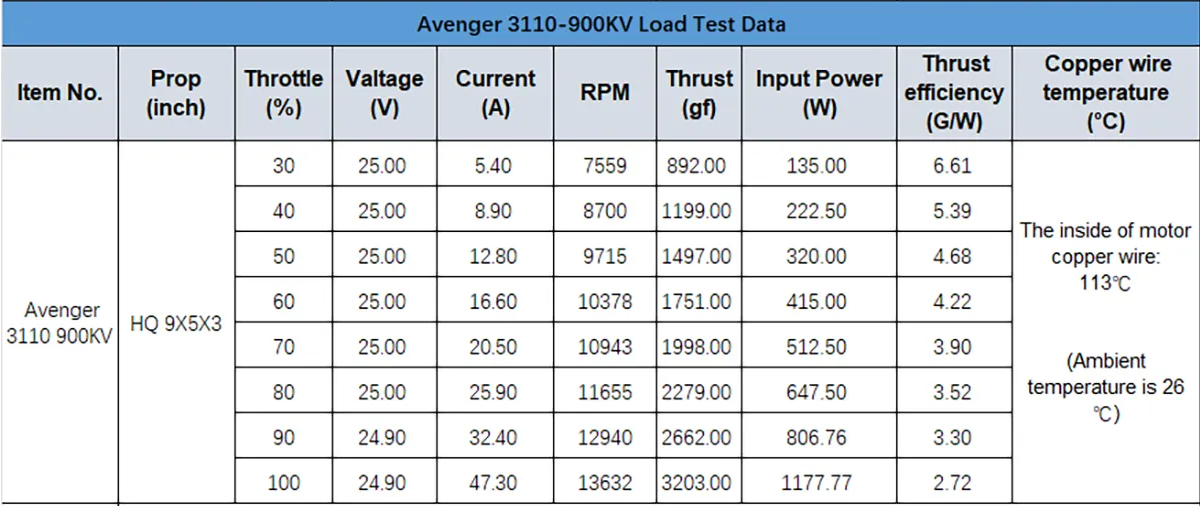
-
Hello,
we are trying to calibrate a m0138 ESC using a VOXL2 mini. We have upgraded the ESC firmware using the provided scripts. We were able to run the script on m0 successfully and motors spun all the way to the max rpm set in the config file (see attached log). However, the calibration failed to spin the motors all the way up to the max pwm value for second motor (it keeps resetting to 0 , ramps up again and never exceeds about %15-20). attached is output log of the failed test as well.
we also tested a version which we updated the number of poles and kv to match our actuators and we seemed to experience similar issue.
Below are some of printouts of the python scripts and also specifications for the actuator we are using:
 ./voxl-esc-board-detect.py
Detected Python version : 3.6.9 (default, Mar 10 2023, 16:46:00)
[GCC 8.4.0]
Found voxl-esc tools bin version: 1.9
VOXL Platform: M0104
Detected RB5 Flight, VOXL2 M0054 or M0104!
INFO: Scanning for ESC firmware: /dev/slpi-uart-2, baud: 2000000
Sending library name request: libslpi_qrb5165_io.so
Sending initialization request
INFO: ESC(s) detected on port: /dev/slpi-uart-2, baud rate: 2000000
INFO: Detected protocol: firmware
INFO: Additional Information:
INFO: ---------------------
ESC detected: ModalAi 4-in-1 ESC (M0138-1)
ESC detected: ModalAi 4-in-1 ESC (M0138-1)
ESC detected: ModalAi 4-in-1 ESC (M0138-1)
ESC detected: ModalAi 4-in-1 ESC (M0138-1)
---------------------
./voxl-esc-verify-params.py Detected Python version : 3.6.9 (default, Mar 10 2023, 16:46:00) [GCC 8.4.0] Found voxl-esc tools bin version: 1.9 VOXL Platform: M0104 Detected RB5 Flight, VOXL2 M0054 or M0104! INFO: Scanning for ESC firmware: /dev/slpi-uart-2, baud: 2000000 Sending library name request: libslpi_qrb5165_io.so Sending initialization request INFO: ESC(s) detected on port: /dev/slpi-uart-2, baud rate: 2000000 INFO: Params from ID 0 match ../voxl-esc-params/FPV_RevB/m0138_xing2_1855_5x4x3.xml INFO: Params from ID 1 match ../voxl-esc-params/FPV_RevB/m0138_xing2_1855_5x4x3.xml INFO: Params from ID 2 match ../voxl-esc-params/FPV_RevB/m0138_xing2_1855_5x4x3.xml INFO: Params from ID 3 match ../voxl-esc-params/FPV_RevB/m0138_xing2_1855_5x4x3.xml INFO: Success! Params in all ESCs are valid and identical../voxl-esc-scan.py Detected Python version : 3.6.9 (default, Mar 10 2023, 16:46:00) [GCC 8.4.0] Found voxl-esc tools bin version: 1.9 VOXL Platform: M0104 Detected RB5 Flight, VOXL2 M0054 or M0104! INFO: Scanning for ESC firmware: /dev/slpi-uart-2, baud: 2000000 Sending library name request: libslpi_qrb5165_io.so Sending initialization request INFO: ESC(s) detected on port: /dev/slpi-uart-2, baud rate: 2000000, protocol: firmware INFO: ESC Information: INFO: --------------------- ID : 0 Board : version 42: ModalAi 4-in-1 ESC (M0138-1) UID : 0x203030335546571500280020 Firmware : version 39.20, hash 9c6233d6 Bootloader : version 184, hash e1c038de ID : 1 Board : version 42: ModalAi 4-in-1 ESC (M0138-1) UID : 0x20303033554657150044001F Firmware : version 39.20, hash 9c6233d6 Bootloader : version 184, hash e1c038de ID : 2 Board : version 42: ModalAi 4-in-1 ESC (M0138-1) UID : 0x2030303355465715004B0020 Firmware : version 39.20, hash 9c6233d6 Bootloader : version 184, hash e1c038de ID : 3 Board : version 42: ModalAi 4-in-1 ESC (M0138-1) UID : 0x20303033554657150027001E Firmware : version 39.20, hash 9c6233d6 Bootloader : version 184, hash e1c038de ---------------------@psafi , it looks like the motor simply does not spin-up properly, most likely because the sinusoidal spin-up is enabled (which it is by default) and the motor parameters are not correct or there is not enough power to spin the motor during spinup.
for the sinusoidal spinup to work properly, you need to set the following parameters in the esc config file (i adjusted the parameters for your motor):
    <param name="vbat_nominal_mv"     value="22200"/>  <!-- used for sanity checking and limiting of voltage-dependent funcions -->
    <param name="num_cycles_per_rev"  value="7"/>      <!-- number of pole pairs in the motor. used for converting electrical frequency to mechanical rpm -->

    <param name="spinup_type"         value="1"/>      <!-- 0: traditional, 1: sinusoidal -->
    <param name="spinup_power"        value="120"/>    <!-- power used to during spin-up procedure -->
    <param name="latch_power"         value="120"/>    <!-- power used during latching stage of spin-up (out of 999)-->
    <param name="spinup_power_ramp"   value="16"/>     <!-- it will take ( 4096 / (spinup_power_ramp*10000) ) seconds to ramp sinusoidal start-up power from 0 to spinup_power -->
    <param name="spinup_rpm_target"   value="1500"/>   <!-- Desired RPM at the end of the sinusoidal spin-up procedure -->
    <param name="spinup_time_ms"      value="1500"/>   <!-- Duration of the sinusoidal spin-up procedure -->
    <param name="spinup_bemf_comp"    value="1"/>      <!-- 0: disable, 1:enable back-emf compensation in sinusoidal spin-up procedure -->
    <param name="motor_kv"            value="900"/>    <!-- kV value of the motor. used in back-emf compensation during spin-up -->
If the motor still struggles, you can try to increase the spin-up power a bit higher to 130 or 140, but double check the current (per motor) during spin-up - a good rule of thumb is not to exceed 2-3 amps per motor during the spin-up phase.
In the params above i set 1.5 seconds spin-up time. you can try shorter if needed. However, significantly shortening the spin-up period, may require slight increase in spin-up power (to give it more torque).
If you calibrate using ID2, you will also see the total current (which will also include power for VOXL2, but that should be minimal).
Also, you mentioned running calibration in several motors - you typically do not need to do that, but you certainly can, just to check for consistency. All the ESC channels should have the same params / calibration.
One more tip; you can test reliability of spin-up by automatically commanding the motor to start / stop using existing test script:
./voxl-esc-spin-step.py --id 2 --rpm 0 --step-amplitude 2000 --step-frequency 1 --timeout 10 --enable-plot 1 --cmd-rate 100(please note that this is a RPM step command, so your motor should be calibrated for RPM control) . if you don't want to spin in rpm mode, you can just use the following command to do a power step:
./voxl-esc-spin-step.py --id 2 --power 0 --step-amplitude 10 --step-frequency 1 --timeout 10 --enable-plot 1 --cmd-rate 100I ran a similar command on a much smaller motor and here is a result (the exact command i ran was the following, but it will be too fast for your big motor / prop. Additionally, i ran the test on a linux pc, which allowed me to get much higher rate of feedback (2000 hz)
./voxl-esc-spin-step.py --id 2 --rpm 0 --step-amplitude 3000 --step-frequency 3 --timeout 10 --enable-plot 1 --cmd-rate 2000 --step-delay 0.1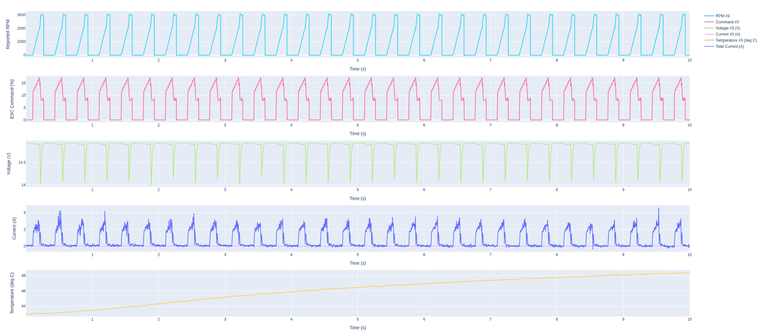
This type of test can be used to automate testing multiple start / stop. Since your motor is different, you should make sure the motor spins down completely before restarting (adjust
--step-frequency).Additional tip, if you want the motor to stop faster (at least for spin-up testing, or permanently), you can set the following param to 1 and the brake will be applied when the motor is commanded to stop spinning (not just coast down):
<param name="brake_to_stop" value="1"/> <!-- apply brake when stopping motor (or not) -->Alex
-
@psafi , it looks like the motor simply does not spin-up properly, most likely because the sinusoidal spin-up is enabled (which it is by default) and the motor parameters are not correct or there is not enough power to spin the motor during spinup.
for the sinusoidal spinup to work properly, you need to set the following parameters in the esc config file (i adjusted the parameters for your motor):
    <param name="vbat_nominal_mv"     value="22200"/>  <!-- used for sanity checking and limiting of voltage-dependent funcions -->
    <param name="num_cycles_per_rev"  value="7"/>      <!-- number of pole pairs in the motor. used for converting electrical frequency to mechanical rpm -->

    <param name="spinup_type"         value="1"/>      <!-- 0: traditional, 1: sinusoidal -->
    <param name="spinup_power"        value="120"/>    <!-- power used to during spin-up procedure -->
    <param name="latch_power"         value="120"/>    <!-- power used during latching stage of spin-up (out of 999)-->
    <param name="spinup_power_ramp"   value="16"/>     <!-- it will take ( 4096 / (spinup_power_ramp*10000) ) seconds to ramp sinusoidal start-up power from 0 to spinup_power -->
    <param name="spinup_rpm_target"   value="1500"/>   <!-- Desired RPM at the end of the sinusoidal spin-up procedure -->
    <param name="spinup_time_ms"      value="1500"/>   <!-- Duration of the sinusoidal spin-up procedure -->
    <param name="spinup_bemf_comp"    value="1"/>      <!-- 0: disable, 1:enable back-emf compensation in sinusoidal spin-up procedure -->
    <param name="motor_kv"            value="900"/>    <!-- kV value of the motor. used in back-emf compensation during spin-up -->
If the motor still struggles, you can try to increase the spin-up power a bit higher to 130 or 140, but double check the current (per motor) during spin-up - a good rule of thumb is not to exceed 2-3 amps per motor during the spin-up phase.
In the params above i set 1.5 seconds spin-up time. you can try shorter if needed. However, significantly shortening the spin-up period, may require slight increase in spin-up power (to give it more torque).
If you calibrate using ID2, you will also see the total current (which will also include power for VOXL2, but that should be minimal).
Also, you mentioned running calibration in several motors - you typically do not need to do that, but you certainly can, just to check for consistency. All the ESC channels should have the same params / calibration.
One more tip; you can test reliability of spin-up by automatically commanding the motor to start / stop using existing test script:
./voxl-esc-spin-step.py --id 2 --rpm 0 --step-amplitude 2000 --step-frequency 1 --timeout 10 --enable-plot 1 --cmd-rate 100(please note that this is a RPM step command, so your motor should be calibrated for RPM control) . if you don't want to spin in rpm mode, you can just use the following command to do a power step:
./voxl-esc-spin-step.py --id 2 --power 0 --step-amplitude 10 --step-frequency 1 --timeout 10 --enable-plot 1 --cmd-rate 100I ran a similar command on a much smaller motor and here is a result (the exact command i ran was the following, but it will be too fast for your big motor / prop. Additionally, i ran the test on a linux pc, which allowed me to get much higher rate of feedback (2000 hz)
./voxl-esc-spin-step.py --id 2 --rpm 0 --step-amplitude 3000 --step-frequency 3 --timeout 10 --enable-plot 1 --cmd-rate 2000 --step-delay 0.1This type of test can be used to automate testing multiple start / stop. Since your motor is different, you should make sure the motor spins down completely before restarting (adjust
--step-frequency).Additional tip, if you want the motor to stop faster (at least for spin-up testing, or permanently), you can set the following param to 1 and the brake will be applied when the motor is commanded to stop spinning (not just coast down):
<param name="brake_to_stop" value="1"/> <!-- apply brake when stopping motor (or not) -->Alex
@Alex-Kushleyev This is all great information. Thank you. We will continue tuning the motors using the utilities provided.
On a separate note, I did not see the html report file in the voxl-esc-tools directory or other directories I looked at. Where do they get exported to?
-
@Alex-Kushleyev This is all great information. Thank you. We will continue tuning the motors using the utilities provided.
On a separate note, I did not see the html report file in the voxl-esc-tools directory or other directories I looked at. Where do they get exported to?
@psafi the html file is saved in the same folder where you run
voxl-esc-spin* scriptsif you have--enable-plot 1. on VOXL2, the plot wont show up on screen, since there is no screen attached to VOXL2 (which would work on a linux pc), but it will be saved to html. In order to save to html, you will need to have plotly installed. You may first need to install pip3apt update apt install python3-pip pip3 install plotly --upgradeAlex

Reading along? Create a free ModalAI Forum account to join in.
With an account you can reply, ask your own question, get an email when a ModalAI engineer answers, and mark the reply that solved it. Your place in each thread is saved between visits.
Questions about VOXL, Flight Core, ESCs and ModalAI drones are answered here by the engineers who build them.
Register Login