Skip to content
  • Categories
  • Recent
  • Tags
  • Popular
  • Users
  • Groups
Collapse
Brand Logo

ModalAI Forum

  1. ModalAI Support Forum
  2. VOXL Compute & Autopilot
  3. VOXL 2 Mini
  4. Voxl2 Mini Failed to Configure px4

Voxl2 Mini Failed to Configure px4

Scheduled Pinned Locked Moved VOXL 2 Mini
14 Posts 2 Posters 2.2k Views 1 Watching
  • Oldest to Newest
  • Newest to Oldest
  • Most Votes
Reply
  • Reply as topic
Log in to reply
This topic has been deleted. Only users with topic management privileges can see it.
  • Nicholas HansenN Offline
    Nicholas HansenN Offline
    Nicholas Hansen
    Contributor
    wrote on last edited by
    #1

    While updating the SDK of a Voxl2 Mini form 1.0.0 to 1.1.2, px4 failed to configure the parameters. I tried power cycling and running voxl-configure-mpa again with the same result. It says the error is likely because voxl-px4 on the SDSP failed to restart, but px4 is always enabled and running when I check voxl-inspect-services. Is there a way to make sure px4 restarts correctly so the parameters can be configured?
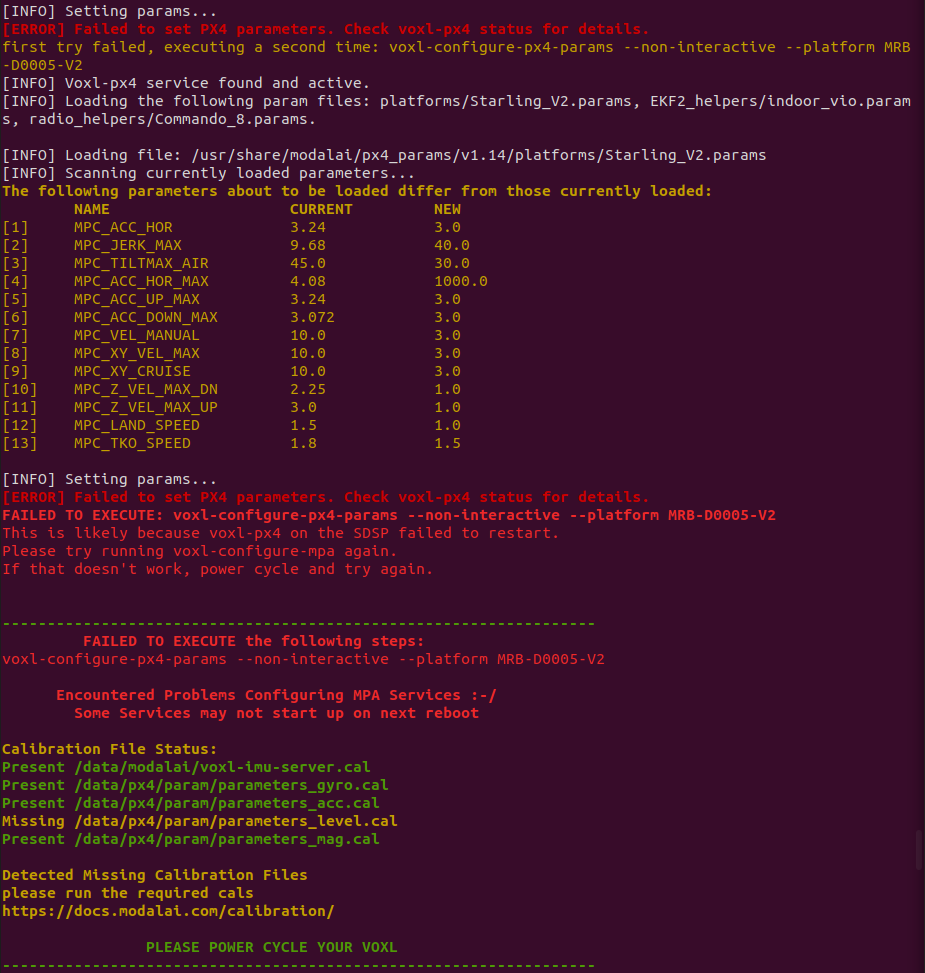
    Screenshot from 2024-04-11 18-08-19.png

    tomT 1 Reply Last reply
    0
    • Nicholas HansenN Nicholas Hansen

      While updating the SDK of a Voxl2 Mini form 1.0.0 to 1.1.2, px4 failed to configure the parameters. I tried power cycling and running voxl-configure-mpa again with the same result. It says the error is likely because voxl-px4 on the SDSP failed to restart, but px4 is always enabled and running when I check voxl-inspect-services. Is there a way to make sure px4 restarts correctly so the parameters can be configured?

      Screenshot from 2024-04-11 18-08-19.png

      tomT Online
      tomT Online
      tom
      admin
      wrote on last edited by tom
      #2

      @Nicholas-Hansen Can you try flashing SDK 1.1.2 using the -w option which will wipe all the board's partitions like so:

      cd voxl2-mini_SDK_1.1.2
      ./install.sh -w
      
      Nicholas HansenN 1 Reply Last reply
      0
      • tomT tom

        @Nicholas-Hansen Can you try flashing SDK 1.1.2 using the -w option which will wipe all the board's partitions like so:

        cd voxl2-mini_SDK_1.1.2
        ./install.sh -w
        
        Nicholas HansenN Offline
        Nicholas HansenN Offline
        Nicholas Hansen
        Contributor
        wrote on last edited by
        #3

        @tom That reflash with wiping all partitions fixed the configuring px4 issue, but has created another issue. The voxl-imu-server is enabled but not running. Attempting to start the server does not work.
        When you connect to QGroundControl the IMU is clearly working because the horizon changes as you move the voxl2 mini board.

        tomT 1 Reply Last reply
        0
        • Nicholas HansenN Nicholas Hansen

          @tom That reflash with wiping all partitions fixed the configuring px4 issue, but has created another issue. The voxl-imu-server is enabled but not running. Attempting to start the server does not work.
          When you connect to QGroundControl the IMU is clearly working because the horizon changes as you move the voxl2 mini board.

          tomT Online
          tomT Online
          tom
          admin
          wrote on last edited by
          #4

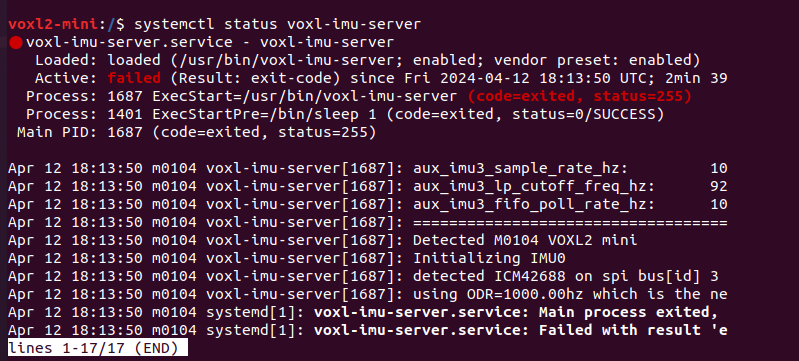
          @Nicholas-Hansen what do you see with systemctl status voxl-imu-server?

          Nicholas HansenN 1 Reply Last reply
          0
          • tomT tom

            @Nicholas-Hansen what do you see with systemctl status voxl-imu-server?

            Nicholas HansenN Offline
            Nicholas HansenN Offline
            Nicholas Hansen
            Contributor
            wrote on last edited by
            #5

            @tom here is what I got 6db85361-8214-4252-a722-93f35483dfa3-image.png

            tomT 1 Reply Last reply
            0
            • Nicholas HansenN Nicholas Hansen

              @tom here is what I got 6db85361-8214-4252-a722-93f35483dfa3-image.png

              tomT Online
              tomT Online
              tom
              admin
              wrote on last edited by
              #6

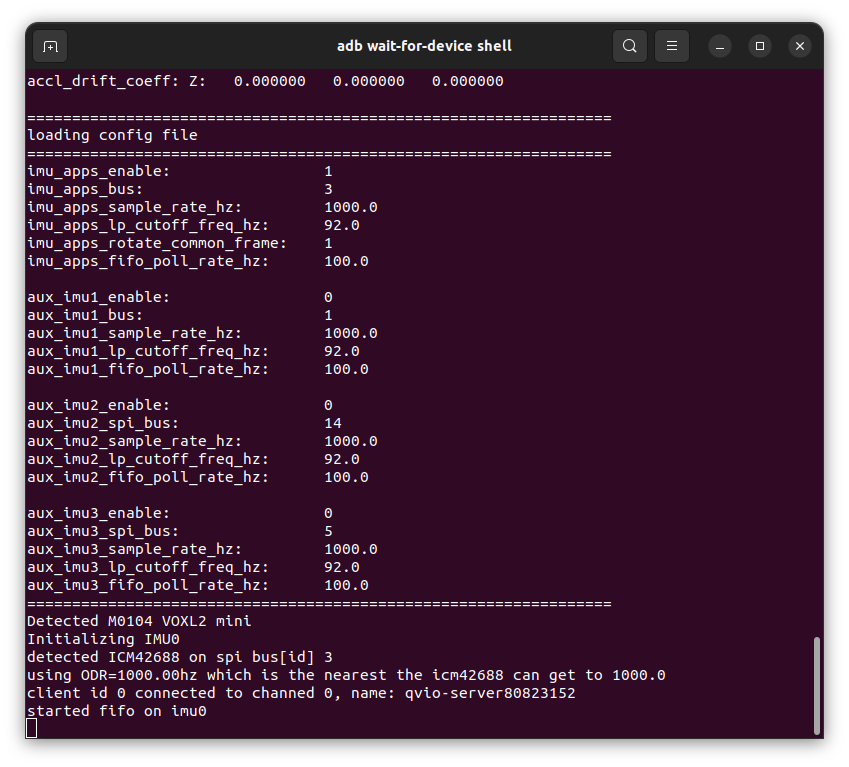
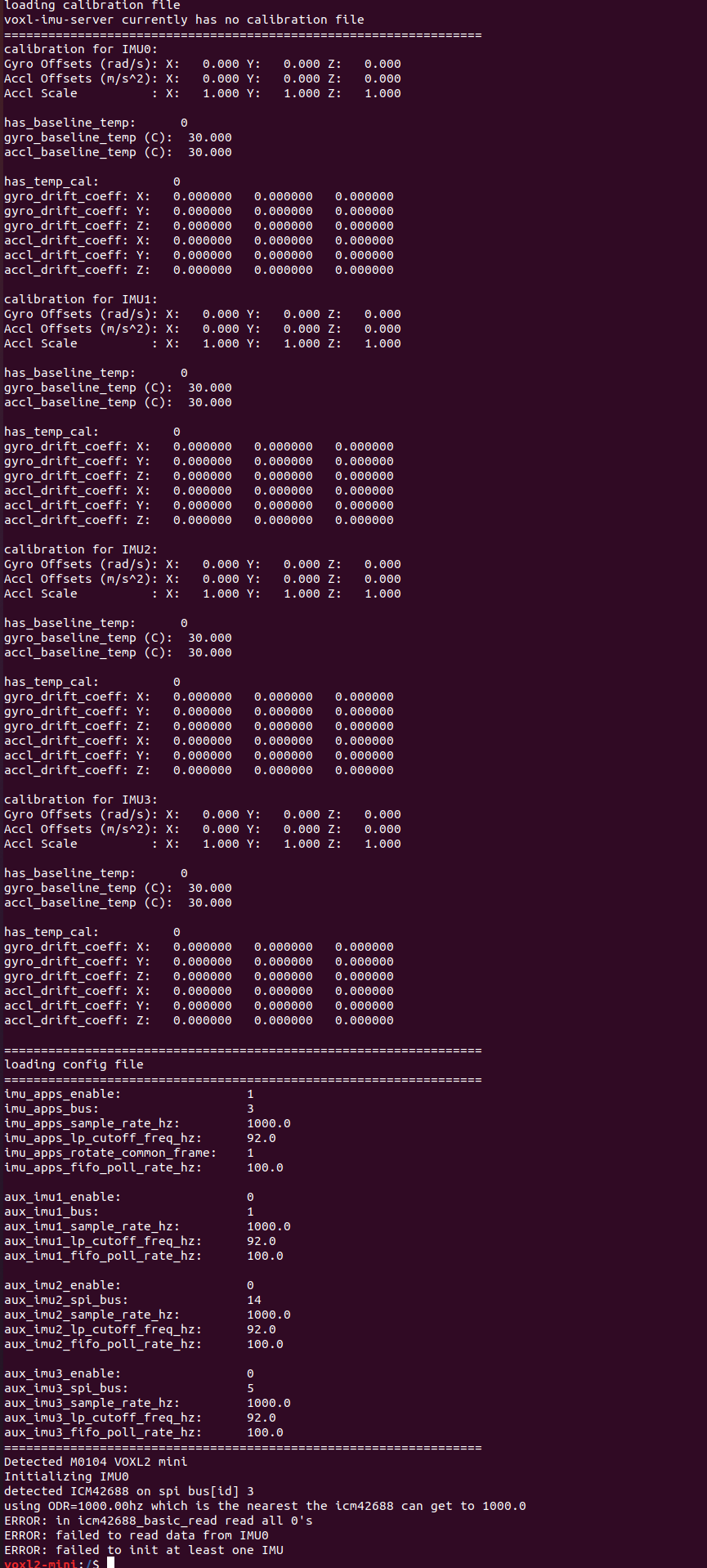
              @Nicholas-Hansen Hmm what do you see if you run voxl-imu-server manually from the command line?

              Nicholas HansenN 1 Reply Last reply
              0
              • tomT tom

                @Nicholas-Hansen Hmm what do you see if you run voxl-imu-server manually from the command line?

                Nicholas HansenN Offline
                Nicholas HansenN Offline
                Nicholas Hansen
                Contributor
                wrote on last edited by
                #7

                @tom here is what I get when I run that command ff9affb7-249b-4858-a3f6-e9b52cb020f5-image.png
                tomT 3 Replies Last reply
                0
                • Nicholas HansenN Nicholas Hansen

                  @tom here is what I get when I run that command ff9affb7-249b-4858-a3f6-e9b52cb020f5-image.png

                  tomT Online
                  tomT Online
                  tom
                  admin
                  wrote on last edited by
                  #8

                  @Nicholas-Hansen d423ca41-24e9-462f-872e-fafb69a07259-image.png

                  Here is what my setup looks like with the same release.

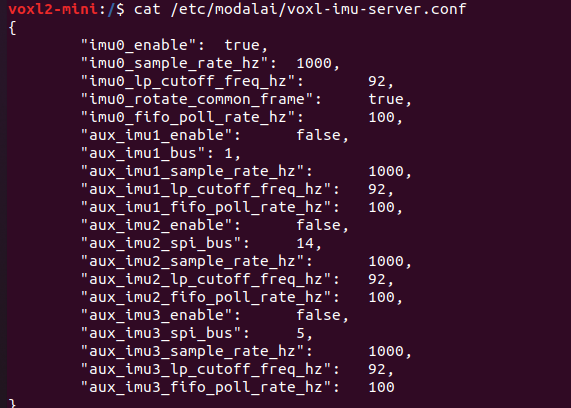
                  Can you confirm that your config file looks the same:

                  voxl2-mini:/$ cat /etc/modalai/voxl-imu-server.conf 
                  {
                  	"imu0_enable":	true,
                  	"imu0_sample_rate_hz":	1000,
                  	"imu0_lp_cutoff_freq_hz":	92,
                  	"imu0_rotate_common_frame":	true,
                  	"imu0_fifo_poll_rate_hz":	100,
                  	"aux_imu1_enable":	false,
                  	"aux_imu1_bus":	1,
                  	"aux_imu1_sample_rate_hz":	1000,
                  	"aux_imu1_lp_cutoff_freq_hz":	92,
                  	"aux_imu1_fifo_poll_rate_hz":	100,
                  	"aux_imu2_enable":	false,
                  	"aux_imu2_spi_bus":	14,
                  	"aux_imu2_sample_rate_hz":	1000,
                  	"aux_imu2_lp_cutoff_freq_hz":	92,
                  	"aux_imu2_fifo_poll_rate_hz":	100,
                  	"aux_imu3_enable":	false,
                  	"aux_imu3_spi_bus":	5,
                  	"aux_imu3_sample_rate_hz":	1000,
                  	"aux_imu3_lp_cutoff_freq_hz":	92,
                  	"aux_imu3_fifo_poll_rate_hz":	100
                  }
                  
                  Nicholas HansenN 1 Reply Last reply
                  0
                  • Nicholas HansenN Nicholas Hansen

                    @tom here is what I get when I run that command ff9affb7-249b-4858-a3f6-e9b52cb020f5-image.png

                    tomT Online
                    tomT Online
                    tom
                    admin
                    wrote on last edited by
                    #9

                    @Nicholas-Hansen Can you also provide me with the board's serial number?

                    It will be on a white sticker in the format MXXXXXXXXXX

                    Nicholas HansenN 1 Reply Last reply
                    0
                    • Nicholas HansenN Nicholas Hansen

                      @tom here is what I get when I run that command ff9affb7-249b-4858-a3f6-e9b52cb020f5-image.png

                      tomT Online
                      tomT Online
                      tom
                      admin
                      wrote on last edited by
                      #10

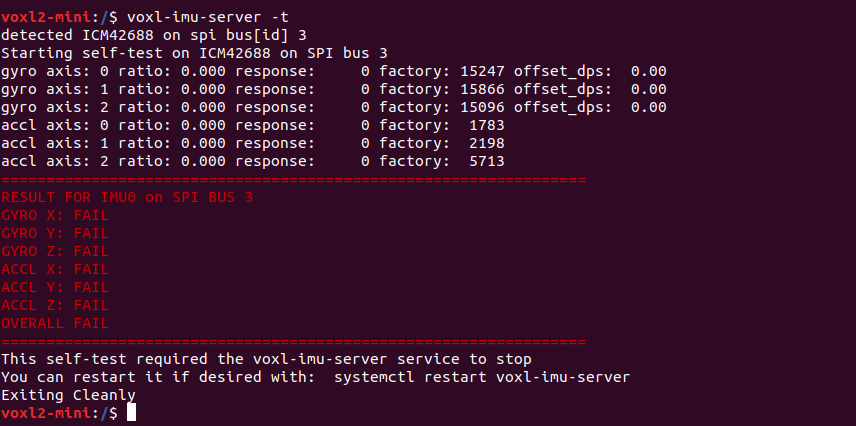
                      @Nicholas-Hansen Lastly can you provide the output of voxl-imu-server -t

                      1 Reply Last reply
                      0
                      • tomT tom

                        @Nicholas-Hansen Can you also provide me with the board's serial number?

                        It will be on a white sticker in the format MXXXXXXXXXX

                        Nicholas HansenN Offline
                        Nicholas HansenN Offline
                        Nicholas Hansen
                        Contributor
                        wrote on last edited by
                        #11

                        @tom M22000006B0 is the serial number, and the output of voxl-imu-server -t is 963ed4e9-2164-46a9-93be-7e720fc358d9-image.png
                        1 Reply Last reply
                        0
                        • tomT tom

                          @Nicholas-Hansen d423ca41-24e9-462f-872e-fafb69a07259-image.png

                          Here is what my setup looks like with the same release.

                          Can you confirm that your config file looks the same:

                          voxl2-mini:/$ cat /etc/modalai/voxl-imu-server.conf 
                          {
                          	"imu0_enable":	true,
                          	"imu0_sample_rate_hz":	1000,
                          	"imu0_lp_cutoff_freq_hz":	92,
                          	"imu0_rotate_common_frame":	true,
                          	"imu0_fifo_poll_rate_hz":	100,
                          	"aux_imu1_enable":	false,
                          	"aux_imu1_bus":	1,
                          	"aux_imu1_sample_rate_hz":	1000,
                          	"aux_imu1_lp_cutoff_freq_hz":	92,
                          	"aux_imu1_fifo_poll_rate_hz":	100,
                          	"aux_imu2_enable":	false,
                          	"aux_imu2_spi_bus":	14,
                          	"aux_imu2_sample_rate_hz":	1000,
                          	"aux_imu2_lp_cutoff_freq_hz":	92,
                          	"aux_imu2_fifo_poll_rate_hz":	100,
                          	"aux_imu3_enable":	false,
                          	"aux_imu3_spi_bus":	5,
                          	"aux_imu3_sample_rate_hz":	1000,
                          	"aux_imu3_lp_cutoff_freq_hz":	92,
                          	"aux_imu3_fifo_poll_rate_hz":	100
                          }
                          
                          Nicholas HansenN Offline
                          Nicholas HansenN Offline
                          Nicholas Hansen
                          Contributor
                          wrote on last edited by
                          #12

                          @tom the config appears to match 151bac38-95dc-4f03-9f95-1ed30345be06-image.png

                          tomT 1 Reply Last reply
                          0
                          • Nicholas HansenN Nicholas Hansen

                            @tom the config appears to match 151bac38-95dc-4f03-9f95-1ed30345be06-image.png

                            tomT Online
                            tomT Online
                            tom
                            admin
                            wrote on last edited by
                            #13

                            @Nicholas-Hansen It seems as though there is a hardware issue preventing the IMU from communicating correctly.

                            Our factory test data all looks good so this failure must've occurred post shipment.

                            If you'd like, you can send this board in for an RMA: https://www.modalai.com/pages/rma

                            Nicholas HansenN 1 Reply Last reply
                            1
                            • tomT tom

                              @Nicholas-Hansen It seems as though there is a hardware issue preventing the IMU from communicating correctly.

                              Our factory test data all looks good so this failure must've occurred post shipment.

                              If you'd like, you can send this board in for an RMA: https://www.modalai.com/pages/rma

                              Nicholas HansenN Offline
                              Nicholas HansenN Offline
                              Nicholas Hansen
                              Contributor
                              wrote on last edited by
                              #14

                              @tom Ok, thank you for you help & time in troubleshooting this issue

                              1 Reply Last reply
                              0

                              Hello! It looks like you're interested in this conversation, but you don't have an account yet.

                              Getting fed up of having to scroll through the same posts each visit? When you register for an account, you'll always come back to exactly where you were before, and choose to be notified of new replies (either via email, or push notification). You'll also be able to save bookmarks and upvote posts to show your appreciation to other community members.

                              With your input, this post could be even better 💗

                              Register Login
                              Reply
                              • Reply as topic
                              Log in to reply
                              • Oldest to Newest
                              • Newest to Oldest
                              • Most Votes


                              ModalAI
                              Categories Recent Tags ModalAI.com Docs
                              © 2026 ModalAI® · Accelerating autonomy for smaller, smarter, safer drones · Powered by NodeBB
                              • Login

                              • Don't have an account? Register

                              • Login or register to search.
                              • First post
                                Last post
                              0
                              • Categories
                              • Recent
                              • Tags
                              • Popular
                              • Users
                              • Groups