
Connect the VOXL 2 I/O using the UART port on the 5G modem
-
compass driver is started inside the voxl-px4 start-up script :
/usr/bin/voxl-px4-start# Auto detect the magnetometer. If one or both of these devices # are not connected it will fail but not cause any harm. /bin/echo "Looking for qmc5883l magnetometer" qshell qmc5883l start -R 10 -X -b 1 /bin/echo "Looking for ist8310 magnetometer" qshell ist8310 start -R 10 -X -b 1please note that both of these drivers are expecting the compass to be connected to the DSP i2c ports. We currently don't have compass driver that can run on the cpu side (unlike GPS). However, you could potentially splice the connection for GND, SDA, SCL and connect the i2c bus to J19 on VOXL2, so that you can use the DSP driver for the compass.. Is that an option for you?
Regarding the RTK corrections not working while GPS is connected to the DSP, I am assuming you have an RTK service that downloads the data from internet and sends a mavlink message with the corrections. That mavlink message needs to be consumed by the gps driver and rtk corrections forwarded to the GPS receiver via UART. If this is not happening, then perhaps the mavlink message never gets to the GPS driver inside the DSP, potentially being filtered out somewhere (mavlink manager?). I don't have deep enough knowledge there, maybe others can comment.
-
Regarding the RTK corrections not working while GPS is connected to the DSP, I am assuming you have an RTK service that downloads the data from internet and sends a mavlink message with the corrections. That mavlink message needs to be consumed by the gps driver and rtk corrections forwarded to the GPS receiver via UART. If this is not happening, then perhaps the mavlink message never gets to the GPS driver inside the DSP, potentially being filtered out somewhere (mavlink manager?). I don't have deep enough knowledge there, maybe others can comment.
@Alex-Kushleyev But the RTK corrections come in when I connect the RTK to the 5G modem over J9. What do you think makes a difference here?
-
@Alex-Kushleyev But the RTK corrections come in when I connect the RTK to the 5G modem over J9. What do you think makes a difference here?
@SMRazaRizvi When you connect the GPS to J9, you start the GPS driver on the cpu side, so there is probably nothing that filters out the mavlink messages with corrections between the rtk mavlink service and your gps driver.
When starting GPS driver on the DSP, there may be a filter somewhere that prevents the rtk corrections mavlink message from reaching the DSP.
That is my guess
-
@SMRazaRizvi When you connect the GPS to J9, you start the GPS driver on the cpu side, so there is probably nothing that filters out the mavlink messages with corrections between the rtk mavlink service and your gps driver.
When starting GPS driver on the DSP, there may be a filter somewhere that prevents the rtk corrections mavlink message from reaching the DSP.
That is my guess
@Alex-Kushleyev I see.
I'll try to splice the connection for GND, SDA, and SCL and connect them to the J19 on VOXL2.In this case, should the GND, SDA, and SCL pins be connected to both the J9 on the 5G modem and the J19, or just to the J19?
-
@Alex-Kushleyev I see.
I'll try to splice the connection for GND, SDA, and SCL and connect them to the J19 on VOXL2.In this case, should the GND, SDA, and SCL pins be connected to both the J9 on the 5G modem and the J19, or just to the J19?
@SMRazaRizvi just J19 for gnd, sda and scl.
Then you still have gnd, 3.3V, rx, tx going to GPS.
-
@SMRazaRizvi just J19 for gnd, sda and scl.
Then you still have gnd, 3.3V, rx, tx going to GPS.
@Alex-Kushleyev Works like a magic!!
Thank you so much
-
@Alex-Kushleyev Works like a magic!!
Thank you so much@SMRazaRizvi awesome..
I want to look into why running the GPS driver on the DSP did not result in RTK corrections getting through.. This would simplify your setup.
Can you please help me by telling me the topic name that is published by the RTK (rtcm) publishing app? I think it is just not going through to the DSP (being filtered out) for some reason. Also, just curious what app are you using to publish the mavlink messages with RTK (rtcm) corrections?
Alex
-
@SMRazaRizvi awesome..
I want to look into why running the GPS driver on the DSP did not result in RTK corrections getting through.. This would simplify your setup.
Can you please help me by telling me the topic name that is published by the RTK (rtcm) publishing app? I think it is just not going through to the DSP (being filtered out) for some reason. Also, just curious what app are you using to publish the mavlink messages with RTK (rtcm) corrections?
Alex
@Alex-Kushleyev Sure.
But currently, I've crashed my drone after it suddenly flipped 180 roll, and crashed on the ground while I was flying.
For some Here's the log:
https://review.px4.io/plot_app?log=2a41a57f-5028-4619-88dd-cebdde721026
Can you see what's the issue here?
-
@Alex-Kushleyev Sure.
But currently, I've crashed my drone after it suddenly flipped 180 roll, and crashed on the ground while I was flying.
For some Here's the log:
https://review.px4.io/plot_app?log=2a41a57f-5028-4619-88dd-cebdde721026
Can you see what's the issue here?
I took a quick look, at the very end it looks like motor 2 (green) was commanded zero output
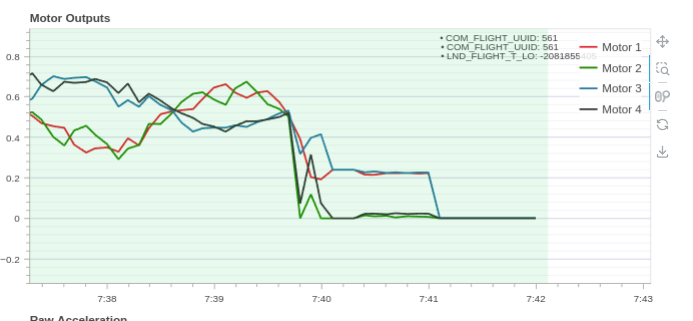
If the PWM range on VOXL2_IO is not calibrated properly, if the mixer is outputting zero, it could result in VOXL2_IO commanding low enough PWM to motor that can cause it to stop.
Can you please let me know if your motors are spinning right after you arm the vehicle (but before you raise the thrust), or they spin up only after you arm AND then raise the throttle stick?
-
I took a quick look, at the very end it looks like motor 2 (green) was commanded zero output
If the PWM range on VOXL2_IO is not calibrated properly, if the mixer is outputting zero, it could result in VOXL2_IO commanding low enough PWM to motor that can cause it to stop.
Can you please let me know if your motors are spinning right after you arm the vehicle (but before you raise the thrust), or they spin up only after you arm AND then raise the throttle stick?
@Alex-Kushleyev The motors were all working fine since the start. I flew the drone for a while actually and then it suddenly crashed.
-
@Alex-Kushleyev The motors were all working fine since the start. I flew the drone for a while actually and then it suddenly crashed.
@SMRazaRizvi , As I mentioned in my previous post, the plot shows that for some reason there was a command for Motor 2 to go to zero (which would convert to the minimum PWM value of 1000). Do you remember if you have performed some aggressive maneuver at the end, which would trigger this?
Also, can you please perform acuator test using GCS and figure out at which actuator output value, your motors actually spin up?
-
@SMRazaRizvi We have not integrated an RTK GPS receiver before so cannot comment on the steps needed to get it working properly. Perhaps the manufacturer of the RTK GPS unit can provide some guidance on how to use it with PX4? Or the PX4 community? But if you are seeing valid data from the unit then at least the hardware seems to be connected properly.
@Eric-Katzfey In my case I am receiving data as @Alex-Kushleyev explains with
stty -F /dev/ttyHS2 115200
cat /dev/ttyHS2
and in the script in /usr/bin/voxl-px4-start I see that section @Eric-Katzfey
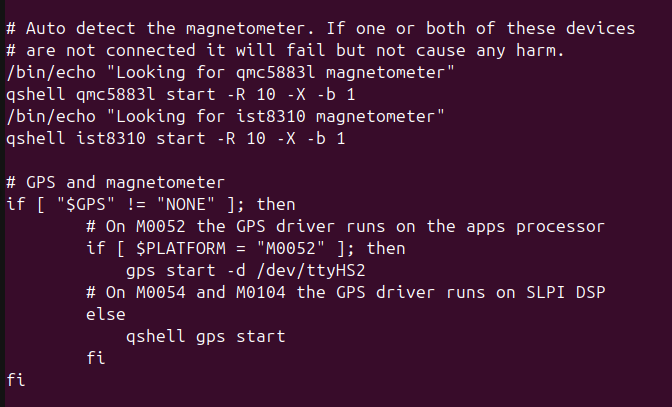
but when it comes to running voxl-px4 it autodetects with different bauds to the GPS. Is it necessary to change it somewhere else?
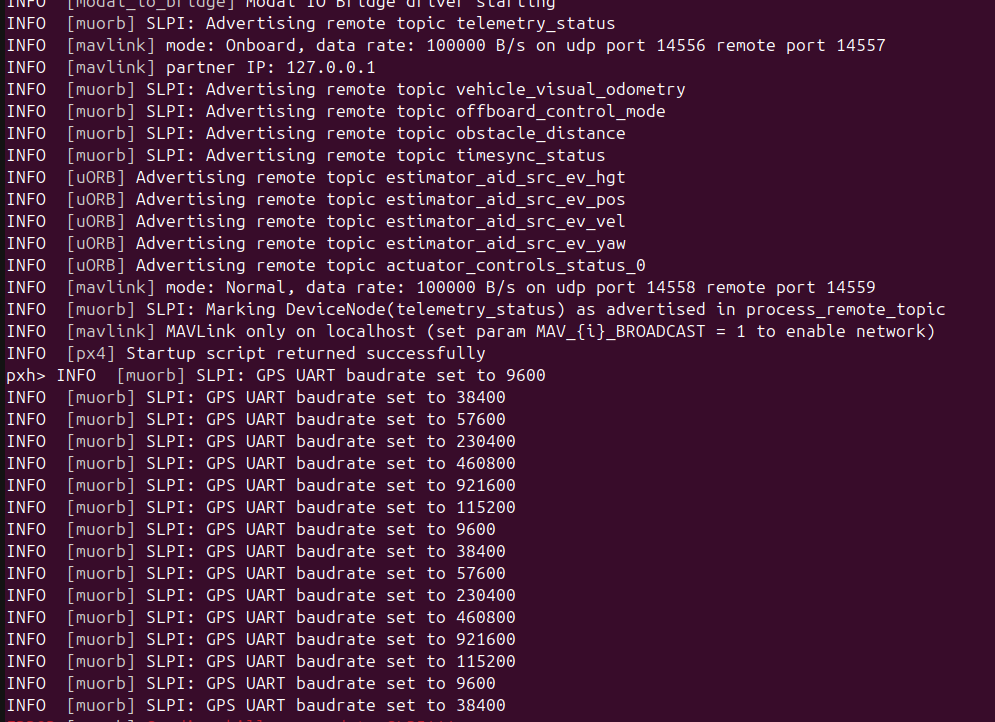
I have no problems with the MAG. It detects it perfectly.
I have the RX and TX of the GPS connected exclusively to the J9 of the 5G, and the rest, to the J19.I also have the RX and TX of the IO Board connected to the RX and TX of the J19.
I have also tried disconnecting the IO Board and leaving only the GPS on the J9.SOLVED: I change in the file voxl-px4-start from M0052 to M0054. Thanks!!!


Reading along? Create a free ModalAI Forum account to join in.
With an account you can reply, ask your own question, get an email when a ModalAI engineer answers, and mark the reply that solved it. Your place in each thread is saved between visits.
Questions about VOXL, Flight Core, ESCs and ModalAI drones are answered here by the engineers who build them.
Register Login