
DSP Tasks Failing Unless mini-dm is Run
-
We were able to update the dsp image and also build voxl-px4 from the sdk-1.1.2 tag.
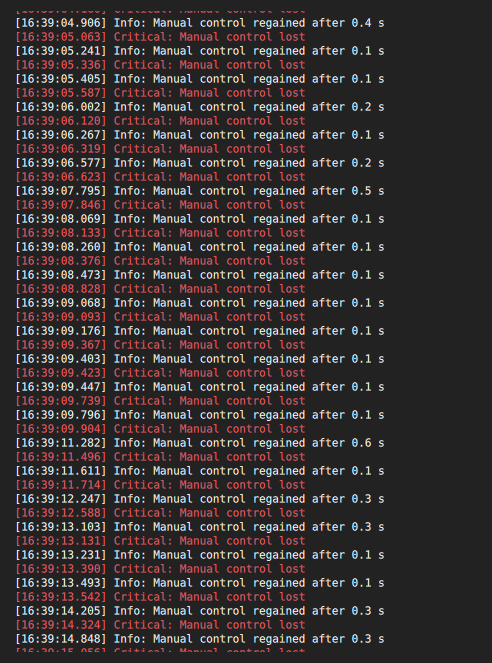
We are able to reproduce this issue with just a joystick connected to QGC (meaning RC in mode set to joystick only and voxl-io board disconnected).
When the issue occurs, this is what the cpuload topic shows:
Every 0.1s: px4-listener cpuload                                                                                                                                                    m0054: Thu Mar  2 13:11:09 2023


TOPIC: cpuload 2 instances

Instance 0:
 cpuload
    timestamp: 730351047 (59.056290 seconds ago)
    process_load: 0.86000
    system_load: 0.86000
    ram_usage: 0.00000
    platform: "QURT"


Instance 1:
 cpuload
    timestamp: 788949259 (0.459716 seconds ago)
    process_load: 0.52000
    system_load: 0.12578
    ram_usage: 0.11849
    platform: "POSIX"
Interesting to note: the timestamp starts to fall behind for most topics published by the QURT side of things...
Memory ballooning is still here. -
We were able to update the dsp image and also build voxl-px4 from the sdk-1.1.2 tag.
We are able to reproduce this issue with just a joystick connected to QGC (meaning RC in mode set to joystick only and voxl-io board disconnected).
When the issue occurs, this is what the cpuload topic shows:
Every 0.1s: px4-listener cpuload                                                                                                                                                    m0054: Thu Mar  2 13:11:09 2023


TOPIC: cpuload 2 instances

Instance 0:
 cpuload
    timestamp: 730351047 (59.056290 seconds ago)
    process_load: 0.86000
    system_load: 0.86000
    ram_usage: 0.00000
    platform: "QURT"


Instance 1:
 cpuload
    timestamp: 788949259 (0.459716 seconds ago)
    process_load: 0.52000
    system_load: 0.12578
    ram_usage: 0.11849
    platform: "POSIX"
Interesting to note: the timestamp starts to fall behind for most topics published by the QURT side of things...
Memory ballooning is still here.@bhanner-bell Wow, 86%, that's really high.
-
@bhanner-bell Wow, 86%, that's really high.
I did a lot of trial and error today. I am 95% sure I just found the problem.
First I got my bench in the messed up state. Then I rolled voxl-px4 back to sdk version 1.0.0 and noticed I was not able to recreate the issue. I immediately after ran dpkg -i on the sdk1.1.2 version and it was broken.
I then proceeded to binary search test all of the commits between 1.0.0 and 1.1.2. After some time I came to the following commits.
b746ab9434b7e4e71f67c9047ea3d3d49de81c00 - working
41a57bc30a40c42990995d5b4e8fe72389f66902 - brokenI saved these debs so i could switch between them multiple times and sure enough every time I switched to
41a57...I would see link loss issue. as soon as I rolled back tob746a...fixed.here is a link to the changes in
41a...
https://github.com/modalai/px4-firmware/commit/41a57bc30a40c42990995d5b4e8fe72389f66902the problem is caused by the removal of this line
qshell commander mode manualI then rolled back to the sdk 1.1.2 commit and added
qshell commander mode manualback to the start script and sure enough I can no longer recreate the link loss issue. I just figured this out and its almost 6pm on a friday so I have not had time to look into why this might break the rc control, but I suspect something is not getting initialized correctly without that call.I love to help you all recreate this on your end and get to the true root of the issue. Let me know if there is any other information you would like me to provide.
-
I did a lot of trial and error today. I am 95% sure I just found the problem.
First I got my bench in the messed up state. Then I rolled voxl-px4 back to sdk version 1.0.0 and noticed I was not able to recreate the issue. I immediately after ran dpkg -i on the sdk1.1.2 version and it was broken.
I then proceeded to binary search test all of the commits between 1.0.0 and 1.1.2. After some time I came to the following commits.
b746ab9434b7e4e71f67c9047ea3d3d49de81c00 - working
41a57bc30a40c42990995d5b4e8fe72389f66902 - brokenI saved these debs so i could switch between them multiple times and sure enough every time I switched to
41a57...I would see link loss issue. as soon as I rolled back tob746a...fixed.here is a link to the changes in
41a...
https://github.com/modalai/px4-firmware/commit/41a57bc30a40c42990995d5b4e8fe72389f66902the problem is caused by the removal of this line
qshell commander mode manualI then rolled back to the sdk 1.1.2 commit and added
qshell commander mode manualback to the start script and sure enough I can no longer recreate the link loss issue. I just figured this out and its almost 6pm on a friday so I have not had time to look into why this might break the rc control, but I suspect something is not getting initialized correctly without that call.I love to help you all recreate this on your end and get to the true root of the issue. Let me know if there is any other information you would like me to provide.
@ejohnson01 Okay, thanks for tracking that down. The commander used to come up in AUTO_LOITER mode by default which runs the CPU way too high (as you have witnessed) so I had the explicit command in the startup script to put it into manual mode. The commit changes the default mode to MANUAL so that the explicit statement in the startup script is no longer necessary. That seemed to be working for me but doesn't seem to be working in your case for some reason. If you query the commander status when you remove that what mode does it report?
-
@ejohnson01 Okay, thanks for tracking that down. The commander used to come up in AUTO_LOITER mode by default which runs the CPU way too high (as you have witnessed) so I had the explicit command in the startup script to put it into manual mode. The commit changes the default mode to MANUAL so that the explicit statement in the startup script is no longer necessary. That seemed to be working for me but doesn't seem to be working in your case for some reason. If you query the commander status when you remove that what mode does it report?
As we have done more testing of the system, we have noticed that one of the symptoms of the issue is that the control inputs become laggy. All inputs from the controller are seen on uorb with more and more time delay over time. For instance sometimes we will let the voxl run for a minute and then look at
watch -n0 px4-listener manual_control_setpointand we will not see the corresponding input show up for 30 seconds. The delay gets worse over time. I was under the impression that uorb had a queue size limit, which if the case, it does not seem to be enforced. If the queue lmit was enforce, I would expect to see a maximum delay of the time to process the size of the queue. I see in a lot of places of the code that there are 16 message length queues so a task running a 50 hz should at most see lag of 800ms (16 * 50ms). I think this might imply a more systemic issue as a few minutes ago we saw thecpuloadmessage get over a minute behind in processing.Does this sound correct to you?
Also, is there any possibility of setting up a call to dig into this issue in more depth?
-
E ejohnson01 referenced this topic on
-
@ejohnson01 Okay, thanks for tracking that down. The commander used to come up in AUTO_LOITER mode by default which runs the CPU way too high (as you have witnessed) so I had the explicit command in the startup script to put it into manual mode. The commit changes the default mode to MANUAL so that the explicit statement in the startup script is no longer necessary. That seemed to be working for me but doesn't seem to be working in your case for some reason. If you query the commander status when you remove that what mode does it report?
When I read this a second time I noticed you told me to check the commander mode. I noticed that when I used the game pad the commander mode was put into POS_HOLD. When this happens it seems to cause the lag to build. If I command the vehicle to switch to STABILIZED or ACRO eventually the system seems to catch up and we see both uorb messages be shown realtime and we can see the HUD update mostly real time as well.
I am guessing the issue has more to do with being in a mode that requires position lock. Interestingly enough, when we have brought the aircraft to the field and booted it with clear view of the sky so that the GPS can get lock, we have seen the aircraft either not have the lag and link loss or have lag and link loss for a few seconds then go away.
You said that you thought mode AUTO_LOITER used too much CPU, do you happen to have any thoughts on which of the modules are using the CPU or where the problem might be originating?
-
When I read this a second time I noticed you told me to check the commander mode. I noticed that when I used the game pad the commander mode was put into POS_HOLD. When this happens it seems to cause the lag to build. If I command the vehicle to switch to STABILIZED or ACRO eventually the system seems to catch up and we see both uorb messages be shown realtime and we can see the HUD update mostly real time as well.
I am guessing the issue has more to do with being in a mode that requires position lock. Interestingly enough, when we have brought the aircraft to the field and booted it with clear view of the sky so that the GPS can get lock, we have seen the aircraft either not have the lag and link loss or have lag and link loss for a few seconds then go away.
You said that you thought mode AUTO_LOITER used too much CPU, do you happen to have any thoughts on which of the modules are using the CPU or where the problem might be originating?
@ejohnson01 We noticed that AUTO_LOITER mode was taking a lot of CPU sort of by accident and switched it to default to MANUAL. I have not gone back to determine what was taking so much time in AUTO_LOITER.
-
When I read this a second time I noticed you told me to check the commander mode. I noticed that when I used the game pad the commander mode was put into POS_HOLD. When this happens it seems to cause the lag to build. If I command the vehicle to switch to STABILIZED or ACRO eventually the system seems to catch up and we see both uorb messages be shown realtime and we can see the HUD update mostly real time as well.
I am guessing the issue has more to do with being in a mode that requires position lock. Interestingly enough, when we have brought the aircraft to the field and booted it with clear view of the sky so that the GPS can get lock, we have seen the aircraft either not have the lag and link loss or have lag and link loss for a few seconds then go away.
You said that you thought mode AUTO_LOITER used too much CPU, do you happen to have any thoughts on which of the modules are using the CPU or where the problem might be originating?
@ejohnson01 I plan to spend some time looking into why POSCTL is taking so much CPU time. AUTO_LOITER hasn't been a very important mode for us but POSCTL certainly is.
-
When I read this a second time I noticed you told me to check the commander mode. I noticed that when I used the game pad the commander mode was put into POS_HOLD. When this happens it seems to cause the lag to build. If I command the vehicle to switch to STABILIZED or ACRO eventually the system seems to catch up and we see both uorb messages be shown realtime and we can see the HUD update mostly real time as well.
I am guessing the issue has more to do with being in a mode that requires position lock. Interestingly enough, when we have brought the aircraft to the field and booted it with clear view of the sky so that the GPS can get lock, we have seen the aircraft either not have the lag and link loss or have lag and link loss for a few seconds then go away.
You said that you thought mode AUTO_LOITER used too much CPU, do you happen to have any thoughts on which of the modules are using the CPU or where the problem might be originating?
@ejohnson01 I have started to look into this and I can recreate the issue. So I'll dig in and see if I can figure out a fix.
-
When I read this a second time I noticed you told me to check the commander mode. I noticed that when I used the game pad the commander mode was put into POS_HOLD. When this happens it seems to cause the lag to build. If I command the vehicle to switch to STABILIZED or ACRO eventually the system seems to catch up and we see both uorb messages be shown realtime and we can see the HUD update mostly real time as well.
I am guessing the issue has more to do with being in a mode that requires position lock. Interestingly enough, when we have brought the aircraft to the field and booted it with clear view of the sky so that the GPS can get lock, we have seen the aircraft either not have the lag and link loss or have lag and link loss for a few seconds then go away.
You said that you thought mode AUTO_LOITER used too much CPU, do you happen to have any thoughts on which of the modules are using the CPU or where the problem might be originating?
@ejohnson01 Can you try bringing this commit into your build and see if it resolves the issue: https://github.com/modalai/px4-firmware/commit/f945d29064b4ab26617a3fb15fc770f5dcb993e9

Reading along? Create a free ModalAI Forum account to join in.
With an account you can reply, ask your own question, get an email when a ModalAI engineer answers, and mark the reply that solved it. Your place in each thread is saved between visits.
Questions about VOXL, Flight Core, ESCs and ModalAI drones are answered here by the engineers who build them.
Register Login