Skip to content
  • Categories
  • Recent
  • Tags
  • Popular
  • Users
  • Groups
Collapse
Brand Logo

ModalAI Forum

S

Sean Hickey

@Sean Hickey
Unfollow Follow
About
Posts
8
Topics
0
Shares
0
Groups
0
Followers
0
Following
0

Posts

Recent Best Controversial

  • Second subscriber on mobilenet_tflite_data, and does that pipe run in the emulator?
    S Sean Hickey

    Hi Philip,

    I checked this on a VOXL 2.

    1. Adding a second subscriber to /run/mpa/mobilenet_tflite_data is a clean fan-out. The Modal Pipe Architecture creates a separate client connection for each subscriber, so the second subscriber does not consume or steal messages from voxl-tflite-server or from an existing subscriber. I tested this with an existing subscriber already running, then attached another subscriber to mobilenet_tflite_data. The system continued running normally and both consumed messages. See picture below.

    Only caveat is normal concerns about load and that a slow subscriber can miss data but won't affect other subscribers/server.

    1. The qrb5165 emulator should support the MPA/libmodal-pipe itself. The pipe can still exist without the board. However, mobilenet_tflite_data will not appear in the arb5165 emulator without additional setup. That pipe is published by voxl-tflite-server, which itself consumes a camera input pipe. The emulator does not provider an emulation of the physical VOXL2 camera pipeline by default. For simulation, I would start by testing the subscriber against recorded or synthetic MPA data rather than trying to emulate the full camera pipeline.

    Best,
    Sean
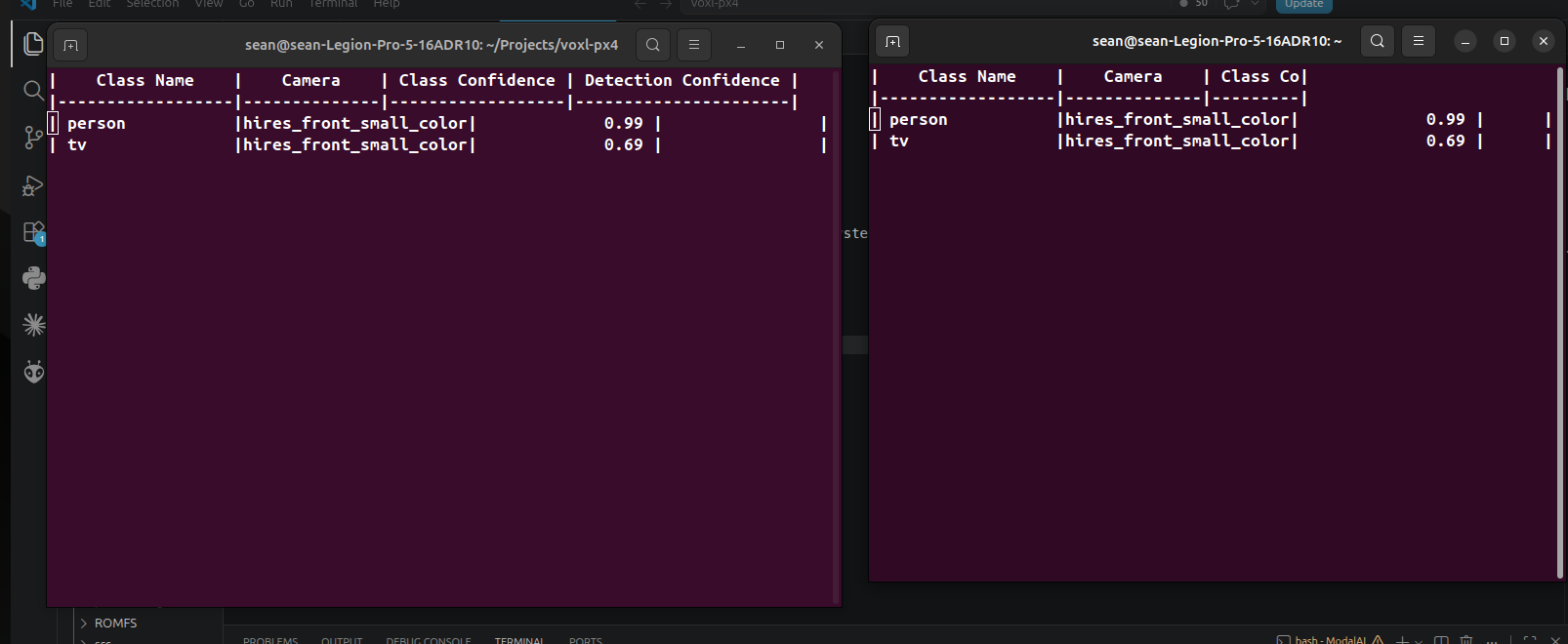
    Screenshot from 2026-08-10 14-13-30.png

    Ask your questions right here!

  • FC v2 Collision prevention issue with voxl 2
    S Sean Hickey

    @Jetson-Nano

    If this doesn't work, on the mavlink console (after testing the collision prevention) call:
    listener obstacle_distance_fused 1
    listener collision_constraints 1

    and let me know the results.

    Ask your questions right here!

  • FC v2 Collision prevention issue with voxl 2
    S Sean Hickey

    @Jetson-Nano

    voxl-px4_1.14.0-2.0.142_arm64.deb

    favicon

    Google Docs (drive.google.com)

    I attached the link above, I am using parameters:

    MPC_POS_MODE: Simple position control
    CP_DIST 1.5 m
    CP_DELAY 0.4 s
    CP_GUIDE_ANG : 0 deg
    CP_GO_NO_DATA: Enabled

    Ask your questions right here!

  • FC v2 Collision prevention issue with voxl 2
    S Sean Hickey

    @Jetson-Nano

    I used VIO with FC, but the path from obstacle detection to Collision Prevention is unchanged between the 2 modes.

    I used the mainline ModalAI PX4 SDK branch. I can share the built px4 deb build with you if that's helpful, but I would try changing the mpc_pos_mode parameter first on your current build to see if that fixes your issue.

    Ask your questions right here!

  • FC v2 Collision prevention issue with voxl 2
    S Sean Hickey

    @Jetson-Nano

    I was able to identify the issue.

    mpc_pos_mode - acceleration based doesn't call Collision Prevention in any of the newest PX4 builds..

    You need to use mpc_pos_mode - Simple Position Control (0) or mpc_pos_mode - smooth position control (3).

    I was able to test this on a similar setup, and confirmed that collision prevention only worked with the mpc_pos_mode indicated above, and notably did not with mpc_pos_mode acceleration.

    Ask your questions right here!

  • FC v2 Collision prevention issue with voxl 2
    S Sean Hickey

    @Jetson-Nano

    Can you see if you are using the MO169 or the MO178?

    Ask your questions right here!

  • FC v2 Collision prevention issue with voxl 2
    S Sean Hickey

    @Jetson-Nano

    What TOF sensor are you using for obstacle distance?

    Just confirming, you are using the ARK Flow MR facing downwards just for optical flow and position hold, but not for collision prevention?

    Ask your questions right here!

  • FC v2 Collision prevention issue with voxl 2
    S Sean Hickey

    @Jetson-Nano

    Looking through the PX4 codebase, the ARK Flow MR publishes to distance_sensor by default, not obstacle_distance. Have you made any changes to the codebase that would affect obstacle_distance or mounted any other sensors?

    Also, how have you mounted the ark_flow_mr. Is it pointing downwards on the vehicle, or forward pointing or some other configuration?

    Finally, have you tried setting the distance for collision prevention higher, and seeing how the drone reacts in that case?

    Ask your questions right here!
  • Login

  • Don't have an account? Register

  • Login or register to search.
  • First post
    Last post
0
  • Categories
  • Recent
  • Tags
  • Popular
  • Users
  • Groups