Skip to content
  • Categories
  • Recent
  • Tags
  • Popular
  • Users
  • Groups
Collapse
Brand Logo

ModalAI Forum

P

PSI

@PSI
Unfollow Follow
About
Posts
8
Topics
3
Shares
0
Groups
0
Followers
0
Following
0

Posts

Recent Best Controversial

  • Listing/Changing Camera Resolution
    P PSI

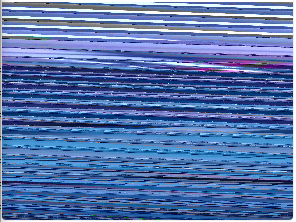
    After some digging, I came across the qtiqmmfsrc GStreamer element. If I use this to get the video stream at 4000x3000 (video/x-raw, format=NV12), I get the same distortion shown above. However, if I request the H.264 stream (video/x-h264, format=NV12), I get a clear picture.

    Below are the pipelines that I tested using the IMX412.

    # Distorted Output
    gst-launch-1.0 -e qtiqmmfsrc name=qmmf ! video/x-raw,format=NV12,width=4000,height=3000,framerate=30/1 ! \
    omxh264enc control-rate=2 target-bitrate=6000000 ! h264parse ! \
    matroskamux ! filesink location=43_raw.mkv
    
    # Good Output
    gst-launch-1.0 -e qtiqmmfsrc name=qmmf ! video/x-h264,format=NV12,width=4000,height=3000,framerate=30/1 ! \
    h264parse ! \
    matroskamux ! filesink location=43_h264.mkv
    

    On a side note, the video's white balance from qtiqmmfsrc is better than when requesting images through voxl-camera-server. The video is extremely warm when delivered through voxl-camera-server, though I admit that I never looked into the configuration for this.

    In any case, it looks like this is maybe an issue with Qualcomm's libs. I haven't yet looked further into the voxl-camera-server source, though I don't suppose there's been an update to the qmmfsrc or related libs that can be updated on the VOXL2, is there?

    VOXL 2

  • Artefacts and poor image quality on high frame-rates using the hardware encoder
    P PSI

    1,000,000 bps (1Mbps) seems low for a FHD stream. What bitrates did you try? Did you try increasing it to 10,000,000 or even 30,000,000 to see if that makes a difference? I'm running 1920x1080 @ 20 FPS with no major artifacts using this.

    The alternative would be either changing resolution or trying to switch to a different codec such as H265 or VP9 (which appear to be supported on the VOXL2 by just searching the gst-inspect-1.0 output), but that would require changes to the voxl-streamer source.

    VOXL 2 voxl-streamer streaming h264 voxl-camera

  • Listing/Changing Camera Resolution
    P PSI

    tl;dr; How do I find supported camera resolutions? I'm trying to get the maximum resolution possible out of the IMX412.

    Details:
    I have an IMX412 which theoretically can output 4056x3040 resolution (e.g. listed here) or when running the voxl-camera-server with verbose output:

    voxl2:/$ voxl-camera-server -d0
    No secondary id found for camera: hires, assuming mono
    ------ voxl-camera-server: Starting camera server
    Attempting to open the hal module
    SUCCESS: Camera module opened on attempt 0
    ----------- Number of cameras: 1
    
    Stats for camera: 0:
    ANDROID_SCALER_AVAILABLE_RAW_SIZES:
    	4056x3040, 4056x2288, 3040x3040, 3040x3040, 3040x3040, 3040x3040, 4056x3040, 4056x3040, 4056x2288, 4056x2288, 4056x2288, 4056x2288, 2028x1112, 1920x1080, 
    ANDROID_SCALER_AVAILABLE_PROCESSED_SIZES:
    	4056x3040, 4056x2288, 3040x3040, 3040x3040, 3040x3040, 3040x3040, 4056x3040, 4056x3040, 
    	4056x2288, 4056x2288, 4056x2288, 4056x2288, 2028x1112, 1920x1080, 
    ANDROID_SENSOR_INFO_SENSITIVITY_RANGE
    	min = 54
    	max = 863
    ANDROID_SENSOR_MAX_ANALOG_SENSITIVITY
    	862
    ANDROID_SENSOR_INFO_EXPOSURE_TIME_RANGE
    	min = 0ns
    	max = 232155075ns
    

    However, actually setting this resolution in voxl-camera-server.conf causes the following error:

    voxl2:/$ voxl-camera-server
    ------ voxl-camera-server: Starting camera server
    ERROR: Camera 0 failed to find supported preview config: 4056x3040
    Encountered error starting camera: hires, exiting
    

    Taking a look at the code, it looks like the actual configurations being searched are the ANDROID_SCALER_AVAILABLE_STREAM_CONFIGURATIONS. Adding a verbose output lists the following resolutions available, including the desired 4056x3040 resolution, albeit in different formats from the apparently desired 34:

    ANDROID_SCALER_AVAILABLE_STREAM_CONFIGURATIONS
    format: 34	4000x3000	0==0
    format: 34	4000x3000	1==0
    format: 35	4000x3000	0==0
    format: 35	4000x3000	1==0
    format: 33	4000x3000	0==0
    format: 34	3840x2160	0==0
    format: 34	3840x2160	1==0
    format: 35	3840x2160	0==0
    format: 35	3840x2160	1==0
    format: 33	3840x2160	0==0
    format: 34	3264x2448	0==0
    format: 34	3264x2448	1==0
    format: 35	3264x2448	0==0
    format: 35	3264x2448	1==0
    format: 33	3264x2448	0==0
    format: 34	3200x2400	0==0
    format: 34	3200x2400	1==0
    format: 35	3200x2400	0==0
    format: 35	3200x2400	1==0
    format: 33	3200x2400	0==0
    format: 34	2976x2976	0==0
    format: 34	2976x2976	1==0
    format: 35	2976x2976	0==0
    format: 35	2976x2976	1==0
    format: 33	2976x2976	0==0
    format: 34	2688x1512	0==0
    format: 35	2688x1512	0==0
    format: 33	2688x1512	0==0
    format: 34	2592x1944	0==0
    format: 34	2592x1944	1==0
    format: 35	2592x1944	0==0
    format: 35	2592x1944	1==0
    format: 33	2592x1944	0==0
    format: 34	2048x1536	0==0
    format: 35	2048x1536	0==0
    format: 33	2048x1536	0==0
    format: 34	1920x1440	0==0
    format: 35	1920x1440	0==0
    format: 33	1920x1440	0==0
    format: 34	1928x1208	0==0
    format: 35	1928x1208	0==0
    format: 33	1928x1208	0==0
    format: 34	1920x1080	0==0
    format: 35	1920x1080	0==0
    format: 33	1920x1080	0==0
    format: 34	1600x1200	0==0
    format: 35	1600x1200	0==0
    format: 33	1600x1200	0==0
    format: 34	1440x1080	0==0
    format: 35	1440x1080	0==0
    format: 33	1440x1080	0==0
    format: 34	1280x960	0==0
    format: 35	1280x960	0==0
    format: 33	1280x960	0==0
    format: 34	1280x800	0==0
    format: 35	1280x800	0==0
    format: 33	1280x800	0==0
    format: 34	1280x768	0==0
    format: 35	1280x768	0==0
    format: 33	1280x768	0==0
    format: 34	1280x720	0==0
    format: 35	1280x720	0==0
    format: 33	1280x720	0==0
    format: 34	1080x1080	0==0
    format: 35	1080x1080	0==0
    format: 33	1080x1080	0==0
    format: 34	1024x738	0==0
    format: 35	1024x738	0==0
    format: 33	1024x738	0==0
    format: 34	1024x768	0==0
    format: 35	1024x768	0==0
    format: 33	1024x768	0==0
    format: 34	864x480	0==0
    format: 35	864x480	0==0
    format: 33	864x480	0==0
    format: 34	800x600	0==0
    format: 35	800x600	0==0
    format: 33	800x600	0==0
    format: 34	800x480	0==0
    format: 35	800x480	0==0
    format: 33	800x480	0==0
    format: 34	720x1280	0==0
    format: 35	720x1280	0==0
    format: 33	720x1280	0==0
    format: 34	720x480	0==0
    format: 35	720x480	0==0
    format: 33	720x480	0==0
    format: 34	640x480	0==0
    format: 35	640x480	0==0
    format: 33	640x480	0==0
    format: 34	640x400	0==0
    format: 35	640x400	0==0
    format: 33	640x400	0==0
    format: 34	640x360	0==0
    format: 35	640x360	0==0
    format: 33	640x360	0==0
    format: 34	352x288	0==0
    format: 35	352x288	0==0
    format: 33	352x288	0==0
    format: 34	320x240	0==0
    format: 35	320x240	0==0
    format: 33	320x240	0==0
    format: 34	240x320	0==0
    format: 35	240x320	0==0
    format: 33	240x320	0==0
    format: 34	176x144	0==0
    format: 35	176x144	0==0
    format: 33	176x144	0==0
    format: 37	4056x3040	0==0
    format: 38	4056x3040	0==0
    format: 32	4056x3040	0==0
    format: 36	4056x3040	0==0
    

    If I step down to the next largest supported resolution of 4000x3000, the camera server starts, but the image is all distorted:
    42b89314-77f4-41dd-bfb4-2a39e2d5ec4b-image.png

    I came across this distortion before when using v4l2, which just required the stride to be corrected (increase it to the next multiple of 256).

    Ideas?

    Other than my hacked version of voxl-camera-server (based on v1.1.0 or SDK 0.8), my system is stock 1.3.1.

    --------------------------------------------------------------------------------
    system-image: 1.3.1-M0054-14.1a-perf
    kernel:       #1 SMP PREEMPT Tue Aug 2 05:23:05 UTC 2022 4.19.125
    --------------------------------------------------------------------------------
    hw version:   M0054
    --------------------------------------------------------------------------------
    voxl-suite:   0.8.1
    --------------------------------------------------------------------------------
    
    
    VOXL 2

  • VOXL 2 IMX377/IMX412 support and configuration
    P PSI

    @modaltb I see, is support for the IMX377 on the roadmap? I'm tempted to just go with the IMX412 (as soon as that's back in stock).

    Regarding configuration, is there anything extra that needs to be done to change from the IMX214 to the IMX412; do I have to manually edit the /etc/modalai/voxl-camera-server.conf file? Or does the camera server or related services automatically scan for general hires sensors and figure out which specific sensor attached?

    VOXL 2

  • VOXL 2 IMX377/IMX412 support and configuration
    P PSI

    I'm trying to get the IMX377 working on the VOXL2 and not having much luck. Most information I found regarding this appears to be on the VOXL (1) rather than the VOXL 2, so I'd like to confirm that the IMX377 and IMX412 is supported on the VOXL 2.

    My attempts have pretty much consisted of running voxl-configure-cameras 4 to use hires only. Loosely following the quick-start video, I have been connecting the camera to J7 via the M0084 Dual camera adapter (attached to JU), and while this works with the IMX214 (M0025-2), it doesn't work with the IMX377 (M0026). Is there any documentation I'm missing on how to configure this properly? I'd also like to eventually use 2-3 of these sensors; is this supported, and does it require the use of specific CSI-2 ports?

    System info:
    system-image: 1.2.1-M0054-14.1a-perf
    hw version: M0054
    voxl-suite: 0.7.0

    VOXL 2

  • External Storage
    P PSI

    @Vinny Sounds good, I'll look at the expansion board for J3. In the past, I've had issues maintaining 40MB/s write speeds over USB2, not sure if it was hardware or software, but thus my jump to USB3.

    Thanks for the info about the Mythic, I'll reach out regarding that.

    VOXL 2

  • External Storage
    P PSI

    I'm currently hoping to bump up to around 240GB total, so if nothing else, I was planning on trying to use one of the USB3 connections to hook on an external drive. Some way to add another 128GB should be fine as long as it supports at least 40MB/s write speed.

    I'm currently trying to determine what is possible with available hardware, so this shouldn't mess with development too much. I'd like to use a USB3 camera and Ethernet adapter, and I was trying to leave J3 and J5 open in case it is needed by the Mythic (though haven't seen much on that). Any recommendations are appreciated.

    VOXL 2

  • External Storage
    P PSI

    Is there a way to expand the storage available on the VOXL? I'm hoping to collect video from 2 cameras and store them for later analysis along with data from external sensors. Unfortunately, we won't be able to stream this out during the flight, so everything must be stored on-board.

    I found references to an expansion board M0062 with PCIe (B-key?) here and here, but no further details or purchase links. I also don't see anything regarding SD cards. I'm trying to avoid using the USB-C port for external storage unless required.

    VOXL 2
  • Login

  • Don't have an account? Register

  • Login or register to search.
  • First post
    Last post
0
  • Categories
  • Recent
  • Tags
  • Popular
  • Users
  • Groups