ModalAI Forum
    • Categories
    • Recent
    • Tags
    • Popular
    • Users
    • Groups
    • Register
    • Login
    1. Home
    2. cguzikowski
    3. Posts
    C
    • Profile
    • Following 0
    • Followers 0
    • Topics 5
    • Posts 19
    • Best 0
    • Controversial 0
    • Groups 0

    Posts made by cguzikowski

    • RE: Hadron ov64b snapshots have a vertical image artifact

      @Alex-Kushleyev Thank you!

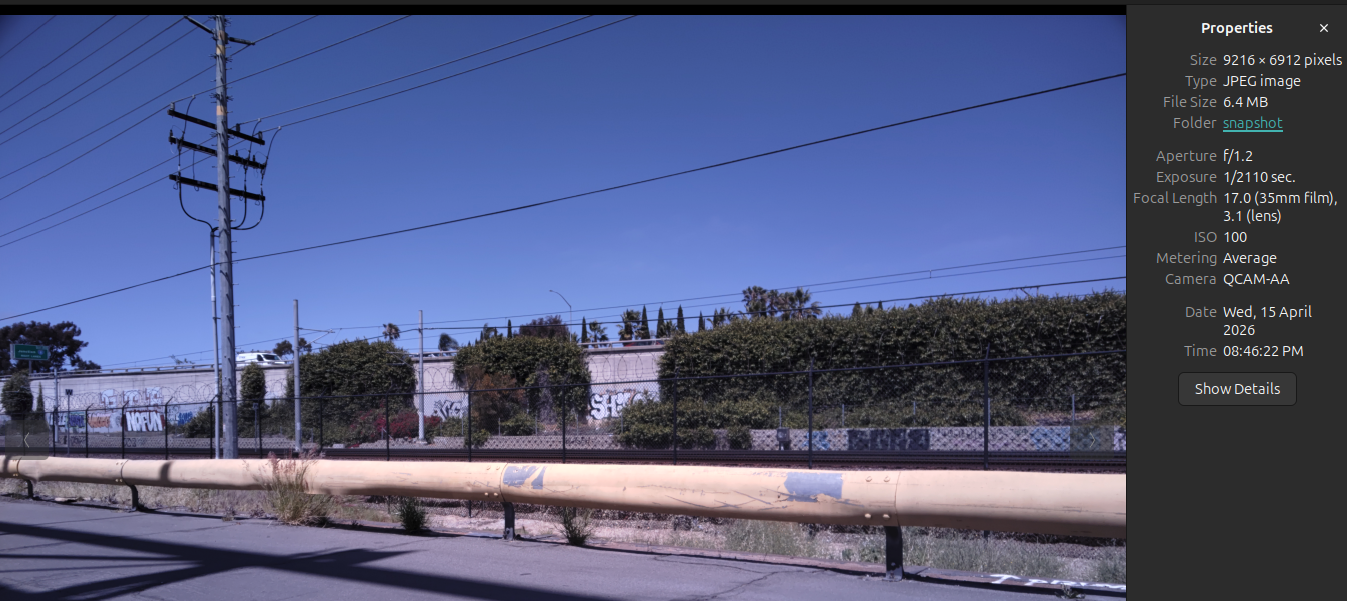
      I was able to get both the full YUV and them in JPEG working. We also noticed that the vertical artifact seemed to disappear in these images. Regarding the resolution we were using when we had the artifacts, we were using 9248 × 6944 on the old drivers.

      posted in Video and Image Sensors
      C
      cguzikowski
    • RE: Hadron ov64b snapshots have a vertical image artifact

      @Alex-Kushleyev Thank you! This now works great and I can save the raw files as a .bin file. Do you have tips for performing raw-jpg conversion both on and offline? I have also tried to take snapshots with the current setup, by disabling MISP and Raw preview, and enabling snapshot and setting the snapshot dimensions to 9248x6944 (9216x6944, 4624x3472, and 4608x3472 all give the error of unsupported file size). voxl-camera-server seems to start up, then immediately gets killed without an error. Here is the output of the command:

      MISP channels enabled in defaults : 0
      MISP channels enabled in config file: 0
      Setting MISP AWB to Auto
      MISP channels enabled in defaults : 0
      MISP channels enabled in config file: 0
      =================================================================
      configuration for 2 cameras:
      
      cam #0
          name:                boson
          type:                boson
          bayer_type:          0
          enabled:             1
          camera_id:           0
          camera_id_second:    -1
          fps:                 30
          en_rotate:           0
          en_rotate2:          0
      
          en_preview:          1
          en_raw_preview:      1
          preview_width:       640
          preview_height:      512
      
          en_misp:             1
          misp_width:          512
          misp_height:         640
      
          en_small_video:      0
          small_video_width:   640
          small_video_height:  480
      
          en_large_video:      0
          large_video_width:   -1
          large_video_height:  -1
      
          en_snapshot:         0
          snap_width:          -1
          snap_height:         -1
          exif_focal_length:   0.000000
          exif_focal_len_35mm_format:0
          exif_fnumber:        0.000000
      
          ae_mode:             off
          msv_exposure_min_us: 20
          msv_exposure_max_us: 33000
          gain_min           : 100
          gain_max           : 100
          standby_enabled:     0
          decimator:           1
          independent_exposure:0
      
      cam #1
          name:                hires
          type:                ov64b
          bayer_type:          1
          enabled:             1
          camera_id:           1
          camera_id_second:    -1
          fps:                 30
          en_rotate:           0
          en_rotate2:          0
      
          en_preview:          1
          en_raw_preview:      0
          preview_width:       9248
          preview_height:      6944
      
          en_misp:             0
          misp_width:          1280
          misp_height:         720
      
          en_small_video:      0
          small_video_width:   1024
          small_video_height:  768
      
          en_large_video:      0
          large_video_width:   3840
          large_video_height:  2160
      
          en_snapshot:         1
          snap_width:          9248
          snap_height:         6944
          exif_focal_length:   3.100000
          exif_focal_len_35mm_format:17
          exif_fnumber:        1.240000
      
          ae_mode:             lme_msv
          msv_exposure_min_us: 20
          msv_exposure_max_us: 33000
          gain_min           : 100
          gain_max           : 1600
          standby_enabled:     0
          decimator:           1
          independent_exposure:0
      
      fsync_en:            0
      fsync_gpio:          109
      =================================================================
      thread is locked to cores: 4 5 6 7
      connected to mavlink pipe
      Connected to cpu-monitor
      Starting Camera: boson (id #0)
      ModalExposureMSV: initializing for camera name  type 
      gbm_create_device(156): Info: backend name is: msm_drm
      MISP Initializing for camera boson
       Detected 1 platform(s)
       Detected 1 GPU device(s)
      Estimated imu dt = 0.000977s
      ERROR in json_from_yaml, failed to open file
      MISP: Loading intrinsics cal file boson_intrinsics.yml for camera boson, ret -1
      WARNING: Lens calibration for camera boson is missing (boson_intrinsics.yml). Using defaults:
      Starting Camera: hires (id #1)
      ModalExposureMSV: initializing for camera name hires type ov64b
      
      ------ voxl-camera-server: Started 2 of 2 cameras
      
      ------ voxl-camera-server: Camera server is now running
      Killed
      

      Don't necessarily need to use the snapshot command, but we want some way to get JPG images off the voxl.

      posted in Video and Image Sensors
      C
      cguzikowski
    • RE: Hadron ov64b snapshots have a vertical image artifact

      @Alex-Kushleyev Hi Alex, thank you for the new drivers and the instructions. Unfortunately I am still having issues getting the hires_bayer pipe to appear. I followed all of the instructions in the README, and when shooting at 9216x6944, I get the following error:

      ERROR:   MISP: Unexpected frame size for camera hires, width 9216, height 6944, stride 11520, alloc 79994880 bytes, calc frame size 79994880
      ERROR:   Could not find frame size from the raw buffer
      

      Same error I was getting last week but now the allocated and calculated values are the same. Running it at 9248x6944 gives a similar error:

      ERROR:   MISP: Unexpected frame size for camera hires, width 9248, height 6944, stride 11568, alloc 80330752 bytes, calc frame size 80328192
      ERROR:   Could not find frame size from the raw buffer
      

      I do see the boson_bayer pipe, and in the portal the camera feed looks great - I believe we were getting a weird preview with the old drivers, but we didn't look too carefully as we are not using the boson yet. Here is the output of voxl-inspect-cam -a:

      |          Pipe Name |  bytes  | wide |  hgt |exp(ms)| gain | frame id |latency(ms)|  fps |  mbps  | format
      |              boson |  327680 |  640 |  512 |  0.00 |  800 |      295 |     13.2  | 60.0 |  157.3 | RAW8
      |        boson_bayer |  327680 |  640 |  512 |  0.00 |    0 |      295 |     12.7  | 60.0 |  157.3 | RAW8
      |        boson_color |  983040 |  640 |  512 |  0.00 |  800 |      295 |     15.6  | 60.0 |  471.9 | RGB
      | boson_misp_encoded |      32 |  640 |  512 |  0.00 |  800 |      295 |     17.0  | 60.0 |    0.0 | H264 (P)   
      |        hires_bayer |
      |   hires_misp_color |
      |    hires_misp_grey |
      

      Disabling MISP gives the following warning and output of voxl-inspect-cam -a:

      ------ voxl-camera-server: Camera server is now running
      Received RAW10 frame from camera hires, will be converting to RAW8 on cpu
      WARNING: preview buffer pool for Cam(hires), Frame(18) has 0 free, skipping request
      
      |          Pipe Name |  bytes  | wide |  hgt |exp(ms)| gain | frame id |latency(ms)|  fps |  mbps  | format
      |              boson |  327680 |  640 |  512 |  0.00 |  800 |      507 |     12.4  | 60.0 |  157.3 | RAW8
      |        boson_bayer |  327680 |  640 |  512 |  0.00 |    0 |      507 |     10.9  | 60.0 |  157.3 | RAW8
      |        boson_color |  983040 |  640 |  512 |  0.00 |  800 |      507 |     13.3  | 60.0 |  471.9 | RGB
      | boson_misp_encoded |      32 |  640 |  512 |  0.00 |  800 |      507 |     14.4  | 60.0 |    0.0 | H264 (P)   
      |        hires_bayer |
      |        hires_color |
      |         hires_grey |64218112 | 9248 | 6944 | 12.06 | 1211 |       16 |   3720.9  |  1.8 |  945.2 | RAW8
      
      posted in Video and Image Sensors
      C
      cguzikowski
    • RE: Hadron ov64b snapshots have a vertical image artifact

      @Alex-Kushleyev Some additional info: When we ran at the lower resolution and tried viewing hires_bayer in the voxl portal this error would pop up in the terminal running voxl-camera-server:

      ERROR:   Could not find frame size from the raw buffer
      ERROR:   MISP: Unexpected frame size for camera hires, width 4624, height 3472, stride 5792, alloc 20111360 bytes, calc frame size 20109824
      ERROR:   Could not find frame size from the raw buffer
      

      Thank you for your speedy response

      posted in Video and Image Sensors
      C
      cguzikowski
    • RE: Hadron ov64b snapshots have a vertical image artifact

      @Alex-Kushleyev we are still having some issues getting the raw images from the hadron. We have updated to SDK 1.6.3. Here is the results when setting the preview resolution to 4624x3472 and disabling MISP (camera server runs, cant get raw image):

      Setting MISP AWB to Auto
      MISP channels enabled in defaults : 0
      MISP channels enabled in config file: 0
      Setting MISP AWB to Auto
      MISP channels enabled in defaults : 0
      MISP channels enabled in config file: 0
      =================================================================
      configuration for 2 cameras:
      
      cam #0
          name:                boson
          type:                boson
          bayer_type:          0
          enabled:             0
          camera_id:           0
          camera_id_second:    -1
          fps:                 30
          en_rotate:           0
          en_rotate2:          0
      
          en_preview:          1
          en_raw_preview:      1
          preview_width:       640
          preview_height:      512
      
          en_misp:             0
          misp_width:          -1
          misp_height:         -1
      
          en_small_video:      0
          small_video_width:   640
          small_video_height:  480
      
          en_large_video:      0
          large_video_width:   -1
          large_video_height:  -1
      
          en_snapshot:         0
          snap_width:          -1
          snap_height:         -1
          exif_focal_length:   0.000000
          exif_focal_len_35mm_format:0
          exif_fnumber:        0.000000
      
          ae_mode:             off
          msv_exposure_min_us: 20
          msv_exposure_max_us: 33000
          gain_min           : 54
          gain_max           : 8000
          standby_enabled:     0
          decimator:           1
          independent_exposure:0
      
      cam #1
          name:                hires
          type:                ov64b
          bayer_type:          1
          enabled:             1
          camera_id:           1
          camera_id_second:    -1
          fps:                 5
          en_rotate:           0
          en_rotate2:          0
      
          en_preview:          1
          en_raw_preview:      1
          preview_width:       4624
          preview_height:      3472
      
          en_misp:             0
          misp_width:          4624
          misp_height:         3472
      
          en_small_video:      1
          small_video_width:   1024
          small_video_height:  768
      
          en_large_video:      0
          large_video_width:   3840
          large_video_height:  2160
      
          en_snapshot:         0
          snap_width:          3840
          snap_height:         2160
          exif_focal_length:   3.100000
          exif_focal_len_35mm_format:17
          exif_fnumber:        1.240000
      
          ae_mode:             isp
          msv_exposure_min_us: 20
          msv_exposure_max_us: 33000
          gain_min           : 100
          gain_max           : 32000
          standby_enabled:     0
          decimator:           1
          independent_exposure:0
      
      fsync_en:            0
      fsync_gpio:          109
      =================================================================
      thread is locked to cores: 4 5 6 7
      connected to mavlink pipe
      Connected to cpu-monitor
      Skipping Camera: boson, configuration marked disabled
      Starting Camera: hires (id #1)
      Estimated imu dt = 0.000977s
      gbm_create_device(156): Info: backend name is: msm_drm
      
      ------ voxl-camera-server: Started 1 of 2 cameras
      
      ------ voxl-camera-server: Camera server is now running
      Received RAW10 frame from camera hires, will be converting to RAW8 on cpu
      

      Here is what we see when we do use MISP, and full resolution:

      existing instance of voxl-camera-server found, attempting to stop it
      Setting MISP AWB to Auto
      MISP channels enabled in defaults : 0
      MISP channels enabled in config file: 0
      Setting MISP AWB to Auto
      MISP channels enabled in defaults : 0
      MISP channels enabled in config file: 0
      =================================================================
      configuration for 2 cameras:
      
      cam #0
          name:                boson
          type:                boson
          bayer_type:          0
          enabled:             0
          camera_id:           0
          camera_id_second:    -1
          fps:                 30
          en_rotate:           0
          en_rotate2:          0
      
          en_preview:          1
          en_raw_preview:      1
          preview_width:       640
          preview_height:      512
      
          en_misp:             0
          misp_width:          -1
          misp_height:         -1
      
          en_small_video:      0
          small_video_width:   640
          small_video_height:  480
      
          en_large_video:      0
          large_video_width:   -1
          large_video_height:  -1
      
          en_snapshot:         0
          snap_width:          -1
          snap_height:         -1
          exif_focal_length:   0.000000
          exif_focal_len_35mm_format:0
          exif_fnumber:        0.000000
      
          ae_mode:             off
          msv_exposure_min_us: 20
          msv_exposure_max_us: 33000
          gain_min           : 54
          gain_max           : 8000
          standby_enabled:     0
          decimator:           1
          independent_exposure:0
      
      cam #1
          name:                hires
          type:                ov64b
          bayer_type:          1
          enabled:             1
          camera_id:           1
          camera_id_second:    -1
          fps:                 5
          en_rotate:           0
          en_rotate2:          0
      
          en_preview:          1
          en_raw_preview:      1
          preview_width:       9248
          preview_height:      6944
      
          en_misp:             1
          misp_width:          1920
          misp_height:         1080
      
          en_small_video:      1
          small_video_width:   1024
          small_video_height:  768
      
          en_large_video:      0
          large_video_width:   3840
          large_video_height:  2160
      
          en_snapshot:         0
          snap_width:          3840
          snap_height:         2160
          exif_focal_length:   3.100000
          exif_focal_len_35mm_format:17
          exif_fnumber:        1.240000
      
          ae_mode:             lme_msv
          msv_exposure_min_us: 20
          msv_exposure_max_us: 33000
          gain_min           : 100
          gain_max           : 32000
          standby_enabled:     0
          decimator:           1
          independent_exposure:0
      
      fsync_en:            0
      fsync_gpio:          109
      =================================================================
      thread is locked to cores: 4 5 6 7
      connected to mavlink pipe
      Connected to cpu-monitor
      Skipping Camera: boson, configuration marked disabled
      Starting Camera: hires (id #1)
      ERROR:   Configure streams failed for camera: 1
      ERROR:   Failed to configure streams for camera: hires
      ERROR:   Failed to start camera: hires
      ERROR:   failed to initialize any cameras
      
      ------ voxl-camera-server: Started 0 of 2 cameras
      
      ------ voxl-camera-server: Camera server is now running
      
      ------ voxl-camera-server: Camera server is now stopping
      
      ------ voxl-camera-server: Camera server exited gracefully, returning -1
      
      
      IMU Manager closing and exiting
      
      posted in Video and Image Sensors
      C
      cguzikowski
    • Missing Camera Store Pages

      Hello, I noticed that the store pages for some of the camera modules are no longer available. Specifically regarding the M0024 and the M00015 cameras. I also noticed the datasheets for the stereo flex cables were also missing. Will these be available to purchase/view anytime soon?

      posted in Image Sensors
      C
      cguzikowski
    • RE: Issues with M9N GPS and Ardupilot

      @Eric-Katzfey okay a little weird but I opened QGC to test something else out today and both the M9N and M10S work just fine with ardupilot... Not sure what is going on there.

      posted in VOXL 2
      C
      cguzikowski
    • RE: Issues with M9N GPS and Ardupilot

      @Eric-Katzfey On a fresh voxl I am getting the same behavior unfortunately. Any other troubleshooting tips?

      posted in VOXL 2
      C
      cguzikowski
    • RE: voxl_mpa_to_ros2 only publishes left stereo camera

      @teddy-zaremba Nevermind, I was able to separate the images by modifying the voxl-camera-server.conf file to treat each camera as separate and it seems to be working now

      posted in ROS
      C
      cguzikowski
    • RE: voxl_mpa_to_ros2 only publishes left stereo camera

      @teddy-zaremba Unfortunately we can't connect them to separate ports. I recorded a bag on the topic "/stereo" and playing the bag back I only see one of the images. All messages are mono8 of size 480x640, so I don't see how they could be stacked on each other. Do I need to separate the images before recording?

      posted in ROS
      C
      cguzikowski
    • RE: Issues with M9N GPS and Ardupilot

      @Eric-Katzfey Updated to 1.5.0 and the issue still persists - exact same behavior as before. Is it possible I am having an issue with my specific board? Our other board is currently in use but I can probably borrow it if necessary.

      posted in VOXL 2
      C
      cguzikowski
    • RE: Issues with M9N GPS and Ardupilot

      @Eric-Katzfey I just had m0015 cameras connected to the J6 connected via a m0076 connector, which I have unplugged and the behavior still persists. I also have a 5G Modem Carrier Board connected with a doodle labs radio, can't unplug this though or else there is no connection to QGC. Yes, I am connected to the standard GPS pins on J19 which I believe to be connected properly, as QGC can detect the compass properly. I have tried swapping the TX and RX pin connections, but this resulted in the GPS to not even work with px4. The current configuration works just fine with PX4.

      posted in VOXL 2
      C
      cguzikowski
    • RE: Issues with M9N GPS and Ardupilot

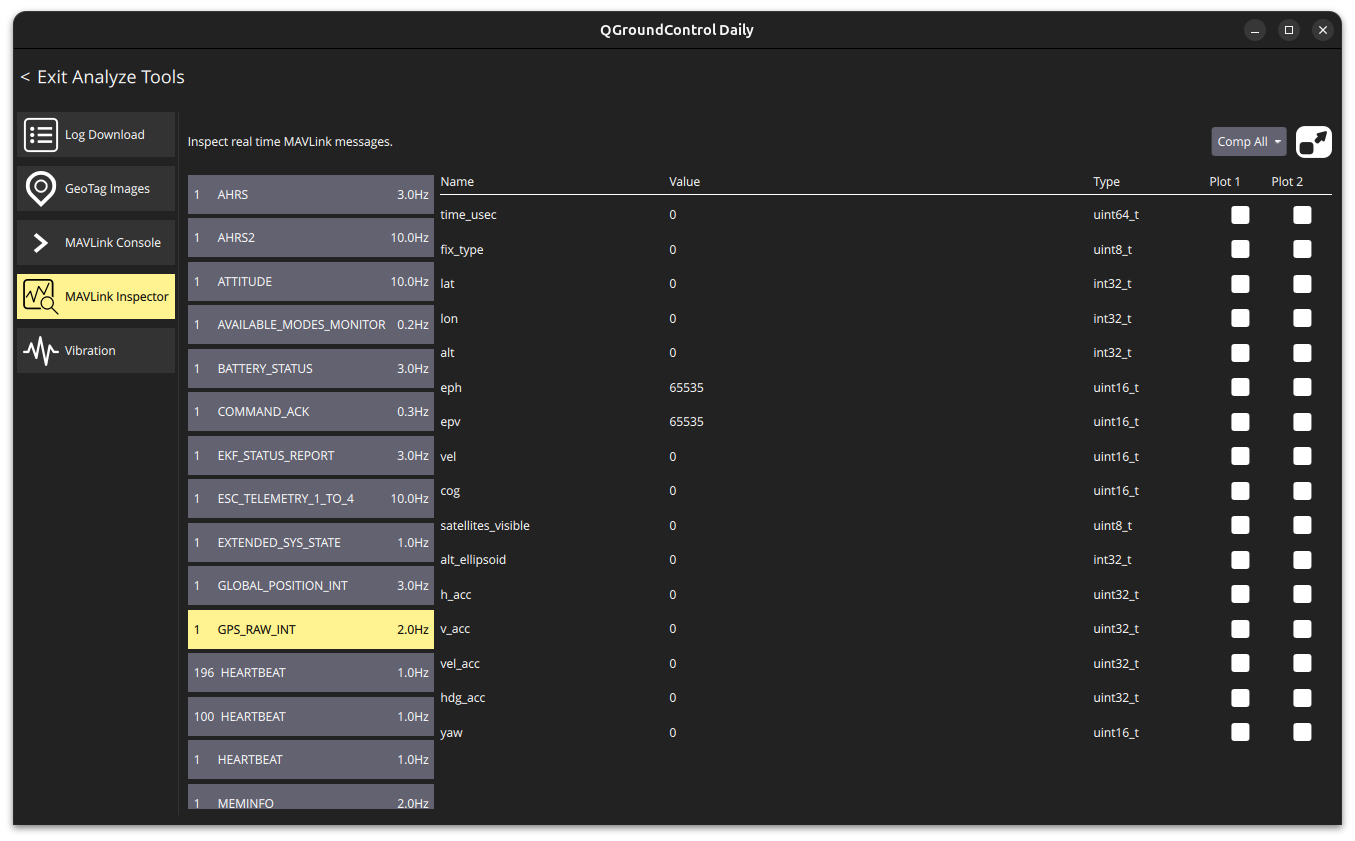
      @Eric-Katzfey I see the GPS_RAW_INT message come in, but all of the fields are zeroed out and there is no cursor on the map:
      26f5ccaf-5981-4f23-bd1d-47524fb4c41f-image.png

      I tested it with PX4 and I was getting reasonable lat/lon positions along with all of the other data fields being filled out.

      posted in VOXL 2
      C
      cguzikowski
    • voxl_mpa_to_ros2 only publishes left stereo camera

      Hello, I am currently trying to use stereo cameras (m0015) within a custom ROS2 application using the voxl_mpa_to_ros2 (version 0.0.6) package on the VOXL2 (SDK 1.4.0), but I am only able to see left stereo camera when running the mpa to ros converter. Here is the output of ros2 topic list:

      /imu_apps
      /parameter_events
      /rosout
      /stereo
      /stereo_disparity
      /stereo_disparity_scaled
      /stereo_pc
      /voa_pc_out
      /vvhub_aligned_vio
      /vvhub_body_wrt_fixed
      /vvhub_body_wrt_local
      

      According to the docs, I should expect something along the lines of /stereo/left and /stereo/right. Recording the topic /stereo and then playing it back confirms that only the left camera is being recorded. Here is the output of /etc/modalai/voxl-camera-server.conf, which was created by running voxl-configure-cameras 10

      {
      	"version":	0.1,
      	"fsync_en":	false,
      	"fsync_gpio":	109,
      	"cameras":	[{
      			"type":	"ov7251",
      			"name":	"stereo",
      			"enabled":	true,
      			"camera_id":	0,
      			"camera_id_second":	1,
      			"independent_exposure":	false,
      			"fps":	30,
      			"en_rotate":	false,
      			"en_rotate_second":	false,
      			"en_preview":	true,
      			"preview_width":	640,
      			"preview_height":	480,
      			"en_raw_preview":	true,
      			"ae_mode":	"lme_msv",
      			"gain_min":	54,
      			"gain_max":	8000,
      			"ae_desired_msv":	60,
      			"exposure_min_us":	20,
      			"exposure_max_us":	33000,
      			"exposure_soft_min_us":	5000,
      			"ae_filter_alpha":	0.600000023841858,
      			"ae_ignore_fraction":	0.20000000298023224,
      			"ae_slope":	0.05000000074505806,
      			"ae_exposure_period":	1,
      			"ae_gain_period":	1
      		}]
      }
      

      Both cameras are fully functional when viewing from the portal.

      How can I get data from both of the cameras?

      posted in ROS
      C
      cguzikowski
    • RE: Issues with M9N GPS and Ardupilot

      @Eric-Katzfey We just got the m10s gps that you linked and are still having some trouble. Again when running px4 the gps works as expected, but running ardupilot seems to cause some issues. Getting the same behavior as the m9n, where running voxl-inspect-gps has no output:
      963eabaf-45fc-4853-b457-8c2ef98cdae7-image.png

      Any ideas on what to try next?

      posted in VOXL 2
      C
      cguzikowski
    • RE: Issues with M9N GPS and Ardupilot

      @Eric-Katzfey Thank you for the response, we don't have that GPS and would like to try to get the M9N to work if possible. Is there any troubleshooting we can try before purchasing a new unit? PX4 has a .conf file in /etc/modalai, I don't see one for Ardupilot, could this be an issue? I have also tried to tweak the parameters in the file /data/APM/defaults.parm and also through QGC, but have had no luck.

      posted in VOXL 2
      C
      cguzikowski
    • Issues with M9N GPS and Ardupilot

      Hi,
      I am currently using a voxl 2 (SDK 1.4.0) running ardupilot version 4.7.0-4803bc14. I have attached a Holybro M9N GPS micro via the J19 connector. When using px4, I am seeing the GPS reading on the map for QGC, and the command voxl-inspect-gps gives out the expected readings. We are trying to use ardupilot, and for some reason when disabling px4 and enabling ardupilot, I lose the ability to see the GPS in QGC and running voxl-inspect-gps shows nothing - however the voxl still connects to QGC. In the documentation, most of the GPS information is linked to when using px4, can GPS be used with ardupilot? If so, how?

      posted in VOXL 2
      C
      cguzikowski
    • OV9782, M0113 Front stereo camera support in SDK 1.4.0+ on VOXL2

      I found an issue when trying to use the front stereo setup with 2 OV9782 sensors (camera configuration 12) on a newer SDK (1.4.0+) version. On a fresh install, I ran the command: voxl-configure-cameras 12 and then rebooted. Then when running voxl-camera-server, the following errors and warnings pop up and flood the terminal:

      WARNING: preview buffer pool for Cam(stereo), Frame(16) has 0 free, skipping request
      ERROR in pipe_server_get_num_clients, channel should be between 0 & 31
      

      Then when trying to view the image previews in the portal, no image appears. Running one camera at a time worked, but

      I do not believe this is a hardware issue, as without touching anything, I installed a fresh 1.3.5 image on the system, ran voxl-configure-cameras 12, rebooted, ran voxl-camera-server with no errors, and the image appears just fine in the portal.

      One thing that I did notice was that even though there were no images in the 1.4.0 and 1.4.1 portal instances, there were more boxes to check for different image viewings. In the 1.3.5 portal, there was only the option to see 'stereo_grey'

      posted in VOXL SDK
      C
      cguzikowski