ModalAI Forum
    • Categories
    • Recent
    • Tags
    • Popular
    • Users
    • Groups
    • Register
    • Login
    1. Home
    2. ndwe
    N
    • Profile
    • Following 0
    • Followers 0
    • Topics 2
    • Posts 5
    • Best 0
    • Controversial 0
    • Groups 0

    ndwe

    @ndwe

    0
    Reputation
    1
    Profile views
    5
    Posts
    0
    Followers
    0
    Following
    Joined Last Online

    ndwe Unfollow Follow

    Latest posts made by ndwe

    • RE: Yaw Error Estimate on PX4v1.15

      @Eric-Katzfey Hi, thanks for the response.

      EKF2_MAG_DECL - yes, set to Sydney, Australia
      COM_ARM_EKF_YAW is set to the max 1.0 - the value it is reading is 3.5+
      Wouldn't changing EKF2_MAG_TYPE to 1 mean that the compass isn't used during flight and rely solely on GPS for heading, but I can ask px4 community this.

      Moving to px4 v1.16 the error changes to X/Y position control error, but the fix is the same.

      A question on px4 firmware versions. ModalAI develops on px4 v.14.
      The latest being modalai_fc-v2_1.14.0-2.0.133.px4

      When I install this firmware the error isn't present and (Ready to fly) arming can occur on the ground without having to move the drone to fix the yaw error. Would you recommend using this version on a non-voxl system, we are using a Jetson? We are interested to know if there is a reason why this version works with your hardware but not later versions of px4?

      Thanks again

      posted in Ask your questions right here!
      N
      ndwe
    • Yaw Error Estimate on PX4v1.15

      Hi,
      We are using fc-v2 with the ModalAI 4-in-1 ESC (M0138) and a 3DR M10 ublox gps unit.

      The fc-v2 was shipped with px4 v1.15. The system works well but there is a pre-flight check fail that we are trying to clear.

      PREFLIGHT FAIL: EKF YAW ERROR

      Care has been taken to calibrate the sensors but we are unable avoid this.

      The solution has been to sway the drone side to side and then the error clears and the drone is 'Ready to fly". Because of our use case this is not a practical approach.

      The drone is for outdoor use and needs GPS.

      Any advise on how to fix this issue would be greatly appreciated.

      Cheers

      posted in Ask your questions right here! yaw flight core v2
      N
      ndwe
    • RE: Mavlink messages through voxl-logging

      Ok thanks, I can parse the raw data. I guess I was expecting the csv to contain the data as well

      posted in Ask your questions right here!
      N
      ndwe
    • RE: Mavlink messages through voxl-logging

      voxl-replay -p /data/voxl-logger/log0014/ -z
      voxl-replay: invalid option -- 'z'

      Replay a log

      -d, --debug enable verbose debug mode
      -h, --help print this help message
      -n, --number {number} number of log to open, e.g. 32
      -p, --path {path} complete path of log to open, e.g. /data/mylog/
      -s, --start {seconds} starts the replay (float) seconds into the log
      -f, --finish {seconds} ends the replay (float) seconds into the log
      -i, --include {name} name of pipe to publish, publish all if not specified
      -e, --exclude {name} name of pipe to not publish, publish all if not specified
      -y, --auto_kill automatically kills servers that conflict with the log

      When I use the -d flag

      voxl2:/data/voxl-logger/log0013$ voxl-replay -p /data/voxl-logger/log0013/ -d
      enabling debug mode
      opening json info file: /data/voxl-logger/log0013/info.json
      using log_format_version=1
      log contains 1 channels
      log started at 20016320271533ns
      log publish channel 0:
      type: mav
      out path: /run/mpa/mavlink_attitude/
      log path: /data/voxl-logger/log0013//run/mpa/mavlink_attitude/
      total samples: 88
      opening csv file: /data/voxl-logger/log0013//run/mpa/mavlink_attitude/data.csv
      opening raw file: /data/voxl-logger/log0013//run/mpa/mavlink_attitude/data.raw
      creating pipe: /run/mpa/mavlink_attitude/
      finding start frame for channel 0
      header for channel 0 /run/mpa/mavlink_attitude/
      i,timestamp(ns)
      log started at 20016320271533ns, shifting to 20016407463491ns
      replay start time ns: 1498719153614entering main loop
      starting to publish mavlink to: /run/mpa/mavlink_attitude/
      publishing to ch0 at 1498819501us a mavlink packet with timestamp 1498819381us
      publishing to ch0 at 1498819646us a mavlink packet with timestamp 1498819397us
      publishing to ch0 at 1498819671us a mavlink packet with timestamp 1498819400us

      Thanks

      posted in Ask your questions right here!
      N
      ndwe
    • Mavlink messages through voxl-logging

      I'm trying to log mavlink messages though voxl-logger but all of the mavlink message pipes contain only i, timestamp.

      I have been able to log imu and tracking camera data but not the mavlink messages. Any ideas?

      Note: still on sdk1.3

      $ voxl-version 
      --------------------------------------------------------------------------------
      system-image: 1.7.10-M0054-14.1a-perf
      kernel:       #1 SMP PREEMPT Fri Sep 27 21:59:02 UTC 2024 4.19.125
      --------------------------------------------------------------------------------
      hw platform:  M0054
      mach.var:     1.0.1
      --------------------------------------------------------------------------------
      voxl-suite:   1.3.5
      
      
      voxl2:/home/starling2voxl-logger -m mavlink_attitude -t 3
      starting 3.0 second timer
      connected to ch 0 mavlink: /run/mpa/mavlink_attitude/
      stopping automatically after requested timeout
      summary of data logged:
      ch 0, type: mav, samples:      88, path: /run/mpa/mavlink_attitude/
      created new log here:
      /data/voxl-logger/log0013/
      voxl2:/home/starling2$ cat /data/voxl-logger/log0013/run/mpa/mavlink_attitude/data.csv 
      i,timestamp(ns)
      0,20016407463491
      1,20016507691080


      mavlink_message_t
      	mavlink_ap_heartbeat
      	mavlink_attitude
      	mavlink_from_gcs
      	mavlink_gps_raw_int
      	mavlink_local_position_ned
      	mavlink_onboard
      	mavlink_sys_status
      	mavlink_to_gcs
      
      
      $ voxl-mavlink-server -j
      loading our own config file
      =================================================================
      Parameters as loaded from config file:
      primary_static_gcs_ip:        
      secondary_static_gcs_ip:      192.168.41.42
      onboard_port_to_autopilot:    14556
      onboard_port_from_autopilot:  14557
      gcs_port_to_autopilot:        14558
      gcs_port_from_autopilot:      14559
      en_external_uart_ap:          0
      autopilot_uart_bus:           1
      autopilot_uart_baudrate:      921600
      autopilot_mission_delay_start:      -1
      udp_mtu:                      0
      gcs_timeout_s                 4.50
      en_external_ap_timesync:      1
      en_external_ap_heartbeat:     1
      =================================================================
      existing instance of voxl-mavlink-server found, attempting to stop it
      starting receive thread for onboard channel from autopilot
      starting receive thread for gcs channel from autopilot
      CONNECTED to autopilot on onboard channel
      CONNECTED to autopilot on gcs channel
      Not connecting to primary gcs ip: 
      Adding secondary manual gcs IP address to udp connection list: 192.168.41.42
      Added new UDP connection to 192.168.41.42
      Init complete, entering main loop
      to ob pipe  ID: 141  compid:   1
      to ob pipe  ID:  32  compid:   1
      to ob pipe  ID: 290  compid:   1
      to ob pipe  ID: 291  compid:   1
      to ob pipe  ID:  30  compid:   1
      to ob pipe  ID: 331  compid:   1
      to ob pipe  ID:  83  compid:   1
      to gcs pipe ID:  31  compid:   1
      to ob pipe  ID:  29  compid:   1
      to ob pipe  ID:  65  compid:   1
      to ob pipe  ID:  36  compid:   1
      to ob pipe  ID:  74  compid:   1
      to ob pipe  ID: 105  compid:   1
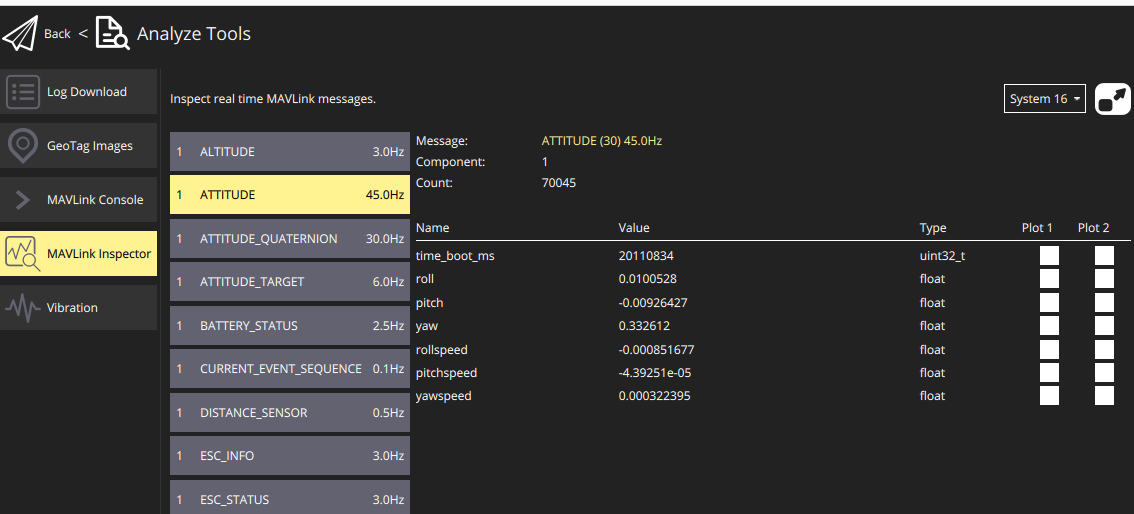


      Screenshot from 2025-10-20 15-10-37.png

      posted in Ask your questions right here!
      N
      ndwe