
Using a GPS through SPI
-
@alan123 said in Using a GPS through SPI:
I'm currently attempting to use a GPS through the J10 SPI port on the VOXL 2. I plugged it in and ran voxl-inspect-gps but it doesn't seem to be connected. Do I have to change some software settings to get this to work?
@alan123 yes you need to change the port that the driver is pointed to. Currently on the voxl2 inside of /usr/bin/voxl-px4-start there is a line that is somewhere along the lines of
qshell gps start XYZand in there one of those args is the literaly bus on the voxl2 that the driver should be probing - if you wish to change to J10, you need to change one of those arguments to point to that endpoint. -
@alan123 said in Using a GPS through SPI:
I'm currently attempting to use a GPS through the J10 SPI port on the VOXL 2. I plugged it in and ran voxl-inspect-gps but it doesn't seem to be connected. Do I have to change some software settings to get this to work?
@alan123 yes you need to change the port that the driver is pointed to. Currently on the voxl2 inside of /usr/bin/voxl-px4-start there is a line that is somewhere along the lines of
qshell gps start XYZand in there one of those args is the literaly bus on the voxl2 that the driver should be probing - if you wish to change to J10, you need to change one of those arguments to point to that endpoint.@Zachary-Lowell-0 It seems like PX4 is configured to find the GPS on UART even though I give it the "dev/spidev14.0" port. Is there a way to force PX4 to listen through SPI protocol? Below is the error I'm receiving:
ERROR [muorb] [gps] failed to open /dev/spidev14.0 err: 22
ERROR [muorb] [drivers__device] Could not convert /dev/spidev14.0 into a valid uart port number -
@Zachary-Lowell-0 It seems like PX4 is configured to find the GPS on UART even though I give it the "dev/spidev14.0" port. Is there a way to force PX4 to listen through SPI protocol? Below is the error I'm receiving:
ERROR [muorb] [gps] failed to open /dev/spidev14.0 err: 22
ERROR [muorb] [drivers__device] Could not convert /dev/spidev14.0 into a valid uart port number@alan123 If you are starting it on apps side the you use
gps start -d <device port>. If you start it on DSP side then you useqshell gps start -d <device port>. For/dev/spidev14.0you have to start on the apps side. Also it defaults to UART so if you want SPI then you will need to add-i spito your start command. -
@alan123 If you are starting it on apps side the you use
gps start -d <device port>. If you start it on DSP side then you useqshell gps start -d <device port>. For/dev/spidev14.0you have to start on the apps side. Also it defaults to UART so if you want SPI then you will need to add-i spito your start command.@Eric-Katzfey Still getting an error but its a different error code number. I've made the changes that you recommended as well. Any other thoughts on what could be wrong?
ERROR [muorb] [gps] failed to open /dev/spidev14.0 err: 34
ERROR [muorb] [drivers__device] Could not convert /dev/spidev14.0 into a valid uart port number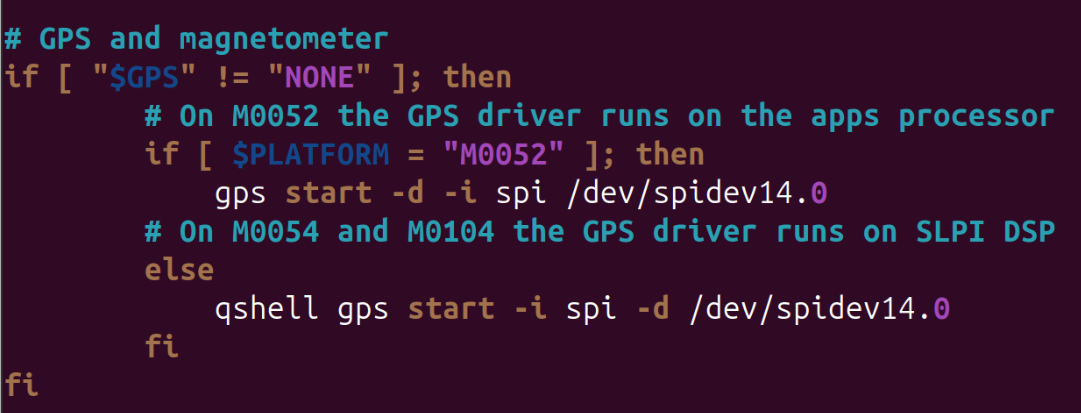
-
@Eric-Katzfey Still getting an error but its a different error code number. I've made the changes that you recommended as well. Any other thoughts on what could be wrong?
ERROR [muorb] [gps] failed to open /dev/spidev14.0 err: 34
ERROR [muorb] [drivers__device] Could not convert /dev/spidev14.0 into a valid uart port number@alan123 Well, is PLATFORM = M0052? Seems like you are still executing the qshell one. And the command isn't setup correctly, should be
gps start -i spi -d /dev/spidev14.0 -
@alan123 Well, is PLATFORM = M0052? Seems like you are still executing the qshell one. And the command isn't setup correctly, should be
gps start -i spi -d /dev/spidev14.0 -
@Eric-Katzfey PLATFORM=M0054. I changed the command to gps start and now when I run "voxl-px4" the gps commands don't print to the shell. QGS and "voxl-inspect-gps" also show that there is no GPS connection. Thoughts?

@alan123 Are you starting voxl-px4 from the command line (e.g.
voxl-px4 -d) or is it starting automatically from a systemd service file on startup. If you have started it from the command line you can enter commands from the px4 shell. So, after the script is done, you can entergps statusto see that the driver is doing. If the driver hasn't been started, try starting it directly from the command line.


Reading along? Create a free ModalAI Forum account to join in.
With an account you can reply, ask your own question, get an email when a ModalAI engineer answers, and mark the reply that solved it. Your place in each thread is saved between visits.
Questions about VOXL, Flight Core, ESCs and ModalAI drones are answered here by the engineers who build them.
Register Login