
ekf2_aid_mask
-
Flight Core is where the EKF2_AID_MASK is being set. Flight Core runs stock PX4, so EKF2_AID_MASK should not behave differently than other flight controllers using stock PX4. Which version of software are you running on Flight Core?
You can find details on Flight Core firmware here: https://docs.modalai.com/flight-core-firmware/ There are a few custom builds for flying without magnetometer indoors.
We have reference EKF settings here: https://gitlab.com/voxl-public/flight-core-px4/px4-parameters/-/tree/master/helpers
If you are trying to fly with VIO, you can look at the instructions here: https://docs.modalai.com/flying-with-vio/
We do not have any experience with "Inhibit IMU Bias", the PX4 forum might be a good place for that.
In general, it might help to share what you are trying to achieve.
Also, can you please try saving your parameters twice? Sometimes QGC gets messed up if not all of the parameters are there the first time.
-
Flight Core is where the EKF2_AID_MASK is being set. Flight Core runs stock PX4, so EKF2_AID_MASK should not behave differently than other flight controllers using stock PX4. Which version of software are you running on Flight Core?
You can find details on Flight Core firmware here: https://docs.modalai.com/flight-core-firmware/ There are a few custom builds for flying without magnetometer indoors.
We have reference EKF settings here: https://gitlab.com/voxl-public/flight-core-px4/px4-parameters/-/tree/master/helpers
If you are trying to fly with VIO, you can look at the instructions here: https://docs.modalai.com/flying-with-vio/
We do not have any experience with "Inhibit IMU Bias", the PX4 forum might be a good place for that.
In general, it might help to share what you are trying to achieve.
Also, can you please try saving your parameters twice? Sometimes QGC gets messed up if not all of the parameters are there the first time.
@Chad-Sweet Hi Chad.
First sorry but this issue is just making me so furious since I've tried so much already (different Firmwares, entering manually etc.) and it can be so infuriating if that one little thing just won't work, you know...Anyways, Flight Core software is PX4 1.12.1 right now but I've also tried the custom ModalAI firmware (1.11.1-0.0.5) and others to no avail.
Using .params files is of no use since the problem is with saving the values not with entering them.As far as I understand it the multirotor-drag thing would use ballistics to calculate like the wind so I regard it as something I would want for a MC.
No vision whatsoever for navigation so I would like to turn these off (should save CPU cycles if not checking, right?).
Also my Logs are filled with
"Estimator Source (8) not supported"
errors and it would be nice to clear those up.Don't get me wrong please, the VOXL-flight is a great piece of hardware and I love working with it, it's just there's a couple smaller issues here and there and sometimes your documentation is dodgy in the important places but of course I realize you guys are also humans likely trying your best and can't be omniscient etc. so yeah,
I hope we'll get this resolved together.
I'm in "weekend" flight-mode for now
 so I'll report back on saving twice next week.
cheers -
hey, I know it's Tuesday ;D but saving twice did nothing and
the only two bitmask-values I can reliably reproduce are 1 and 7 (meaning the Parameter is set to "1" or "7" with a corresponding selection), neither of them are of much help.The thing is, the quad is flying fine autonomously but I can't really have the unreliability of a somewhat important parameter chosing its own setting, you know...
So it would be nice if we'd be able to find some way to set them reliably to what one actually chooses.
Only thing I can think of the top of my head is that we're using no PX4-flow or any kind of optical sensors whatsoever.For reference this constant string of errors is a consequence of this parameter not being set right:
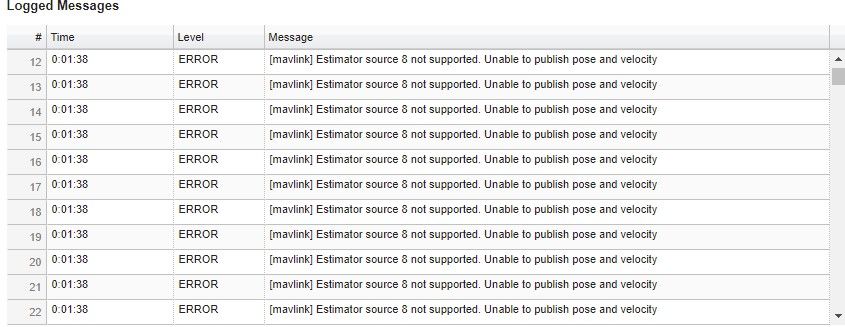
Just an aside I got to fly your guys' new firmware today and can confirm it's doing good so far.
I still had to include my own fix to make J1009 (TELEM/SERIAL4) work for now but that's already been merged into master so should be included with whatever next version you guys put out as well.
cheers -
We have never seen this and cannot reproduce. We have not tried 1.12, but stock 1.11 on flight core should behave as any other px4 hardware platform as far as the ekf_aid_mask is concerned
Can you share your full parameters file and associated log files? Maybe you have other parameters that are conflicting
-
Hi,
I recently saw this and thought I'd reach out. Sorry you're dealing with this issue - I know how frustrating stuff like this can be

As Chad mentioned, please share your related log and parameters files. Curious, are you using Flight Core with a VOXL board or do you have the all in one VOXL Flight board?
For clarity, I assume when you use our parameters file: https://gitlab.com/voxl-public/flight-core-px4/px4-parameters/-/tree/master/platforms/v1.11, https://gitlab.com/voxl-public/flight-core-px4/px4-parameters/-/tree/master/helpers
and Use the indoor and outdoor helpers, does the ekf2_aid_mask correctly set?
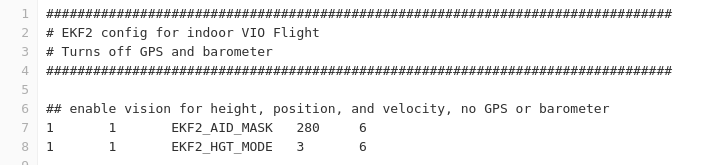
OR
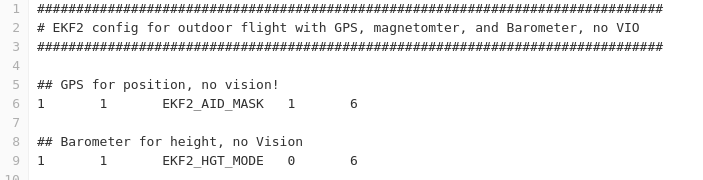
For reference, this is the EKF2_AID_MASK parameter listing:
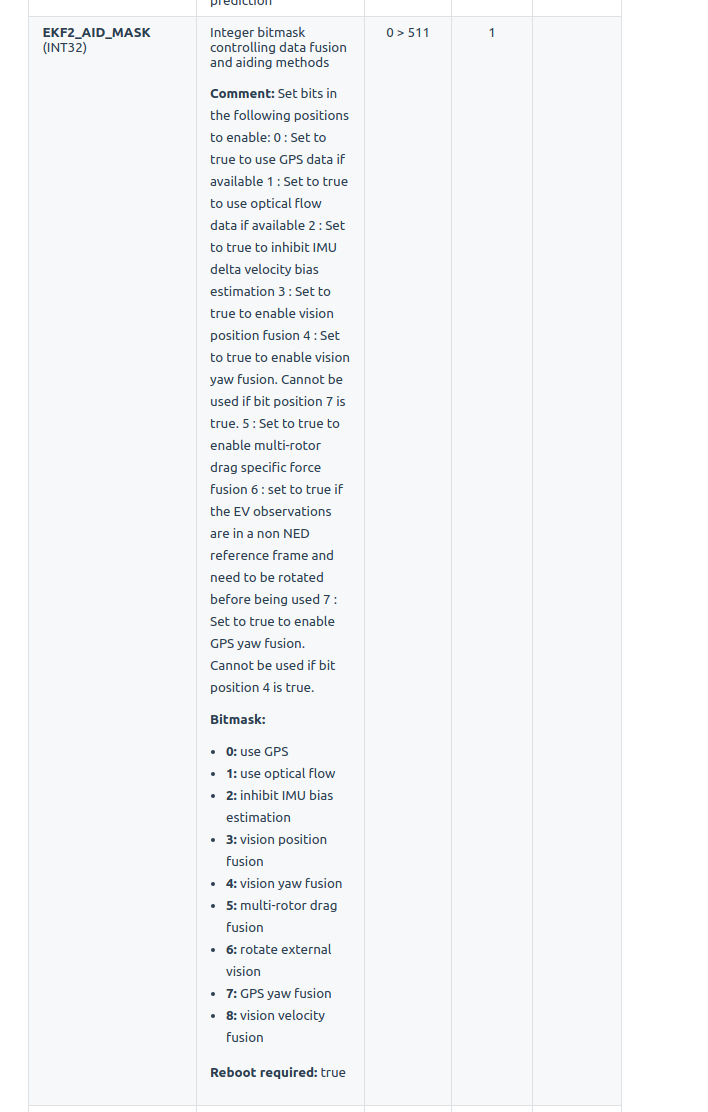
The error you list "Estimator source 8 not supported." seems odd. Are you not providing VIO nor optic flow input?
Also from my understanding, if you would like to use GPS yaw fusion, GPS needs to be used or enabled in the bit, since it's integrating GPS yaw.
So, I'm thinking you would want value 165 --> 1 0 1 0 0 1 0 1 --> Mask: 0 (GPS), 2(imu bias), 5 (drag fusion), 7 (GPS yaw).I've never used the drag fusion bit, so unsure how that's supposed to behave. Maybe other parameters need to be tuned and updated? https://docs.px4.io/master/en/advanced_config/tuning_the_ecl_ekf.html#multicopter-wind-estimation-using-drag-specific-forces
Best,
Rich -
Hi,
I recently saw this and thought I'd reach out. Sorry you're dealing with this issue - I know how frustrating stuff like this can be
As Chad mentioned, please share your related log and parameters files. Curious, are you using Flight Core with a VOXL board or do you have the all in one VOXL Flight board?
For clarity, I assume when you use our parameters file: https://gitlab.com/voxl-public/flight-core-px4/px4-parameters/-/tree/master/platforms/v1.11, https://gitlab.com/voxl-public/flight-core-px4/px4-parameters/-/tree/master/helpers
and Use the indoor and outdoor helpers, does the ekf2_aid_mask correctly set?
OR
For reference, this is the EKF2_AID_MASK parameter listing:
The error you list "Estimator source 8 not supported." seems odd. Are you not providing VIO nor optic flow input?
Also from my understanding, if you would like to use GPS yaw fusion, GPS needs to be used or enabled in the bit, since it's integrating GPS yaw.
So, I'm thinking you would want value 165 --> 1 0 1 0 0 1 0 1 --> Mask: 0 (GPS), 2(imu bias), 5 (drag fusion), 7 (GPS yaw).I've never used the drag fusion bit, so unsure how that's supposed to behave. Maybe other parameters need to be tuned and updated? https://docs.px4.io/master/en/advanced_config/tuning_the_ecl_ekf.html#multicopter-wind-estimation-using-drag-specific-forces
Best,
Rich@RichieRich Hello there.
Awesome, thanks so much for taking the time as these are exactly the hints I'm looking for.
Will gather logs and parameters to share here, today, and try the combination "165" as well.I'm using the combined "VOXL-Flight" units (one-PCB Flight-Core and VOXL).
Not using any VIO data, only GPS, mag, baro basically.Will report back with more data. Thanks again and have a nice one everyone.
-
Hey once more.
After trying to go back to a basic and default setup today I narrowed my issue down to the QGroundControl version being used.
With the stable release the parameters actually do save (but I'm missing lots of other improvements in regards to PX4 now) so I guess this specific issue is solved
but
please let me ask, while you're here, what's the preferred sequence of steps to go back to an absolute default PX4 configuration for a VOXL-Flight (i.e. combination of flashing PX4-version / resetting parameters to vehicle defaults /resetting to firmware defaults /when to reboot etc)?
cheers and have a good week. -
Glad to hear it was a QGC issue - interesting to see that.
For the flight core portion of VOXL-Flight: Re-flashing the firmware will bring you back to factory (https://docs.modalai.com/flight-core-firmware/#px4-v111) and after that load parameters from our repo (https://gitlab.com/voxl-public/flight-core-px4/px4-parameters/-/tree/master/).
That should do it




 ️
️Reading along? Create a free ModalAI Forum account to join in.
With an account you can reply, ask your own question, get an email when a ModalAI engineer answers, and mark the reply that solved it. Your place in each thread is saved between visits.
Questions about VOXL, Flight Core, ESCs and ModalAI drones are answered here by the engineers who build them.
Register Login