
Request for QURT Compatibility for OSD Program
-
@JP-Drone Okay, I will try to get it running on the DSP side to use J19. I'm guessing that you don't use GPS so it's okay to use that UART port for OSD? I should be able to complete this by the end of the year.
@Eric-Katzfey Thank you for your response.
Yes, that's correct. I don't use GPS for indoor flight, so it's fine to use that UART port on J19 for OSD.
I appreciate your support and look forward to the update.
-
@Eric-Katzfey Thank you for your response.
Yes, that's correct. I don't use GPS for indoor flight, so it's fine to use that UART port on J19 for OSD.
I appreciate your support and look forward to the update.
@JP-Drone Can you try this voxl-px4 package and see if msp_dp_osd works for you on the GPS UART? You will need to add the driver start command in
/usr/bin/voxl-px4-start. For example:qshell msp_dp_osd start -d 6. Download the package withwget http://voxl-packages.modalai.com/dists/qrb5165/dev/binary-arm64/voxl-px4_1.14.0-2.0.87-202412180935_arm64.debor use the link http://voxl-packages.modalai.com/dists/qrb5165/dev/binary-arm64/voxl-px4_1.14.0-2.0.87-202412180935_arm64.deb -
@JP-Drone Can you try this voxl-px4 package and see if msp_dp_osd works for you on the GPS UART? You will need to add the driver start command in
/usr/bin/voxl-px4-start. For example:qshell msp_dp_osd start -d 6. Download the package withwget http://voxl-packages.modalai.com/dists/qrb5165/dev/binary-arm64/voxl-px4_1.14.0-2.0.87-202412180935_arm64.debor use the link http://voxl-packages.modalai.com/dists/qrb5165/dev/binary-arm64/voxl-px4_1.14.0-2.0.87-202412180935_arm64.deb@Eric-Katzfey Thank you for providing the updated package.
I will test it within the next three days.
I’ll get back to you with the results shortly. -
@JP-Drone Can you try this voxl-px4 package and see if msp_dp_osd works for you on the GPS UART? You will need to add the driver start command in
/usr/bin/voxl-px4-start. For example:qshell msp_dp_osd start -d 6. Download the package withwget http://voxl-packages.modalai.com/dists/qrb5165/dev/binary-arm64/voxl-px4_1.14.0-2.0.87-202412180935_arm64.debor use the link http://voxl-packages.modalai.com/dists/qrb5165/dev/binary-arm64/voxl-px4_1.14.0-2.0.87-202412180935_arm64.deb@Eric-Katzfey Thank you for your support and the updated package.
I have successfully verified that the OSD works using J19 pins for UART communication. The msp_dp_osd program is displaying the OSD as expected.
However, I noticed an issue where a STATUS message or similar text is displayed in two locations. One appears correctly in the lower-left corner, as configured, but another is also visible near the center-left of the screen (please see the attached image).
Could you confirm if this behavior is expected?
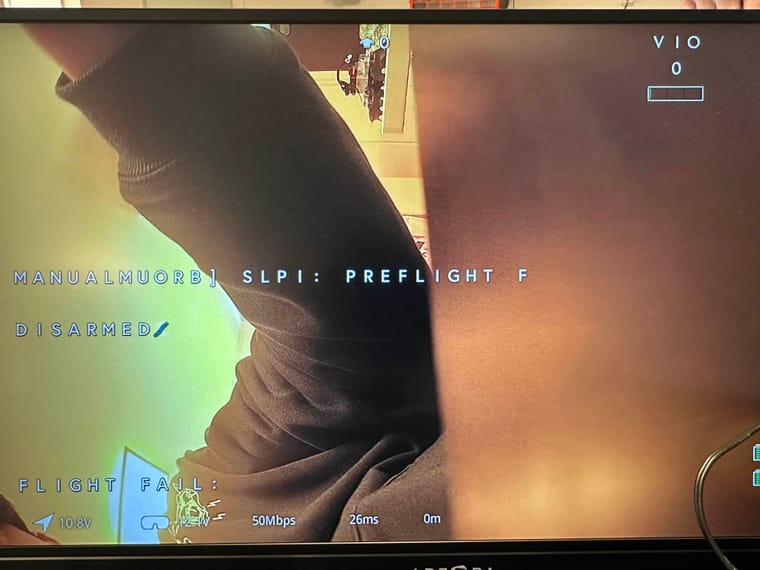
Current configurations:
OSD_DIS_COL 1
OSD_DIS_ROW 11
OSD_STATUS_COL 1
OSD_STATUS_ROW 17I would also be happy to handle long error messages.
-
@Eric-Katzfey Thank you for your support and the updated package.
I have successfully verified that the OSD works using J19 pins for UART communication. The msp_dp_osd program is displaying the OSD as expected.
However, I noticed an issue where a STATUS message or similar text is displayed in two locations. One appears correctly in the lower-left corner, as configured, but another is also visible near the center-left of the screen (please see the attached image).
Could you confirm if this behavior is expected?
Current configurations:
OSD_DIS_COL 1
OSD_DIS_ROW 11
OSD_STATUS_COL 1
OSD_STATUS_ROW 17I would also be happy to handle long error messages.
@JP-Drone No, that isn't expected. Can you send the values of all OSD parameters? What type of VTX unit are you connecting to? If you set OSD_STATUS_ROW to -1 do both messages disappear or only one of them? I see it is also showing the VIO status which is controlled by the parameters OSD_VIO_COL and OSD_VIO_ROW.
-
@Eric-Katzfey Thank you for your support and the updated package.
I have successfully verified that the OSD works using J19 pins for UART communication. The msp_dp_osd program is displaying the OSD as expected.
However, I noticed an issue where a STATUS message or similar text is displayed in two locations. One appears correctly in the lower-left corner, as configured, but another is also visible near the center-left of the screen (please see the attached image).
Could you confirm if this behavior is expected?
Current configurations:
OSD_DIS_COL 1
OSD_DIS_ROW 11
OSD_STATUS_COL 1
OSD_STATUS_ROW 17I would also be happy to handle long error messages.
@JP-Drone Does it work as expected when you try it from the J10 port (/dev/ttyHS0)?
-
@JP-Drone Does it work as expected when you try it from the J10 port (/dev/ttyHS0)?
Here is the OSD params
1	1	OSD_BAND	5	6
1	1	OSD_BATT_COL	44	6
1	1	OSD_BATT_ROW	17	6
1	1	OSD_CBATT_COL	44	6
1	1	OSD_CBATT_ROW	16	6
1	1	OSD_CHANNEL	1	6
1	1	OSD_CH_COL	-1	6
1	1	OSD_CH_HEIGHT	0	6
1	1	OSD_CH_ROW	-1	6
1	1	OSD_CURR_COL	-1	6
1	1	OSD_CURR_ROW	-1	6
1	1	OSD_DIS_COL	1	6
1	1	OSD_DIS_ROW	11	6
1	1	OSD_DWELL_TIME	500	6
1	1	OSD_FM_COL	1	6
1	1	OSD_FM_ROW	9	6
1	1	OSD_HDG_COL	21	6
1	1	OSD_HDG_ROW	0	6
1	1	OSD_HOME_COL	-1	6
1	1	OSD_HOME_ROW	-1	6
1	1	OSD_LAT_COL	-1	6
1	1	OSD_LAT_ROW	-1	6
1	1	OSD_LOG_LEVEL	3	6
1	1	OSD_LONG_COL	-1	6
1	1	OSD_LONG_ROW	-1	6
1	1	OSD_REMOTE	0	6
1	1	OSD_RSSI_COL	-1	6
1	1	OSD_RSSI_ROW	-1	6
1	1	OSD_SCROLL_RATE	125	6
1	1	OSD_STATUS_COL	1	6
1	1	OSD_STATUS_ROW	17	6
1	1	OSD_SYMBOLS	16383	6
1	1	OSD_VIO_COL	38	6
1	1	OSD_VIO_ROW	0	6
Thank you for the advice.
Both messages are disappeared when I set OSD_STATUS_ROW to -1
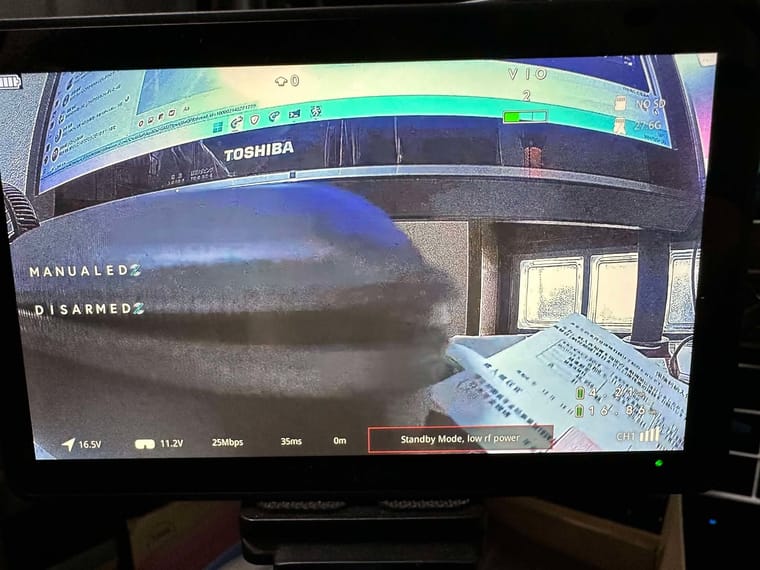
Also it was working as expected when I try it from the J10 port
-
Here is the OSD params
1	1	OSD_BAND	5	6
1	1	OSD_BATT_COL	44	6
1	1	OSD_BATT_ROW	17	6
1	1	OSD_CBATT_COL	44	6
1	1	OSD_CBATT_ROW	16	6
1	1	OSD_CHANNEL	1	6
1	1	OSD_CH_COL	-1	6
1	1	OSD_CH_HEIGHT	0	6
1	1	OSD_CH_ROW	-1	6
1	1	OSD_CURR_COL	-1	6
1	1	OSD_CURR_ROW	-1	6
1	1	OSD_DIS_COL	1	6
1	1	OSD_DIS_ROW	11	6
1	1	OSD_DWELL_TIME	500	6
1	1	OSD_FM_COL	1	6
1	1	OSD_FM_ROW	9	6
1	1	OSD_HDG_COL	21	6
1	1	OSD_HDG_ROW	0	6
1	1	OSD_HOME_COL	-1	6
1	1	OSD_HOME_ROW	-1	6
1	1	OSD_LAT_COL	-1	6
1	1	OSD_LAT_ROW	-1	6
1	1	OSD_LOG_LEVEL	3	6
1	1	OSD_LONG_COL	-1	6
1	1	OSD_LONG_ROW	-1	6
1	1	OSD_REMOTE	0	6
1	1	OSD_RSSI_COL	-1	6
1	1	OSD_RSSI_ROW	-1	6
1	1	OSD_SCROLL_RATE	125	6
1	1	OSD_STATUS_COL	1	6
1	1	OSD_STATUS_ROW	17	6
1	1	OSD_SYMBOLS	16383	6
1	1	OSD_VIO_COL	38	6
1	1	OSD_VIO_ROW	0	6
Thank you for the advice.
Both messages are disappeared when I set OSD_STATUS_ROW to -1
Also it was working as expected when I try it from the J10 port
@Eric-Katzfey
I think the messages of OSD_STATUS_ROW appear on both, OSD_STATUS and OSD_FM.
Problem seems the message is appear to OSD_FM_ROW when OSD_STATUS_ROW is enabled. -
@Eric-Katzfey
I think the messages of OSD_STATUS_ROW appear on both, OSD_STATUS and OSD_FM.
Problem seems the message is appear to OSD_FM_ROW when OSD_STATUS_ROW is enabled.@JP-Drone Looks like there was an issue with the handling of strings in the DSP version of the code. I made an update, can you try it now? http://voxl-packages.modalai.com/dists/qrb5165/dev/binary-arm64/voxl-px4_1.14.0-2.0.89-202412270902_arm64.deb
-
@JP-Drone Looks like there was an issue with the handling of strings in the DSP version of the code. I made an update, can you try it now? http://voxl-packages.modalai.com/dists/qrb5165/dev/binary-arm64/voxl-px4_1.14.0-2.0.89-202412270902_arm64.deb
@Eric-Katzfey
Thank you for your quick update.
I was able to confirm that it is functioning properly.
Really appreciate your support. Wishing you a wonderful New Year!


Reading along? Create a free ModalAI Forum account to join in.
With an account you can reply, ask your own question, get an email when a ModalAI engineer answers, and mark the reply that solved it. Your place in each thread is saved between visits.
Questions about VOXL, Flight Core, ESCs and ModalAI drones are answered here by the engineers who build them.
Register Login