
Mag Not Getting Detected on VOXL2 (sdk 1.0.0)
-
Good afternoon,
I've been having an issue where the mag is not being detected on the GPS + MAG module I have connected to a VOXL2.
The GPS is a MATEK NEO-M9N and the mag is an IST8308.
I tried changing the settings in voxl-px4.conf to HOLYBRO. That did not fix the problem.
Whenever I am on QGC with SYS_HAS_MAG set to 1, it will give me the warning "Compass sensor 0 is missing". Attempts to calibrate the mag fail.
Entering the command,
qshell ist8310 start -R 10 -X -b 1gives this output:
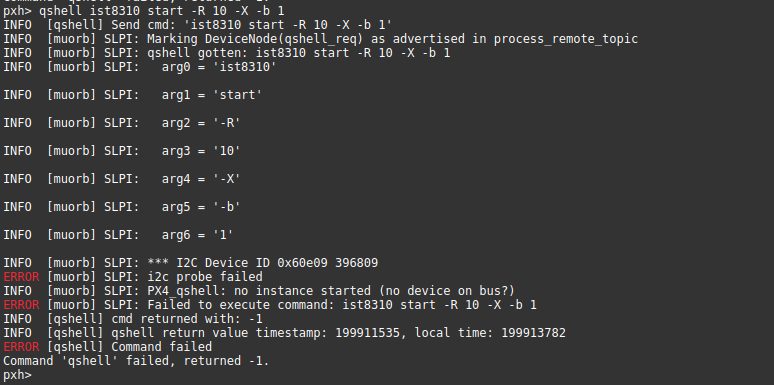
This gives the same output regardless if the gps module in voxl-px4.conf is set to HOLYBRO, MATEK or NONE
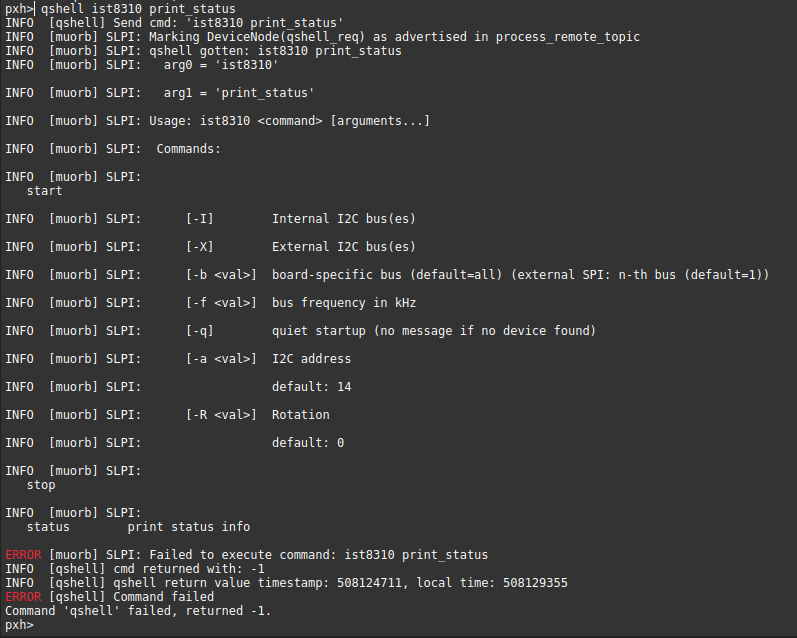
Also checking the status of ist8310 gives this output:
I've tried this with two separate GPS+MAG boards.
This is the specific model:
mRo GPS u-Blox Neo-M9N – IST8308
https://mrobotics.io/docs/mro-gps-u-blox-neo-m9n-ist8308-ultra-robust/ -
Good afternoon,
I've been having an issue where the mag is not being detected on the GPS + MAG module I have connected to a VOXL2.
The GPS is a MATEK NEO-M9N and the mag is an IST8308.
I tried changing the settings in voxl-px4.conf to HOLYBRO. That did not fix the problem.
Whenever I am on QGC with SYS_HAS_MAG set to 1, it will give me the warning "Compass sensor 0 is missing". Attempts to calibrate the mag fail.
Entering the command,
qshell ist8310 start -R 10 -X -b 1gives this output:
This gives the same output regardless if the gps module in voxl-px4.conf is set to HOLYBRO, MATEK or NONE
Also checking the status of ist8310 gives this output:
I've tried this with two separate GPS+MAG boards.
This is the specific model:
mRo GPS u-Blox Neo-M9N – IST8308
https://mrobotics.io/docs/mro-gps-u-blox-neo-m9n-ist8308-ultra-robust/@John-Nomikos-0 Yes, the ist8310 magnetometer driver does not work with the ist8308 magnetometer. The ist8308 magnetometer driver needs to be added to the build and started instead of the ist8310 driver. The newest px4 release has the ist8308 magnetometer driver built in so it's just a matter of switching to that and then modifying the start line in
voxl-px4-startto specify ist8308 instead of ist8310. The newest release is here: http://voxl-packages.modalai.com/dists/qrb5165/staging/binary-arm64/voxl-px4_1.14.0-2.0.43_arm64.deb -
@John-Nomikos-0 Yes, the ist8310 magnetometer driver does not work with the ist8308 magnetometer. The ist8308 magnetometer driver needs to be added to the build and started instead of the ist8310 driver. The newest px4 release has the ist8308 magnetometer driver built in so it's just a matter of switching to that and then modifying the start line in
voxl-px4-startto specify ist8308 instead of ist8310. The newest release is here: http://voxl-packages.modalai.com/dists/qrb5165/staging/binary-arm64/voxl-px4_1.14.0-2.0.43_arm64.deb@Eric-Katzfey Thank you so much for the help! Going to do that right now
-
@John-Nomikos-0 Yes, the ist8310 magnetometer driver does not work with the ist8308 magnetometer. The ist8308 magnetometer driver needs to be added to the build and started instead of the ist8310 driver. The newest px4 release has the ist8308 magnetometer driver built in so it's just a matter of switching to that and then modifying the start line in
voxl-px4-startto specify ist8308 instead of ist8310. The newest release is here: http://voxl-packages.modalai.com/dists/qrb5165/staging/binary-arm64/voxl-px4_1.14.0-2.0.43_arm64.deb@Eric-Katzfey I did what you suggested and it works! Thank you again!


Reading along? Create a free ModalAI Forum account to join in.
With an account you can reply, ask your own question, get an email when a ModalAI engineer answers, and mark the reply that solved it. Your place in each thread is saved between visits.
Questions about VOXL, Flight Core, ESCs and ModalAI drones are answered here by the engineers who build them.
Register Login