
Boson 640 MIPI M0153 16-bit
-
Also, a quick update.. after some additional testing, we are actually able to communicate with Boson via the CCI connection directly from VOXL2. Hopefully we will be able to enable (partial) Boson configuration from VOXL2 directly, avoiding the use of the USB connection for simple configuration change.
Here is a sample script that can be used to test triggering FFC. The script uses
cci-directlibrary which allows to communicate to cameras while they are running (in camera server).Before running this script, make sure the camera server is running and it is configured to enable Boson camera (and take note of the camera id (sw id, not slot)), which is needed by
cci-directand the script. This is also abit of a hack since we are writing part of the payload as the the address in addressed write (as it is common in i2c transactions), but Boson's i2c interface does not support addressing.#!/bin/bash if [ "$#" -eq 0 ]; then echo "Error: No arguments provided." echo "Usage: $0 <boson camera id>" exit 1 fi cam_id=$1 #command to trigger FFC #(extra two 00's at the end to make it a multiple of 3, since we are sending 3 bytes at a time in this test) data="8E A1 00 0C 00 00 00 FC 00 05 00 07 FF FF FF FF 00 00" IFS=' ' read -r -a words <<< "$data" for (( i=0; i<${#words[@]}; i+=3 )); do echo "${words[i]} ${words[i+1]} ${words[i+2]}" voxl-cci-direct -c ${cam_id} -w 0x${words[i]}${words[i+1]} 0x${words[i+2]} done -
@Alex-Kushleyev Cool, follow up then the Boson has an external sync pin, does the mipi board support this still?
@mkriesel , our M0153 / M0201 adapter does have an option to connect Boson to the common sync line that is used for synchronizing AR0144 tracking cameras (GPIO 109). This line is typically driven at 30Hz, but the frequency is adjustable.
There is a resistor pad on M0153 / M0201 adapter which is DNI by default, so a 0-ohm resistor would need to be installed to enable this functionality. However, we have not verified that it works.
It is on our to-do list to verify the Boson sync. Once we confirm that it works, I can provide instructions for installing the resistor if you wanted to enable that functionality. Boson's configuration will also need to be updated to enable the sync input, but it's not a big change.
Let me get back to you next week..
Alex
-
@mkriesel , our M0153 / M0201 adapter does have an option to connect Boson to the common sync line that is used for synchronizing AR0144 tracking cameras (GPIO 109). This line is typically driven at 30Hz, but the frequency is adjustable.
There is a resistor pad on M0153 / M0201 adapter which is DNI by default, so a 0-ohm resistor would need to be installed to enable this functionality. However, we have not verified that it works.
It is on our to-do list to verify the Boson sync. Once we confirm that it works, I can provide instructions for installing the resistor if you wanted to enable that functionality. Boson's configuration will also need to be updated to enable the sync input, but it's not a big change.
Let me get back to you next week..
Alex
I did a basic test of configuring Boson for external sync using
bosonSetExtSyncMode(FLR_BOSON_EXT_SYNC_MODE_E.FLR_BOSON_EXT_SYNC_SLAVE_MODE)in the FLIR python API.If the sync signal is absent, then Boson just stops sending frames (as expected). Once I installed the missing resistor on the ModalAI Boson adapter to patch the common 30FPS camera sync signal from VOXL2 to Boson, I started receiving frames from Boson at 30FPS. Adjusting the sync signal from 30 to 60FPS resulted in some FPS instability (as well as some minor flickering artifacts) in Boson frames due to the fact that the sync signal coming out of voxl2 has some jitter. Boson timing at 60FPS is very tight, so sync signal coming in too early can cut off the previous frame, so i believe that was happening.
I also noticed that when the sync signal was at 30FPS, the FFC would take twice as long, which is interesting. I wonder if Boson indeed expects 60FPS sync signal and perhaps something may not work properly otherwise. will need to check Boson documentation..
Also keep in mind that the tracking cameras (AR0144) cannot operate at 60FPS in sync'ed mode (different story). So, if you are using sync'ed AR0144 tracking cameras and would like to use 60FPS sync'ed Boson, this may not be possible with the same sync line.
I will need to experiment with this some more. Can you please elaborate on the use of Boson sync in your application (and whether you need VOXL2 to generate the sync signal or you have your own sync signal)?
Alex
-
I did a basic test of configuring Boson for external sync using
bosonSetExtSyncMode(FLR_BOSON_EXT_SYNC_MODE_E.FLR_BOSON_EXT_SYNC_SLAVE_MODE)in the FLIR python API.If the sync signal is absent, then Boson just stops sending frames (as expected). Once I installed the missing resistor on the ModalAI Boson adapter to patch the common 30FPS camera sync signal from VOXL2 to Boson, I started receiving frames from Boson at 30FPS. Adjusting the sync signal from 30 to 60FPS resulted in some FPS instability (as well as some minor flickering artifacts) in Boson frames due to the fact that the sync signal coming out of voxl2 has some jitter. Boson timing at 60FPS is very tight, so sync signal coming in too early can cut off the previous frame, so i believe that was happening.
I also noticed that when the sync signal was at 30FPS, the FFC would take twice as long, which is interesting. I wonder if Boson indeed expects 60FPS sync signal and perhaps something may not work properly otherwise. will need to check Boson documentation..
Also keep in mind that the tracking cameras (AR0144) cannot operate at 60FPS in sync'ed mode (different story). So, if you are using sync'ed AR0144 tracking cameras and would like to use 60FPS sync'ed Boson, this may not be possible with the same sync line.
I will need to experiment with this some more. Can you please elaborate on the use of Boson sync in your application (and whether you need VOXL2 to generate the sync signal or you have your own sync signal)?
Alex
Thanks for looking into this. At the moment there aren't any plans using the sync pin but we are trying to see if this is something worth looking into.
Back to testing, I recently got the boson board in and am trying to test it but have run into an issue with trying to get the camera-server installed.
I'm getting
voxl-camera-server depends on libmodal-pipe (>= 2.14.0); however:
Version of libmodal-pipe on system is 2.13.2.Then for libmodal-pipe 2.14.0
dpkg: regarding libmodal-pipe_2.14.0_arm64.deb containing libmodal-pipe:
libmodal-pipe conflicts with voxl-cpu-monitor (<< 0.7.0)
voxl-cpu-monitor (version 0.6.0) is present and installed.Bu voxl-cpu-monitor 0.7.0
dpkg: regarding voxl-cpu-monitor_0.7.0_arm64.deb containing voxl-cpu-monitor:
voxl-cpu-monitor conflicts with libmodal-pipe (<< 2.14.0)
libmodal-pipe (version 2.13.2) is present and installed.So I'm stuck in a bit of a circle with the libmodal-pipe if you could help out
-
Thanks for looking into this. At the moment there aren't any plans using the sync pin but we are trying to see if this is something worth looking into.
Back to testing, I recently got the boson board in and am trying to test it but have run into an issue with trying to get the camera-server installed.
I'm getting
voxl-camera-server depends on libmodal-pipe (>= 2.14.0); however:
Version of libmodal-pipe on system is 2.13.2.Then for libmodal-pipe 2.14.0
dpkg: regarding libmodal-pipe_2.14.0_arm64.deb containing libmodal-pipe:
libmodal-pipe conflicts with voxl-cpu-monitor (<< 0.7.0)
voxl-cpu-monitor (version 0.6.0) is present and installed.Bu voxl-cpu-monitor 0.7.0
dpkg: regarding voxl-cpu-monitor_0.7.0_arm64.deb containing voxl-cpu-monitor:
voxl-cpu-monitor conflicts with libmodal-pipe (<< 2.14.0)
libmodal-pipe (version 2.13.2) is present and installed.So I'm stuck in a bit of a circle with the libmodal-pipe if you could help out
@mkriesel , oh yeah, i now that dpkg stuck issue..
use
dpkg --force-all -i <package.deb>, you can install voxl-cpu-monitor and libmodal-pipe together or separately.Alex
-
@mkriesel , oh yeah, i now that dpkg stuck issue..
use
dpkg --force-all -i <package.deb>, you can install voxl-cpu-monitor and libmodal-pipe together or separately.Alex
@Alex-Kushleyev
Alright, I've tried a few things and I can't see to get things to work.voxl2-mini:~$ voxl-camera-server
Setting MISP AWB to Auto
MISP channels enabled in defaults : 0
MISP channels enabled in config file: 0configuration for 1 cameras:
cam #0
name: boson
type: boson-fpv
bayer_type: 0
enabled: 1
camera_id: 0
camera_id_second: -1
fps: 30
en_rotate: 0
en_rotate2: 0en_preview: 1 en_raw_preview: 1 preview_width: 640 preview_height: 512 en_misp: 1 misp_width: 640 misp_height: 512 en_small_video: 0 small_video_width: 640 small_video_height: 512 en_large_video: 0 large_video_width: -1 large_video_height: -1 en_snapshot: 0 snap_width: -1 snap_height: -1 exif_focal_length: 0.000000 exif_focal_len_35mm_format:0 exif_fnumber: 0.000000 ae_mode: lme_msv msv_exposure_min_us: 20 msv_exposure_max_us: 33000 gain_min : 54 gain_max : 8000 standby_enabled: 0 decimator: 1 independent_exposure:0fsync_en: 0
fsync_gpio: 109thread is locked to cores: 4 5 6 7
connected to mavlink pipe
Starting Camera: boson (id #0)
Opened GBM fd
gbm_create_device(156): Info: backend name is: msm_drm
Created GBM device
MISP Initializing for camera boson
Detected 1 platform(s)
Detected 1 GPU device(s)
Estimated imu dt = 0.000977s
Got unsupported format in getUVStartFromFmt, returning nullptr
WARNING: OMX SetTargetBitrate: H265 CBR requires bps >= 3.0Mbit (2000000 bps provided). Using FPS hack. scale = 1.500000------ voxl-camera-server: Started 1 of 1 cameras
------ voxl-camera-server: Camera server is now running
ERROR: Received "Result" error from camera: boson
ERROR: Received "Buffer" error from camera: boson
ERROR: Received "Result" error from camera: boson
ERROR: Received "Buffer" error from camera: boson
ERROR: Received "Result" error from camera: boson
ERROR: Received "Buffer" error from camera: boson
ERROR: Received "Result" error from camera: boson
ERROR: Received "Buffer" error from camera: boson
ERROR: Received "Result" error from camera: boson
ERROR: Received "Buffer" error from camera: boson
ERROR: Received "Request" error from camera: boson| Pipe Name | bytes | wide | hgt |exp(ms)| gain | frame id |latency(ms)| fps | mbps | format
| boson |
| boson_bayer |
| boson_color |
| boson_misp_encoded |I copied the drivers into /usr/lib/camera/ and both the 8 bit and 14 bit drivers you provided gave the same error running various combinations of the set and read python scripts you sent.
(base) ➜ boson python3 boson_set_14bit.py
C serial FSLP load
Serial port open
Software Version: 4 0 27141
camera SN: 322022
dvoSetOutputFormat:
0
dvoSetType:
0
dvoSetOutputIr16Format:
0
roicSetFrameSkip:
0
Apply Custom Settings:
0
Save Settings To Flash:
0
Reboot
0
Closing com port and freeing serial port instance.
Serial port close
(base) ➜ boson python3 boson_read.py
C serial FSLP load
Serial port open
Software Version: 4 0 27141
camera SN: 322022
dvoGetType:
0
5
dvoGetOutputFormat:
0
3
dvoGetOutputIr16Format:
0
0
dvoGetLCDConfig:
0
0
ClockInfo:
0
60.0
27.0
16Let me know if it seemed like I did something wrong, I tried both the J6 and J7 ports on the voxl 2 mini with the corresponding numbered driver.
-
@Alex-Kushleyev
Alright, I've tried a few things and I can't see to get things to work.voxl2-mini:~$ voxl-camera-server
Setting MISP AWB to Auto
MISP channels enabled in defaults : 0
MISP channels enabled in config file: 0configuration for 1 cameras:
cam #0
name: boson
type: boson-fpv
bayer_type: 0
enabled: 1
camera_id: 0
camera_id_second: -1
fps: 30
en_rotate: 0
en_rotate2: 0en_preview: 1 en_raw_preview: 1 preview_width: 640 preview_height: 512 en_misp: 1 misp_width: 640 misp_height: 512 en_small_video: 0 small_video_width: 640 small_video_height: 512 en_large_video: 0 large_video_width: -1 large_video_height: -1 en_snapshot: 0 snap_width: -1 snap_height: -1 exif_focal_length: 0.000000 exif_focal_len_35mm_format:0 exif_fnumber: 0.000000 ae_mode: lme_msv msv_exposure_min_us: 20 msv_exposure_max_us: 33000 gain_min : 54 gain_max : 8000 standby_enabled: 0 decimator: 1 independent_exposure:0fsync_en: 0
fsync_gpio: 109thread is locked to cores: 4 5 6 7
connected to mavlink pipe
Starting Camera: boson (id #0)
Opened GBM fd
gbm_create_device(156): Info: backend name is: msm_drm
Created GBM device
MISP Initializing for camera boson
Detected 1 platform(s)
Detected 1 GPU device(s)
Estimated imu dt = 0.000977s
Got unsupported format in getUVStartFromFmt, returning nullptr
WARNING: OMX SetTargetBitrate: H265 CBR requires bps >= 3.0Mbit (2000000 bps provided). Using FPS hack. scale = 1.500000------ voxl-camera-server: Started 1 of 1 cameras
------ voxl-camera-server: Camera server is now running
ERROR: Received "Result" error from camera: boson
ERROR: Received "Buffer" error from camera: boson
ERROR: Received "Result" error from camera: boson
ERROR: Received "Buffer" error from camera: boson
ERROR: Received "Result" error from camera: boson
ERROR: Received "Buffer" error from camera: boson
ERROR: Received "Result" error from camera: boson
ERROR: Received "Buffer" error from camera: boson
ERROR: Received "Result" error from camera: boson
ERROR: Received "Buffer" error from camera: boson
ERROR: Received "Request" error from camera: boson| Pipe Name | bytes | wide | hgt |exp(ms)| gain | frame id |latency(ms)| fps | mbps | format
| boson |
| boson_bayer |
| boson_color |
| boson_misp_encoded |I copied the drivers into /usr/lib/camera/ and both the 8 bit and 14 bit drivers you provided gave the same error running various combinations of the set and read python scripts you sent.
(base) ➜ boson python3 boson_set_14bit.py
C serial FSLP load
Serial port open
Software Version: 4 0 27141
camera SN: 322022
dvoSetOutputFormat:
0
dvoSetType:
0
dvoSetOutputIr16Format:
0
roicSetFrameSkip:
0
Apply Custom Settings:
0
Save Settings To Flash:
0
Reboot
0
Closing com port and freeing serial port instance.
Serial port close
(base) ➜ boson python3 boson_read.py
C serial FSLP load
Serial port open
Software Version: 4 0 27141
camera SN: 322022
dvoGetType:
0
5
dvoGetOutputFormat:
0
3
dvoGetOutputIr16Format:
0
0
dvoGetLCDConfig:
0
0
ClockInfo:
0
60.0
27.0
16Let me know if it seemed like I did something wrong, I tried both the J6 and J7 ports on the voxl 2 mini with the corresponding numbered driver.
Please make sure that you only have one sensormodule file for boson for the given configuration in
/usr/lib/camera/.One thing to check is to see if the Boson is in active mipi state by default. You can add this to your
boson_read.pyfile :print('dvoGetMipiStartState: ') result, mipi_start_state = myCam.dvoGetMipiStartState() print(result) print(mipi_start_state) print('dvoGetMipiState: ') result, mipi_state = myCam.dvoGetMipiState() print(result) print(mipi_state)My output is:
dvoGetMipiStartState: FLR_RESULT.R_SUCCESS FLR_DVO_MIPI_STATE_E.FLR_DVO_MIPI_STATE_ACTIVE dvoGetMipiState: FLR_RESULT.R_SUCCESS FLR_DVO_MIPI_STATE_E.FLR_DVO_MIPI_STATE_ACTIVEFLR_DVO_MIPI_STATE_ACTIVEis 2,FLR_DVO_MIPI_STATE_OFFis 0If your sensor does not show active start state, then it may need to be set using the following:
myCam.dvoSetMipiStartState(FLR_DVO_MIPI_STATE_E.FLR_DVO_MIPI_STATE_ACTIVE)If this still does not work, it is possible that my script does not do the full setup for mipi output, so you may want to try using the FLIR GUI for the initial setup (for 8 bit post AGC and use the default 8 bit sensormodule): https://docs.modalai.com/M0153/#boson-software-setup
Alex
-
Please make sure that you only have one sensormodule file for boson for the given configuration in
/usr/lib/camera/.One thing to check is to see if the Boson is in active mipi state by default. You can add this to your
boson_read.pyfile :print('dvoGetMipiStartState: ') result, mipi_start_state = myCam.dvoGetMipiStartState() print(result) print(mipi_start_state) print('dvoGetMipiState: ') result, mipi_state = myCam.dvoGetMipiState() print(result) print(mipi_state)My output is:
dvoGetMipiStartState: FLR_RESULT.R_SUCCESS FLR_DVO_MIPI_STATE_E.FLR_DVO_MIPI_STATE_ACTIVE dvoGetMipiState: FLR_RESULT.R_SUCCESS FLR_DVO_MIPI_STATE_E.FLR_DVO_MIPI_STATE_ACTIVEFLR_DVO_MIPI_STATE_ACTIVEis 2,FLR_DVO_MIPI_STATE_OFFis 0If your sensor does not show active start state, then it may need to be set using the following:
myCam.dvoSetMipiStartState(FLR_DVO_MIPI_STATE_E.FLR_DVO_MIPI_STATE_ACTIVE)If this still does not work, it is possible that my script does not do the full setup for mipi output, so you may want to try using the FLIR GUI for the initial setup (for 8 bit post AGC and use the default 8 bit sensormodule): https://docs.modalai.com/M0153/#boson-software-setup
Alex
@mkriesel , I have updated the boson configuration and read scripts (
boson_read.py,boson_set_8bit.py, etc) to include configuring additional settings like mipi start state, dvo output interface, etc. Please download them again (from links earlier in this thread) and try again. Also, just to confirm that the original Boson setup instruction using the FLIR GUI should work for 8 bit format.Just one note, even though I set
myCam.dvoSetOutputFormat(FLR_DVO_OUTPUT_FORMAT_E.FLR_DVO_IR16), whereFLR_DVO_IR16 = 3, when i read back the configuration, i get the default format (2) :FLR_DVO_OUTPUT_FORMAT_E.FLR_DVO_DEFAULT_FORMAT = 2. It seems that in your output the ouput format is set to 3 - i am not sure why, there could be some minor quirks in the boson firmware.In any case, please try the GUI and updated scripts and let me know how it goes!
Alex
-
@mkriesel , I have updated the boson configuration and read scripts (
boson_read.py,boson_set_8bit.py, etc) to include configuring additional settings like mipi start state, dvo output interface, etc. Please download them again (from links earlier in this thread) and try again. Also, just to confirm that the original Boson setup instruction using the FLIR GUI should work for 8 bit format.Just one note, even though I set
myCam.dvoSetOutputFormat(FLR_DVO_OUTPUT_FORMAT_E.FLR_DVO_IR16), whereFLR_DVO_IR16 = 3, when i read back the configuration, i get the default format (2) :FLR_DVO_OUTPUT_FORMAT_E.FLR_DVO_DEFAULT_FORMAT = 2. It seems that in your output the ouput format is set to 3 - i am not sure why, there could be some minor quirks in the boson firmware.In any case, please try the GUI and updated scripts and let me know how it goes!
Alex
@Alex-Kushleyev It seems to be working now, I'll do more testing but this looks correct
| Pipe Name | bytes | wide | hgt |exp(ms)| gain | frame id |latency(ms)| fps | mbps | format
| boson | 327680 | 640 | 512 | 0.00 | 799 | 163 | 21.6 | 60.0 | 157.3 | RAW8
| boson_bayer | 655360 | 640 | 512 | 0.00 | 0 | 163 | 20.0 | 60.0 | 314.6 | RAW16
| boson_color | 983040 | 640 | 512 | 0.00 | 799 | 163 | 22.7 | 60.0 | 471.9 | RGB
| boson_misp_encoded | 8826 | 640 | 512 | 0.00 | 799 | 163 | 25.5 | 60.0 | 4.1 | H265 (P)Thanks for the help! Also, what version of the bosonSDK are you using for your python scripts? My version (3.0) doesn't have the dvoSetMipiStartState and a few other functions and I can't find a higher version on their website?
-
@Alex-Kushleyev It seems to be working now, I'll do more testing but this looks correct
| Pipe Name | bytes | wide | hgt |exp(ms)| gain | frame id |latency(ms)| fps | mbps | format
| boson | 327680 | 640 | 512 | 0.00 | 799 | 163 | 21.6 | 60.0 | 157.3 | RAW8
| boson_bayer | 655360 | 640 | 512 | 0.00 | 0 | 163 | 20.0 | 60.0 | 314.6 | RAW16
| boson_color | 983040 | 640 | 512 | 0.00 | 799 | 163 | 22.7 | 60.0 | 471.9 | RGB
| boson_misp_encoded | 8826 | 640 | 512 | 0.00 | 799 | 163 | 25.5 | 60.0 | 4.1 | H265 (P)Thanks for the help! Also, what version of the bosonSDK are you using for your python scripts? My version (3.0) doesn't have the dvoSetMipiStartState and a few other functions and I can't find a higher version on their website?
@mkriesel , I am glad that you got it working! You should also be able to view the boson output in
voxl-portal-- for the 14 bit case, there is a very simple re-scaling done from 14 to 8 bit, just for testing (WIP).I am using
SDK4.0_Boson_Plus_SDK. You should probably contact Flir to get access to it, since we can't distribute it.Alex
-
@mkriesel , I am glad that you got it working! You should also be able to view the boson output in
voxl-portal-- for the 14 bit case, there is a very simple re-scaling done from 14 to 8 bit, just for testing (WIP).I am using
SDK4.0_Boson_Plus_SDK. You should probably contact Flir to get access to it, since we can't distribute it.Alex
I'm trying to pull the images off and they seem to be corrupted somewhat. It almost seems like I'm getting the 16 bit image but in an 8 bit format. I'm subscribing to the boson_bayer and the image I'm getting seems to be the correct size and length but when I save its not correct. The RAW 8 stream I get on the voxl-portal looks the same, which I would expect for testing.
Heres what I'm getting for reference
https://drive.google.com/file/d/1fG5XEPM-b1NbC6H9R4jWSvZTDxm-a6Y_/view?usp=sharingAnd then code I'm using to save it
static void _frame_cb(__attribute__((unused)) int ch, camera_image_metadata_t meta, char* frame, void* context)
{

    CameraInterface* interface = (CameraInterface*)context;

    if (interface->GetState() != ST_RUNNING) {
        return;
    }

    if (interface->ShouldSkip()) {
        return;
    }

    if (meta.format == IMAGE_FORMAT_NV12) {

    }
    else if (meta.format == IMAGE_FORMAT_RAW8) {

    }
    else if (meta.format == IMAGE_FORMAT_RAW10) {

    }
    else if (meta.format == IMAGE_FORMAT_RAW16) {
        std::cout << "16 bit image " << meta.size_bytes << " stride " << meta.stride << std::endl;
        int input_height = meta.height;
        int input_width  = meta.width;

        size_t frame_size = input_width * input_height * 2;

        char outname[100];

        std::string image_folder_name = "/data/pgm_frames";

        // uint16_t* frame_data = reinterpret_cast<uint16_t*>(frame);

        sprintf(outname, "%s/frame_%06lu.pgm", image_folder_name.c_str(), meta.timestamp_ns);
        printf("Output filename: %s\n", outname);

        // out_image.write(reinterpret_cast<char*>(pixels), IMAGE_PIXELS * sizeof(uint16_t));
        std::ofstream out_image(outname, std::ios::binary | std::ios::out);

        out_image << "P5\n640 512 65535\n";
        out_image.write(frame, frame_size);

    }
    else {
        // Not implemented
        std::cout << "other" << std::endl;
    }
}
Any thoughts?
-
I'm trying to pull the images off and they seem to be corrupted somewhat. It almost seems like I'm getting the 16 bit image but in an 8 bit format. I'm subscribing to the boson_bayer and the image I'm getting seems to be the correct size and length but when I save its not correct. The RAW 8 stream I get on the voxl-portal looks the same, which I would expect for testing.
Heres what I'm getting for reference
https://drive.google.com/file/d/1fG5XEPM-b1NbC6H9R4jWSvZTDxm-a6Y_/view?usp=sharingAnd then code I'm using to save it
static void _frame_cb(__attribute__((unused)) int ch, camera_image_metadata_t meta, char* frame, void* context)
{

    CameraInterface* interface = (CameraInterface*)context;

    if (interface->GetState() != ST_RUNNING) {
        return;
    }

    if (interface->ShouldSkip()) {
        return;
    }

    if (meta.format == IMAGE_FORMAT_NV12) {

    }
    else if (meta.format == IMAGE_FORMAT_RAW8) {

    }
    else if (meta.format == IMAGE_FORMAT_RAW10) {

    }
    else if (meta.format == IMAGE_FORMAT_RAW16) {
        std::cout << "16 bit image " << meta.size_bytes << " stride " << meta.stride << std::endl;
        int input_height = meta.height;
        int input_width  = meta.width;

        size_t frame_size = input_width * input_height * 2;

        char outname[100];

        std::string image_folder_name = "/data/pgm_frames";

        // uint16_t* frame_data = reinterpret_cast<uint16_t*>(frame);

        sprintf(outname, "%s/frame_%06lu.pgm", image_folder_name.c_str(), meta.timestamp_ns);
        printf("Output filename: %s\n", outname);

        // out_image.write(reinterpret_cast<char*>(pixels), IMAGE_PIXELS * sizeof(uint16_t));
        std::ofstream out_image(outname, std::ios::binary | std::ios::out);

        out_image << "P5\n640 512 65535\n";
        out_image.write(frame, frame_size);

    }
    else {
        // Not implemented
        std::cout << "other" << std::endl;
    }
}
Any thoughts?
@mkriesel , it looks like potentially an little vs big endian issue when using PGM - can you try to swap the byte order?
Alex
-
@mkriesel , it looks like potentially an little vs big endian issue when using PGM - can you try to swap the byte order?
Alex
save image on voxl:
voxl-record-raw-image boson640_bayer -n 1 -d ./display image using python3:
import cv2
import numpy as np

WIDTH  = 640
HEIGHT = 512
FILENAME = "boson640_bayer_640x512.gray"

# read 16-bit file
img = np.fromfile(FILENAME, dtype=np.uint16).reshape(HEIGHT, WIDTH)

# simple normalize
vmin     = np.min(img)
vmax     = np.max(img)
img_8bit = cv2.convertScaleAbs(img-vmin, alpha=255.0/(vmax-vmin))

# show image
cv2.imshow("Normalized Image", img_8bit)
cv2.waitKey(3000)
cv2.destroyAllWindows()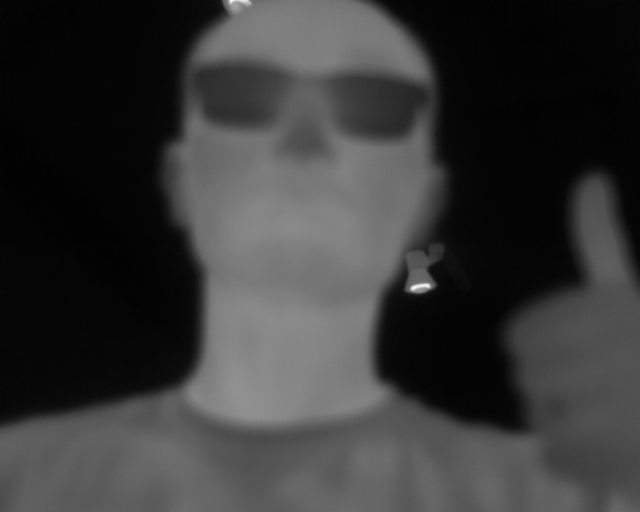

Reading along? Create a free ModalAI Forum account to join in.
With an account you can reply, ask your own question, get an email when a ModalAI engineer answers, and mark the reply that solved it. Your place in each thread is saved between visits.
Questions about VOXL, Flight Core, ESCs and ModalAI drones are answered here by the engineers who build them.
Register Login