
@serge said in autostart voxl-streamer:
@Alex-Gardner said in autostart voxl-streamer:
systemctl enable voxl-stream
thank you
@serge said in autostart voxl-streamer:
@Alex-Gardner said in autostart voxl-streamer:
systemctl enable voxl-stream
thank you
we tryed to calibrate the he stereo cam of fresh received original voxlcam following your web, and we get calibration error, please check below:
voxl:~$ voxl-calibrate-camera stereo -s 6x8 -l 0.0305
Sampling overlapping images now
Enter an empty line to take a sample or "stop" to finish sampling
Taking Frame
Taking Frame
Taking Frame
stop
Stopping sampling
Calibrating Left Camera
Matrix
[492.1770564681099, 0, 295.4825398094734;
0, 492.8901026252761, 209.272634625896;
0, 0, 1]
Distortion
[-0.1594579771759119;
0.04962863321553145;
-0.001253636483962171;
-0.001198103506208682;
0]
distortion_model: plumb_bob
Re-projection error reported by calibrateCamera: 0.397087
Calibration Succeded!
Calibrating Right Camera
Matrix
[494.8907451968516, 0, 316.5899881855318;
0, 495.6589926401959, 253.4642768466877;
0, 0, 1]
Distortion
[-0.1745222226485783;
0.07184982910704507;
-0.0007935469814187805;
0.002257594081306318;
0]
distortion_model: plumb_bob
Re-projection error reported by calibrateCamera: 0.416621
Calibration Succeded!
Calibrating Extrinsics
3 frames will be processed
R
[-0.9974198548962341, -0.03078682869103906, 0.06485217219125451;
0.03354128911161051, -0.9985619529928232, 0.04182114249862379;
0.06347137136935731, 0.04388846333955487, 0.9970181481809569]
T
[0.001165923908125856;
-0.01414810568973897;
-0.008488033152070548]
Re-projection error reported by stereoCalibrate: 79.097565
Extrinsics Calibration Failed
Max reprojection error: 0.5
Hello, we need to autostart voxl-streamer, can you tell us how to do it?
Kind regards.
Hello,
We work on the integration for the voxl board in our uav.
We need to be able to add ethernet interface to it.
Can you help us to find solution?
@sergio said in ARDUPILOT VOXL CAM ORIENTATION ISSUE ?:
@serge said in ARDUPILOT VOXL CAM ORIENTATION ISSUE ?:
@Chad-Sweet Hello,
Ok for test the upside down, can you share here the extrinsics to put it upside down?
As you can show on the photos on posts above, I set the extrinsics file to this values below to match the tracking camera positionning, and I achieve better positionning and qvio quality.
Please check my extrinsics below:
{
"name": "seeker_v1_voxlcam",
"extrinsics": [{
"parent": "imu0",
"child": "tracking",
"T_child_wrt_parent": [0.041, 0.014, 0.01],
"RPY_parent_to_child": [0, 0, 0]
}, {
"parent": "imu1",
"child": "tracking",
"T_child_wrt_parent": [-0.0074, 0.021, 0.01],
"RPY_parent_to_child": [0, 0, 0]
}, {
"parent": "body",
"child": "imu0",
"T_child_wrt_parent": [0.0496, -0.0152, 0.0161],
"RPY_parent_to_child": [0, 90, 90]
}, {
"parent": "body",
"child": "imu1",
"T_child_wrt_parent": [0.0465, 0.0332, -0.013],
"RPY_parent_to_child": [0, 90, 90]
}, {
"parent": "body",
"child": "stereo_l",
"T_child_wrt_parent": [0.055, -0.04, 0],
"RPY_parent_to_child": [0, 90, 90]
}, {
"parent": "body",
"child": "ground",
"T_child_wrt_parent": [0, 0, 0.045],
"RPY_parent_to_child": [0, 0, 0]
}, {
"parent": "imu1",
"child": "imu0",
"T_child_wrt_parent": [-0.0484, 0.037, 0.002],
"RPY_parent_to_child": [0, 0, 0]
}, {
"parent": "body",
"child": "tof",
"T_child_wrt_parent": [0.055, 0, 0],
"RPY_parent_to_child": [0, 90, -90]
}]
}But the issue, is that I always get bad positionning.
please check the ardurover log via the link below:
https://1drv.ms/u/s!AssmjyIs_YcBqz7NvkZmM4Gv7LZt?e=mBVFhSYou can see that we achieve to make U chape trajectory, but at some point, qvio loses the yaw.......
Please check the log.
Please also tell me how to make qvio logs with voxlcam for you post analys what going on.
Also, please tel me what qvio quality number must be achieved when going forward and making turns?
here you have the best logs we achieved.
at the end qvio lose yaw....I really would like to try the upside down voxlcam with tracking camera mounted as factory deliver it.
Please let me know how to achieve this, I think that extrinsics file is not the only conf file to tune for it, and all the items must be reversed?
It would be gracefull from your part to provide consistant support for it by giving the extrisincs and sharing it at all your customers here.
Kind regards.
Dear Chad, Please, can you tell me if tracking camera is factory calibrated? Do you advice to calibrate it to enhance the results?
Also Please send me the voxl cam intrinsics for upside down the voxlcam in rover app.
I really need your support to go forward please.
@Chad-Sweet Hello,
Ok for test the upside down, can you share here the extrinsics to put it upside down?
As you can show on the photos on posts above, I set the extrinsics file to this values below to match the tracking camera positionning, and I achieve better positionning and qvio quality.
Please check my extrinsics below:
{
"name": "seeker_v1_voxlcam",
"extrinsics": [{
"parent": "imu0",
"child": "tracking",
"T_child_wrt_parent": [0.041, 0.014, 0.01],
"RPY_parent_to_child": [0, 0, 0]
}, {
"parent": "imu1",
"child": "tracking",
"T_child_wrt_parent": [-0.0074, 0.021, 0.01],
"RPY_parent_to_child": [0, 0, 0]
}, {
"parent": "body",
"child": "imu0",
"T_child_wrt_parent": [0.0496, -0.0152, 0.0161],
"RPY_parent_to_child": [0, 90, 90]
}, {
"parent": "body",
"child": "imu1",
"T_child_wrt_parent": [0.0465, 0.0332, -0.013],
"RPY_parent_to_child": [0, 90, 90]
}, {
"parent": "body",
"child": "stereo_l",
"T_child_wrt_parent": [0.055, -0.04, 0],
"RPY_parent_to_child": [0, 90, 90]
}, {
"parent": "body",
"child": "ground",
"T_child_wrt_parent": [0, 0, 0.045],
"RPY_parent_to_child": [0, 0, 0]
}, {
"parent": "imu1",
"child": "imu0",
"T_child_wrt_parent": [-0.0484, 0.037, 0.002],
"RPY_parent_to_child": [0, 0, 0]
}, {
"parent": "body",
"child": "tof",
"T_child_wrt_parent": [0.055, 0, 0],
"RPY_parent_to_child": [0, 90, -90]
}]
}
But the issue, is that I always get bad positionning.
please check the ardurover log via the link below:
https://1drv.ms/u/s!AssmjyIs_YcBqz7NvkZmM4Gv7LZt?e=mBVFhS
You can see that we achieve to make U chape trajectory, but at some point, qvio loses the yaw.......
Please check the log.
Please also tell me how to make qvio logs with voxlcam for you post analys what going on.
Also, please tel me what qvio quality number must be achieved when going forward and making turns?
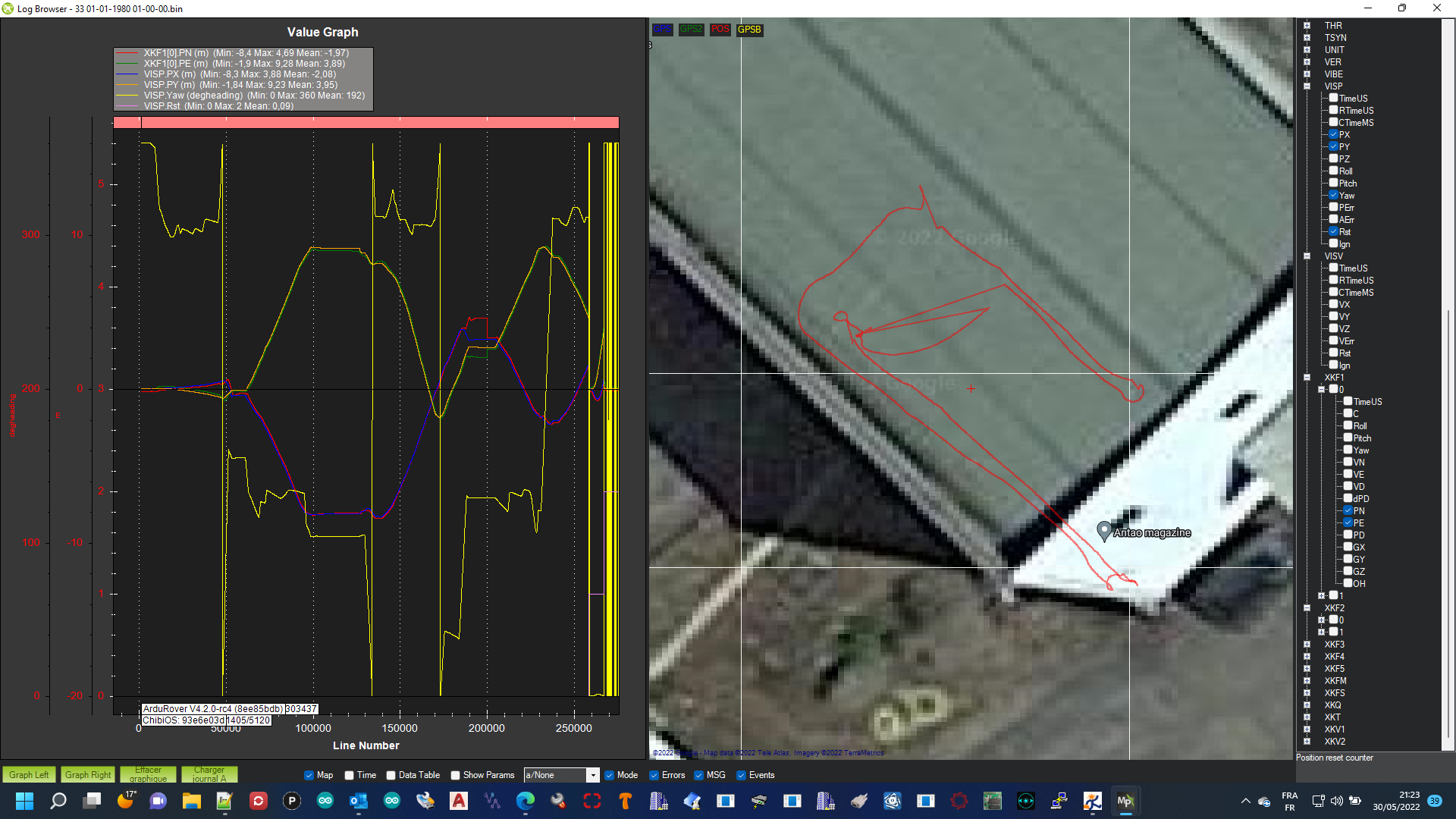
here you have the best logs we achieved.
at the end qvio lose yaw....
I really would like to try the upside down voxlcam with tracking camera mounted as factory deliver it.
Please let me know how to achieve this, I think that extrinsics file is not the only conf file to tune for it, and all the items must be reversed?
It would be gracefull from your part to provide consistant support for it by giving the extrisincs and sharing it at all your customers here.
Kind regards.
After many test we get singular issue.
All seem to be related to bad reference between autopilot and voxlcam.
We initialising, we we go straight to the north, there is no errors, as soon as we make turn EK3 failsafe.
Maybe we need proffessionnal support from you, can you please contact us ?
Kind regards.
Hello, So I corrected this point now I achive to make ride indoor with 0,1 mean quality and even I go to 0,6 quality spikes, so now we can tell that this extrinsics are correct for qvio.
Now the issue is that there is clearly issus beetwin voxl coordinates and px4.
I always have ekf faisafe as soon as I go forward.
So As I use normal px4 ap, there is extrinsics to enter in extrinsics conf fil or px4?
Can you help me please?
can you give me the right numbers?
I dont understand the orientation...
tracking is now 9mm above old position and 27mm to the right respecting the old position.
for me is the only change.
so based on old extrinsics:
iimu1/tracking -0.0344 -0,027mm , 0.03, 0.005 - 0,009mm this is right?
or the good change is: -0.0344, 0.03 -0,027mm, 0.005 - 0,009mm
Please help us.
So the error is also in the imu0 I think....
Hello,
I moded params in voxl:~$ vi /etc/modalai/extrinsics.conf
for match the new tracking camera position (image below).
Can you confirm that new intrinsec params are good for it?
"name": "seeker_v1_voxlcam",
"extrinsics": [{
"parent": "imu0",
"child": "tracking",
"T_child_wrt_parent": [0.041, -0.005, 0.005],
"RPY_parent_to_child": [0, 0, 0]
}, {
"parent": "imu1",
"child": "tracking",
"T_child_wrt_parent": [-0.0614, -0.08, 0.005],
"RPY_parent_to_child": [0, 0, 0]
}, {
"parent": "body",
"child": "imu0",
"T_child_wrt_parent": [0.0496, -0.0152, 0.0161],
"RPY_parent_to_child": [0, 90, 90]
}, {
"parent": "body",
"child": "imu1",
"T_child_wrt_parent": [0.0465, 0.0332, -0.013],
"RPY_parent_to_child": [0, 90, 90]
}, {
"parent": "body",
"child": "stereo_l",
"T_child_wrt_parent": [0.055, -0.04, 0],
"RPY_parent_to_child": [0, 90, 90]
}, {
"parent": "body",
"child": "ground",
"T_child_wrt_parent": [0, 0, 0.045],
"RPY_parent_to_child": [0, 0, 0]
}, {
"parent": "imu1",
"child": "imu0",
"T_child_wrt_parent": [-0.0484, 0.037, 0.002],
"RPY_parent_to_child": [0, 0, 0]
}, {
"parent": "body",
"child": "tof",
"T_child_wrt_parent": [0.055, 0, 0],
"RPY_parent_to_child": [0, 90, -90]
}]
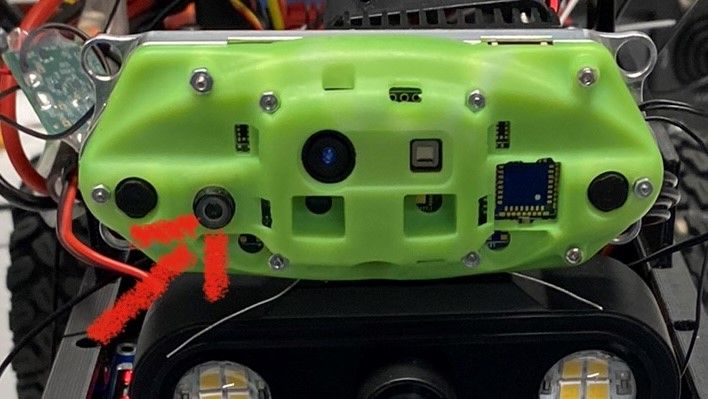
After I make tests with this new setup, but it not changer anythink....
As soon as I go forward qvio quality drop directly:
voxl:~$ voxl-inspect-qvio -q
waiting for server
T_imu_wrt_vio (m) |Roll Pitch Yaw (deg)| quality | state| error_code
from this:
6.85 0.19 -0.63| 0.7 55.2 -7.5| 0.08832| OKAY |
to 0.00005 and make error.
So question is doeas I changed the good extrinsics file???
How to make that the quality no drop when rover move.
(there is no vibrations)
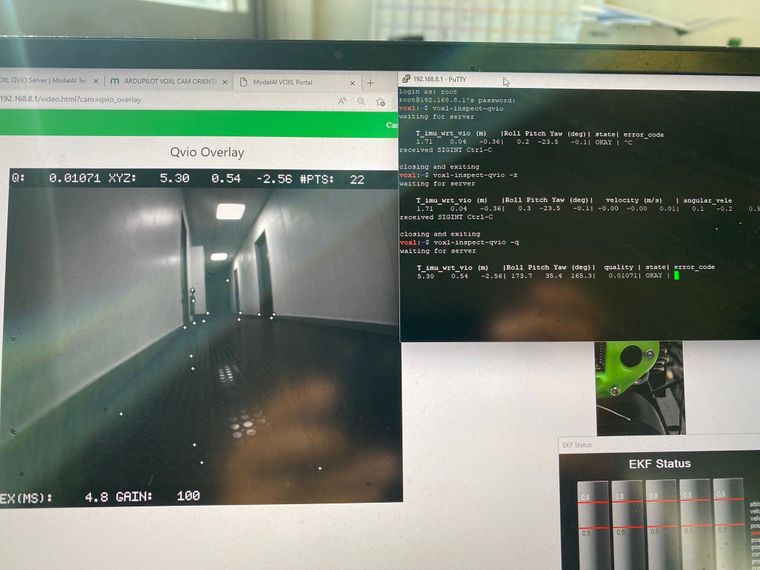
We hope to have support from your team.
Rgds,
Hello, I found from where come the issue:
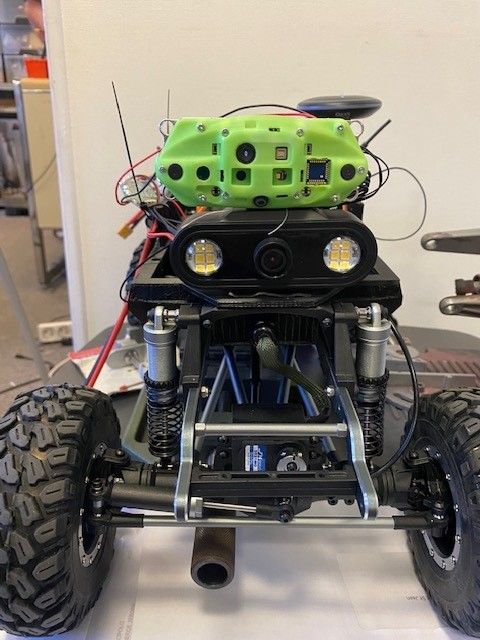
tracking camera is badly oriented for this rover application.
So I moove the tracking camera to front left position at the right of the left stereo camera.
I will try to setup the extrinsics.
Hello, today, I've been able to make tests, running voxl-configure-extrinsics and select the option for Seeker/VOXLCAM.
So now I been able to make it work, but I have an issue....
I'm working on rover, and when it move from 3m voxl cam see 3,70m....
I also test the rove by directly mooving it with my arm at 1m above the ground, indor and outdoor, EKF go failsafe very quicly.
EKF is set to lissen only voxlcam.
So what can be the issue, what can I check to correct the issue ?
please check the image below with test and params:
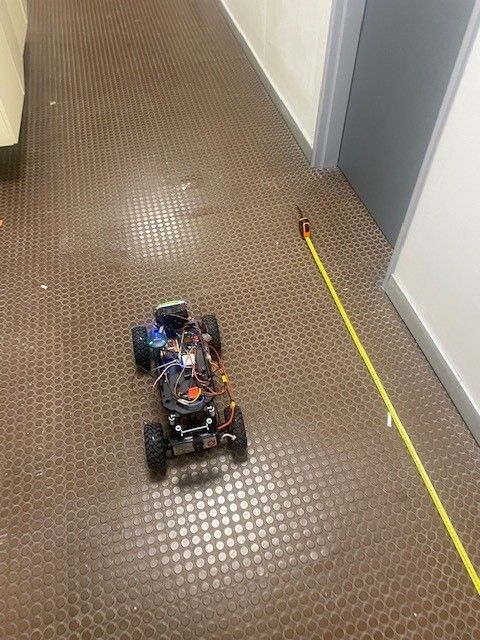
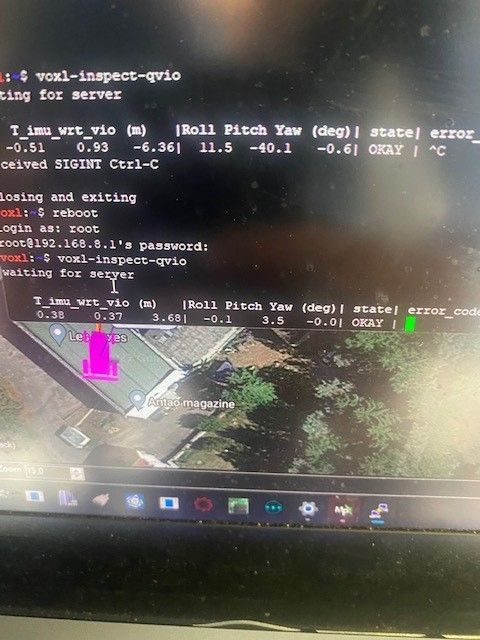
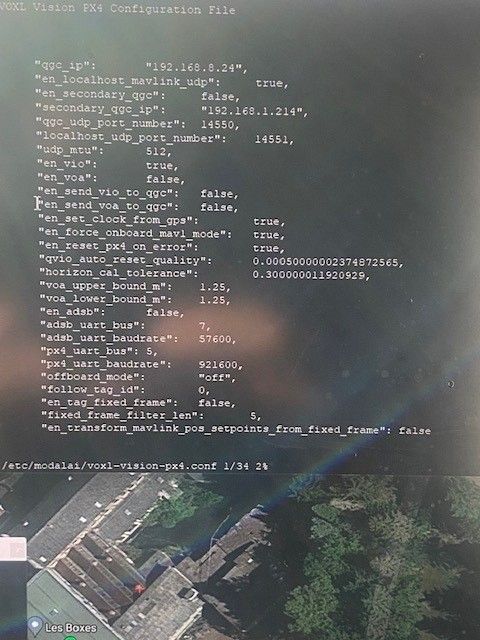
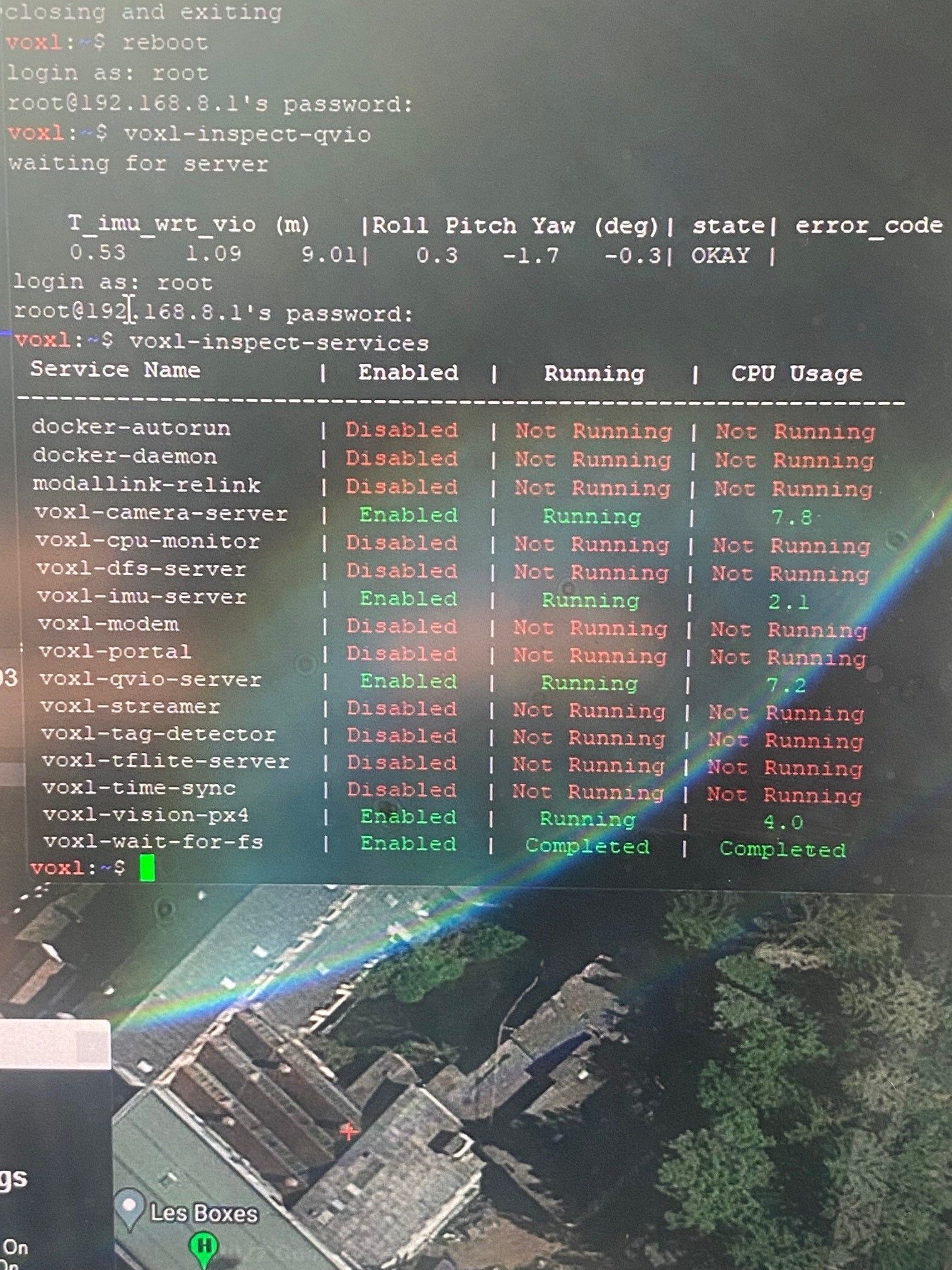
I hope you can give us check to do to understand from where come the issue.
Rgds
Thank you for your feedback,
The best will be you send us the complete setup with all the steps from scratch to made the voxl cam indoor work perfectly with our PX4 autopilot
Can you help us?
We try to make it work, we have 10 units voxl cam order pending.....
Kind regards.
Last 4.2 arducopter permit to test voxl cam
So i ordered fresh voxl cam (indoor setup) and tryed to make it work with arducopter:
connexion is well established but i get issue:
Issue is that voxl tell that its imu is upside down….

All is standard and viso orientation is set to forward.

So i dont understand how to resolve this…
Randy Mackay (ardupilot dev leader) tell me that issue came from voxlcam.
Mavlink communication between VOXL CAM and CUBE ORANGE is well established:

As you can see on photos (ardupilot discuss link below) , I oriented voxl cam standard in forward position.
So if the issue come from the voxlcam imu how to fix?
Also ordering it, as marked on your web normaly is ready to use without tune…
Can you help?
I made an issue on ardupilot discuss below:
https://github.com/ArduPilot/ardupilot/issues/20481#issue-1196148461
Thank you so much for your help.
