Skip to content
  • Categories
  • Recent
  • Tags
  • Popular
  • Users
  • Groups
Collapse
Brand Logo

ModalAI Forum

Meytal LempelM

Meytal Lempel

@Meytal Lempel
Contributor
Unfollow Follow
About
Posts
13
Topics
2
Shares
0
Groups
1
Followers
0
Following
0

Posts

Recent Best Controversial

  • voxl_planner: send vx,vy,yaw_rate command
    Meytal LempelM Meytal Lempel

    Hi again,

    From investigating the voxl-vision-hub code with added prints for debug, I see that the setpoint SETPOINT_POSITION_MAGIC_NUMBER is sent to mavlink-server from two functions -

    (1) _send_current_position()
    sending the current position, and type-mask ignoring vx,vy,vz,ax,ay,az,yaw_rate

    // fetch latest position and attitude from px4 itself so the setpoint
    // we are about to send is a close as possible to where we currently are
    

    (2) execute_setpoint_position_command()
    sending the setpoint as recieved from voxl-planner

    The implemented behaviour of (1) suits the situation of position+yaw command. However for vx+vy+z+yaw_rate command I think something is missing.

    Any help will be appreciated.
    Thank you, Meytal

    VOXL SDK

  • voxl_planner: send vx,vy,yaw_rate command
    Meytal LempelM Meytal Lempel

    Hi!

    I currently use voxl_planner to send position+yaw commands 1Hz:

    void LocalOneStep::send_setpoint_position_to_position(Point3f &goal_pos, float goal_yaw)
    {    
        setpoint_position_t msg;
        msg.magic_number = SETPOINT_POSITION_MAGIC_NUMBER;
        msg.coordinate_frame = MAV_FRAME_LOCAL_NED;
        msg.type_mask = POSITION_TARGET_TYPEMASK_VX_IGNORE |
                        POSITION_TARGET_TYPEMASK_VY_IGNORE |
                        POSITION_TARGET_TYPEMASK_VZ_IGNORE |
                        POSITION_TARGET_TYPEMASK_AX_IGNORE |
                        POSITION_TARGET_TYPEMASK_AY_IGNORE |
                        POSITION_TARGET_TYPEMASK_AZ_IGNORE |
                        POSITION_TARGET_TYPEMASK_YAW_RATE_IGNORE;
        msg.position[0] = cos_north_wrt_fixed*goal_pos[0] - sin_north_wrt_fixed*goal_pos[1];
        msg.position[1] = sin_north_wrt_fixed*goal_pos[0] + cos_north_wrt_fixed*goal_pos[1];
        msg.position[2] = goal_z_m; //goal_pos[2];        
        msg.yaw = goal_yaw + north_wrt_fixed_rad;
    
        // to be ignored:
        msg.velocity[0] = 0.0;// [m/s]
        msg.velocity[1] = 0.0;// [m/s]
        msg.velocity[2] = 0.0; // [m/s]
        msg.yaw_rate = 0.0; // [rad/sec]


        pipe_server_write(plan_ch_, &msg, sizeof(setpoint_position_t));
    }
    

    Similarly, I would like to send commands vx,vy,z,yaw_rate :

    void LocalOneStep::send_setpoint_position_velocity_and_yaw_rate(Point3f &cur_pos, float curr_yaw, Point3f &des_velocity, float des_yaw_rate)
    {    
        setpoint_position_t msg;
        msg.magic_number = SETPOINT_POSITION_MAGIC_NUMBER;    
        msg.coordinate_frame = MAV_FRAME_LOCAL_NED; 
        // !! any other frame like MAV_FRAME_LOCAL_FRD is 
        // currently not supported by voxl-vision-hub
        msg.type_mask = POSITION_TARGET_TYPEMASK_X_IGNORE |
                        POSITION_TARGET_TYPEMASK_Y_IGNORE |
                        POSITION_TARGET_TYPEMASK_VZ_IGNORE |
                        POSITION_TARGET_TYPEMASK_AX_IGNORE |
                        POSITION_TARGET_TYPEMASK_AY_IGNORE |
                        POSITION_TARGET_TYPEMASK_AZ_IGNORE |
                        POSITION_TARGET_TYPEMASK_YAW_IGNORE;
    
        msg.velocity[0] = cos_north_wrt_fixed*des_velocity[0] - sin_north_wrt_fixed*des_velocity[1];// [m/s]
        msg.velocity[1] = sin_north_wrt_fixed*des_velocity[0] + cos_north_wrt_fixed*des_velocity[1];// [m/s]
        msg.velocity[2] = 0.0; // [m/s] # to be ignored
        msg.yaw_rate = des_yaw_rate; // [rad/sec]
    
        // for stop in-place - see voxl-vision-hub offboard_trajetcory.c: _update_last_position
        msg.position[0] = cos_north_wrt_fixed*cur_pos[0] - sin_north_wrt_fixed*cur_pos[1];
        msg.position[1] = sin_north_wrt_fixed*cur_pos[0] + cos_north_wrt_fixed*cur_pos[1];
        msg.position[2] = goal_z_m; //cur_pos[2]; # to be included in cmd
        msg.yaw = curr_yaw + north_wrt_fixed_rad;    
        
        pipe_server_write(plan_ch_, &msg, sizeof(setpoint_position_t));
    }
    

    But It seems like my intentions are lost during the processing of voxl-vision-hub.

    I use pymavlink to listen to the mavlink messages:

    connection = mavutil.mavlink_connection('udpin:127.0.0.1:14551')
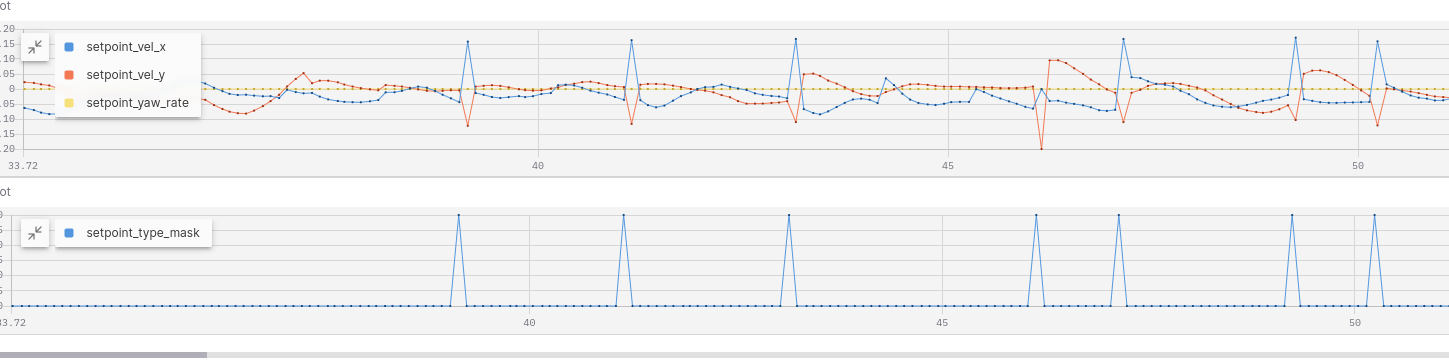
    Below are my recordings of POSITION_TARGET_LOCAL_NED mavlink msg (@10Hz)
    Screenshot from 2025-07-02 12-53-20.png

    I would expect the setpoint values to remain constant until a new value is sent from voxl-planner (like it is with the x,y,z,yaw setpoint command)
    Any thoughts?

    Thank you

    VOXL SDK

  • Sensor Fusion Question w/ GPS, VIO, and downward distance sensor on Starling 2
    Meytal LempelM Meytal Lempel

    @shawn_ricardo Hi!

    To my understanding EKF2_EV_CTRL 15-->13 only remove EV from pos_z estimation, so it should be ok to do that if the range sensor is active. However, I did revert all parameters to the default settings (matching the VOXL-SDK definitions).

    As my attempts to integrate the range-sensor data in altitude estimation did not seem to succeed, I decided to try and integrate the range-sensor in the VIO solution.
    I created a version of the voxl-qvio-server in which pos_z estimation from VIO is replaced by the equivalent value based on the rangefinder:

    s.T_imu_wrt_vio[2] = - down_range_m;

    This seem to work better, however it is a workaround and not a full solution. My current experiments are performed in low altitude (~40-90 cm), so I am not concerned with the limited range of the rangefinder sensor.

    I'm not sure what is the current implemented behaviour when EV estimation is not good, there should be some fall-back relying on the range sensor and imu. From my short experience with such cases of poor EV estimation mid-flight, the drone just crushes or jump to the ceiling with no control.

    Any suggestions or further explanations will be much appreciated. Thank you

    GPS-denied Navigation (VIO)

  • Sensor Fusion Question w/ GPS, VIO, and downward distance sensor on Starling 2
    Meytal LempelM Meytal Lempel

    @shawn_ricardo
    Thank you for your response,

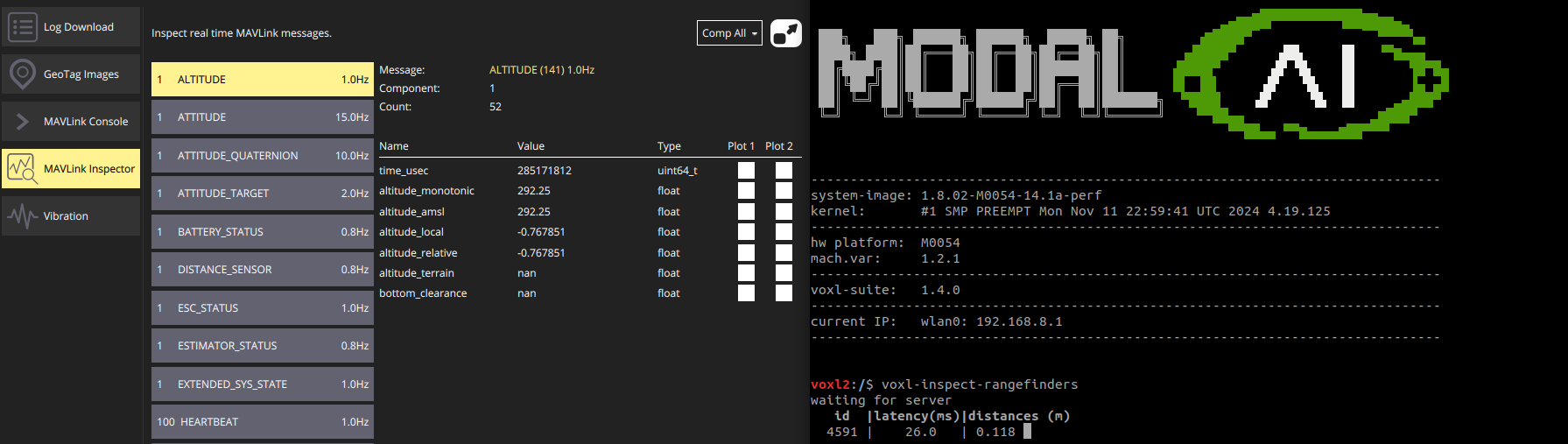
    My GPS is not connected, and the px4 does get the distance sensor (I can see it through the qground app, matching the same values as in the right terminal "voxl-inspect-rangefinders")

    Any other suggestions?

    GPS-denied Navigation (VIO)

  • Sensor Fusion Question w/ GPS, VIO, and downward distance sensor on Starling 2
    Meytal LempelM Meytal Lempel

    @Eric-Katzfey any thoughts?

    GPS-denied Navigation (VIO)

  • Sensor Fusion Question w/ GPS, VIO, and downward distance sensor on Starling 2
    Meytal LempelM Meytal Lempel

    @shawn_ricardo @Eric-Katzfey @Alex-Kushleyev
    Hi!

    We are flying indoors, and trying to configure PX4 for our vertical position to relay on the downward distance sensor only.

    following https://docs.modalai.com/rangefinders/#px4-autopilot-height-estimate-integration :

    EKF2_RNG_CTRL: (0-->1) set to 1 to enable integration of the rangefinder data into EKF2's height estimate
    EKF2_HGT_REF: (3-->2) set to 2 to use the rangefinder as the primary height reference.

    this was not enough, so in addition, we changed these:

    EKF2_RNG_NOISE: 0.1-->0.01
    EKF2_EV_CTRL 15-->13 (remove external vision sensor aiding from vertical position calc)
    (EKF2_RNG_A_HMAX = 5)

    In any case we couldn't achieve usage of downward distance sensor in altitude estimation :
    Screenshot from 2025-05-25 11-08-41.png

    Thank you in advance! Meytal and Valentin

    GPS-denied Navigation (VIO)

  • downloading the voxl-mapper service log file
    Meytal LempelM Meytal Lempel

    @Eric-Katzfey Thank you! I now use journalctl and write to a file in a logger service, for example:

    voxl-mapper-logger.service

    [Unit]
    Description=Logs voxl-mapper log output to file
    After=voxl-wait-for-fs.service network.target network-online.target
    Requires=voxl-wait-for-fs.service network.target network-online.target voxl-mapper.service
    
    [Service]
    Type=simple
    ExecStart=/bin/bash -c "sleep 45 && journalctl -f -u voxl-mapper.service >> /data/logs/voxl_mapper.log"
    StartLimitInterval=0
    
    Restart=always
    RestartSec=2s
    
    [Install]
    WantedBy=multi-user.target
    
    VOXL 2

  • downloading the voxl-mapper service log file
    Meytal LempelM Meytal Lempel

    @Eric-Katzfey thank you, but I want to download the textual notes that are written to a log file during the code execution of a service, not the recording of a pipe. Similar to dowload logs in the debug option in the voxl-portal. How do I do that?

    VOXL 2

  • downloading the voxl-mapper service log file
    Meytal LempelM Meytal Lempel

    Hi!
    Where do I find the log files of each service (for example voxl-mapper) on voxl2?
    (without using the voxl-portal)
    Thank you

    VOXL 2

  • Python MPA image example
    Meytal LempelM Meytal Lempel

    @Alex-Kushleyev Thank you, it works!

    Modal Pipe Architecture (MPA)

  • Python MPA image example
    Meytal LempelM Meytal Lempel

    @Alex-Kushleyev Hi!

    My team and I are working with both voxl1 and voxl2 based platforms. We used your example and changed it to publish a ros topic (Image) to pipe on voxl2. It works great. Now we try to do the same on voxl1 (compiling the same code to ipk) and encounter the problem:

    Traceback (most recent call last):
      File "ros_img_mpa_pub.py", line 19, in <module>
        from pympa import *
      File "/usr/share/modalai/voxl-mpa-tools/pympa.py", line 23, in <module>
        pympa = ct.CDLL("libpympa.so")
      File "/usr/lib/python3.6/ctypes/__init__.py", line 348, in __init__
        self._handle = _dlopen(self._name, mode)
    OSError: libpympa.so: wrong ELF class: ELFCLASS64
    

    Is there any other branch that may be suitable for voxl1 to our purpose?

    Thank you, Meytal

    Modal Pipe Architecture (MPA)

  • GPS not connecting
    Meytal LempelM Meytal Lempel

    Hi @tom , here is my /etc/modalai/voxl-px4.conf:

    #!/bin/bash
    #
    # voxl-px4 Configuration File    
    #    
    # GPS:    
    #     Tell PX4 which GPS to use. If there is no GPS unit use NONE. Otherwise    
    #     choose AUTODETECT and the startup script will attempt to automatically    
    #     configure the GPS, magnetometer, and status LED    
    #     Options include: [NONE, AUTODETECT]    
    #    
    # RC:    
    #     Tell PX4 which RC transmitter to use.     
    #     Use EXTERNAL when getting RC control from external Mavlink messages (e.g Via QGC)    
    #     Options include: [SPEKTRUM, CRSF_MAV, CRSF_RAW, M0065_SBUS, EXTERNAL, FAKE_RC_INPUT]    
    #    
    # ESC:    
    #     Tell PX4 which type of ESC to use.     
    #     Options include: [VOXL_ESC, VOXL2_IO_PWM_ESC]    
    #    
    # POWER_MANAGER:    
    #     Tell PX4 which power manager to use.     
    #     Use NONE for ModalAI Mini-ESC since the ESC driver handles PM.    
    #     Use EXTERNAL when not using the ModalAI APM power manager to power the board    
    #       This also just disables the voxlpm driver, same as the NONE option    
    #     Options include: [VOXLPM, EXTERNAL, NONE]    
    #    
    # DISTANCE_SENSOR:    
    #     Tell PX4 which distance sensor peripheral to use. 	
    #     Note: The sensor will be started on the RC port so it is only	
    #           really possible to use it when using external RC.    
    #     Options include: [NONE, LIGHTWARE_SF000]    
    #    
    # OSD:    
    #     Tell PX4 whether to enable OSD (on-screen display).     
    #     Options include: [ENABLE, DISABLE]    
    #    
    # DAEMON_MODE:    
    #     Tell PX4 whether to enable daemon mode.     
    #     Options include: [ENABLE, DISABLE]    
    #    
    # SENSOR_CAL:    
    #     Tell PX4 where to source sensor calibration information.     
    #     Options include: [ACTUAL, FAKE]    
    #    
    # ARTIFACT_MODE:    
    #     Do not allow artifacts to be saved to disk. Will not start the logging     
    #     module, will delete any current log files, and will delete the data manager file.     
    #     Options include: [ENABLE, DISABLE]    
    #    
    # EXTRA_STEPS:    
    #     Optional field that allows a user to define custom commands to be run by PX4 on boot.     
    #     Must be a valid bash array as seen below     
    #     Example: EXTRA_STEPS=( "qshell gps start" "qshell commander mode manual" )     
    #    
    #
    GPS=AUTODETECT
    RC=GHST
    ESC=VOXL_ESC
    POWER_MANAGER=VOXLPM
    DISTANCE_SENSOR=NONE
    OSD=DISABLE
    DAEMON_MODE=ENABLE
    SENSOR_CAL=ACTUAL
    ARTIFACT_MODE=DISABLE
    EXTRA_STEPS=()
    
    Starling & Starling 2

  • GPS not connecting
    Meytal LempelM Meytal Lempel

    Hi @Alex-Kushleyev, (I am from the same team as John's)

    Our VOXL2 SDK is "voxl-suite 1.3.1".
    We did try to connect the cable that goes into the sensor to another "taoglas CGGBP 18.4.A.02" and recieved GPS messages.
    Our Starling2 came out of the box like that, should we change the sensor's configuration or is it a hardware malfunction?

    Thank you!

    Starling & Starling 2
  • Login

  • Don't have an account? Register

  • Login or register to search.
  • First post
    Last post
0
  • Categories
  • Recent
  • Tags
  • Popular
  • Users
  • Groups