
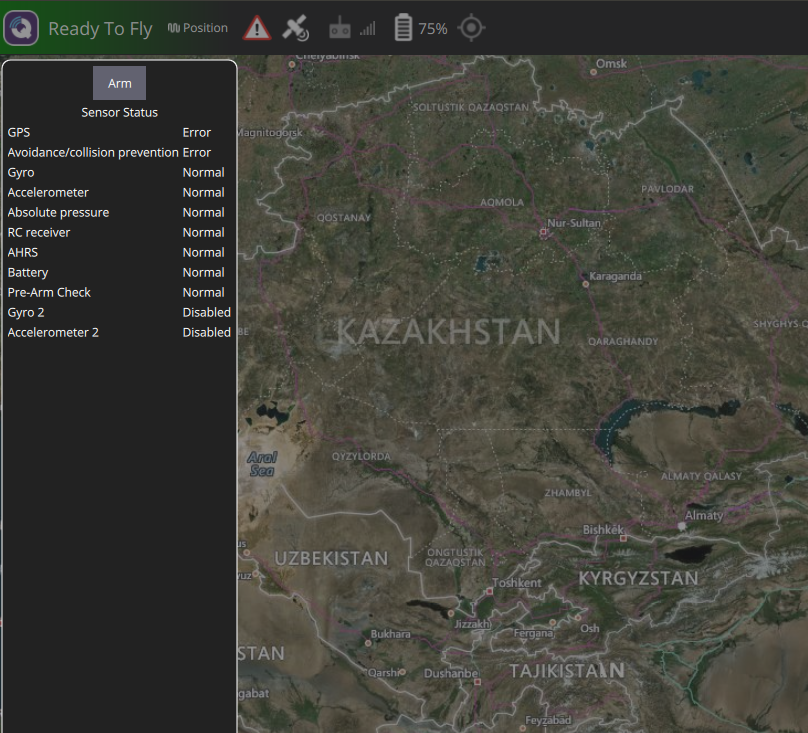
avoidance/collision prevention Error
-
Hi,
I wanna check collision prevention function using TOF sensor.
My m 500 flight was set up with TOF + stereo cam + Tracking cam.
I checked VOA function in debug mode of voxl-vision-px4 as below.index: 0 dist: none back index: 1 dist: none index: 2 dist: none index: 3 dist: none index: 4 dist: none index: 5 dist: none index: 6 dist: none index: 7 dist: none index: 8 dist: none index: 9 dist: none left index: 10 dist: none index: 11 dist: none index: 12 dist: none index: 13 dist: 1.82m index: 14 dist: 2.11m index: 15 dist: 1.83m index: 16 dist: 1.66m index: 17 dist: 1.52m index: 18 dist: 1.04m forward index: 19 dist: 1.00m index: 20 dist: 0.83m index: 21 dist: 0.86m index: 22 dist: 0.42m index: 23 dist: 1.35m index: 24 dist: none index: 25 dist: none index: 26 dist: none index: 27 dist: none right index: 28 dist: none index: 29 dist: none index: 30 dist: none index: 31 dist: none index: 32 dist: none index: 33 dist: none index: 34 dist: none index: 35 dist: none index: 36 dist: noneAlso, I enable collision prevention with 1.5m distance in QGC.
But, when I switch to Position mode, I got a message "avoidance/collision prevention Error" as below
This is my voxl-vision-px4 config file.
        "config_file_version":  1,
        "qgc_ip":       "192.168.219.164",
        "en_secondary_qgc":     false,
        "secondary_qgc_ip":     "192.168.1.214",
        "qgc_udp_port_number":  14550,
        "udp_mtu":      512,
        "en_localhost_mavlink_udp":     true,
        "localhost_udp_port_number":    14551,
        "en_vio":       true,
        "en_voa":       true,
        "en_send_vio_to_qgc":   false,
        "en_send_voa_to_qgc":   false,
        "voa_upper_bound_m":    -0.15000000596046448,
        "voa_lower_bound_m":    0.15000000596046448,
        "en_set_clock_from_gps":        true,
        "en_force_onboard_mav1_mode":   true,
        "en_reset_px4_on_error":        true,
        "qvio_auto_reset_quality":      0.00050000002374872565,
        "horizon_cal_tolerance":        0.300000011920929,
        "offboard_mode":        "trajectory",
        "follow_tag_id":        0,
        "figure_eight_move_home":       true,
        "en_tag_fixed_frame":   false,
        "fixed_frame_filter_len":       5,
        "en_transform_mavlink_pos_setpoints_from_fixed_frame":  false
Could you please let me know the reason?
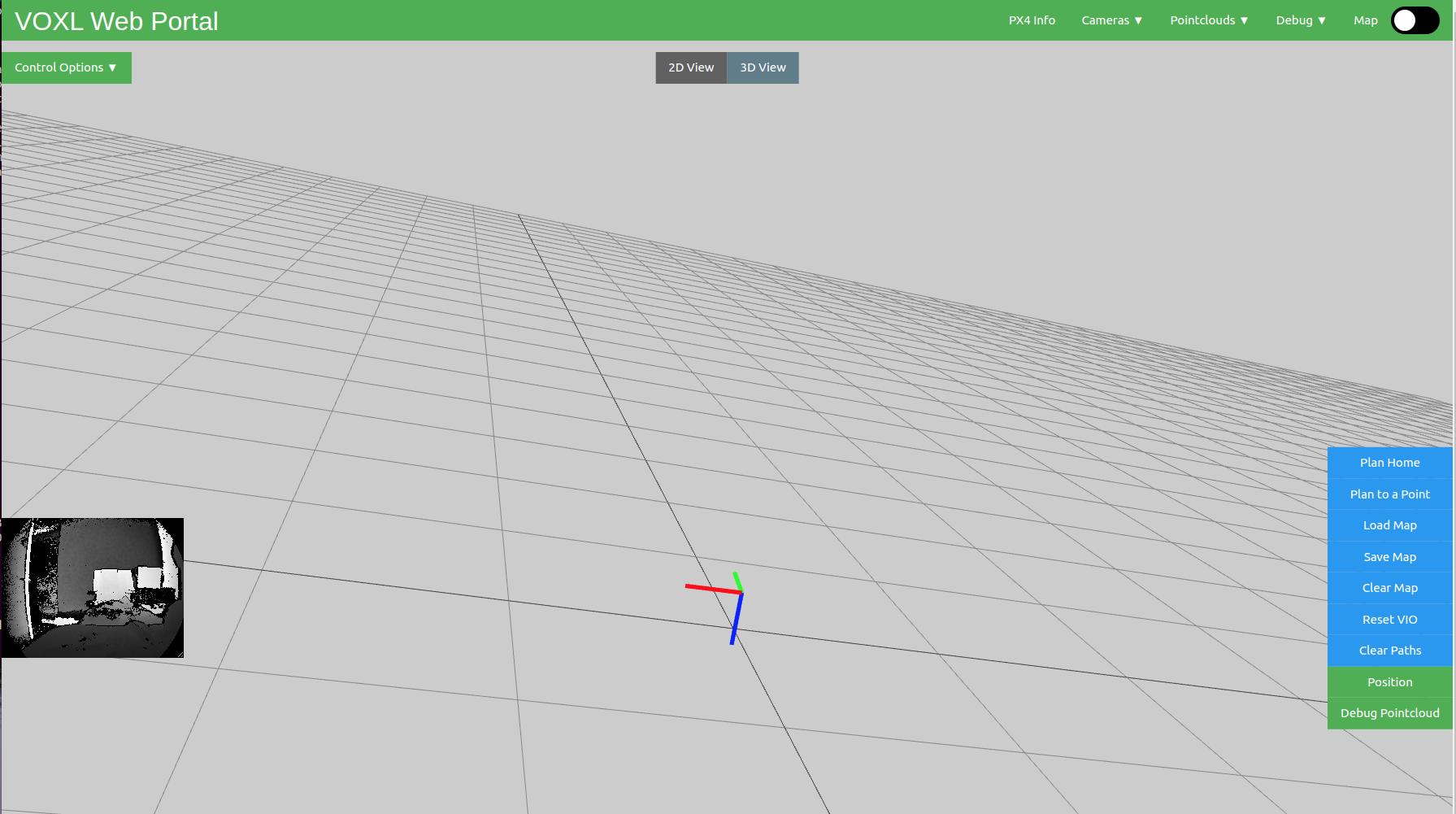
One more question, I already check TOF VOA, TOF PC, but, cannot see any mapping result on voxl-portal.
How can I get map result?
Thanks,
-
Hi,
The "map" page on portal refers to the output of voxl-mapper which takes depth data and position to create a 3d reconstruction of the environment, not the VOA which takes depth data to perform obstacle avoidance. If you want obstacle avoidance to work, you'll need to enable it in VVPX4, if you're trying to see a map you'll need to configure and run the voxl-mapper service.
-
Hi,
The "map" page on portal refers to the output of voxl-mapper which takes depth data and position to create a 3d reconstruction of the environment, not the VOA which takes depth data to perform obstacle avoidance. If you want obstacle avoidance to work, you'll need to enable it in VVPX4, if you're trying to see a map you'll need to configure and run the voxl-mapper service.
@Alex-Gardner Voxl-Vision-PX4 is already running on background.
voxl:~$ voxl-inspect-services Service Name | Enabled | Running | CPU Usage --------------------------------------------------------------- docker-autorun | Disabled | Not Running | docker-daemon | Disabled | Not Running | modallink-relink | Disabled | Not Running | voxl-camera-server | Enabled | Running | 19.1 voxl-cpu-monitor | Enabled | Running | 0.0 voxl-dfs-server | Enabled | Not Running | voxl-imu-server | Enabled | Running | 0.0 voxl-mavlink-server | Enabled | Running | 2.1 voxl-modem | Disabled | Not Running | voxl-portal | Enabled | Running | 0.0 voxl-qvio-server | Enabled | Running | 2.1 voxl-streamer | Disabled | Not Running | voxl-tag-detector | Disabled | Not Running | voxl-tflite-server | Disabled | Not Running | voxl-time-sync | Disabled | Not Running | voxl-vision-px4 | Enabled | Running | 4.2 voxl-wait-for-fs | Enabled | Completed | voxl:~$ -
I updated my m500 with System Image 4.0(ver 0.9).
But, I cannot see the installed voxl-mapper.Can I need to install voxl-mapper manually? and need to install something else?
Thanks,
Setting up /etc/opkg/opkg.conf [INFO] updating opkg package list Downloading file:///data/voxl-suite-offline-packages/Packages.gz. Updated source 'local'. [INFO] installing voxl-suite Downloading file:///data/voxl-suite-offline-packages/voxl-suite_0.9.4.ipk. Installing voxl-suite (0.9.4) on root. Installing apq8096-dfs-server (0.3.1) on root. Downloading file:///data/voxl-suite-offline-packages/apq8096-dfs-server_0.3.1.ipk. Installing libmodal-pipe (2.6.0) on root. Downloading file:///data/voxl-suite-offline-packages/libmodal-pipe_2.6.0.ipk. Installing libmodal-json (0.4.3) on root. Downloading file:///data/voxl-suite-offline-packages/libmodal-json_0.4.3.ipk. Installing voxl-opencv (4.5.5-1) on root. Downloading file:///data/voxl-suite-offline-packages/voxl-opencv_4.5.5-1.ipk. Installing apq8096-imu-server (1.0.3) on root. Downloading file:///data/voxl-suite-offline-packages/apq8096-imu-server_1.0.3.ipk. Installing libapq8096-io (0.6.0) on root. Downloading file:///data/voxl-suite-offline-packages/libapq8096-io_0.6.0.ipk. Installing librc-math (1.3.0) on root. Downloading file:///data/voxl-suite-offline-packages/librc-math_1.3.0.ipk. Installing voxl-cpu-monitor (0.3.0) on root. Downloading file:///data/voxl-suite-offline-packages/voxl-cpu-monitor_0.3.0.ipk. Installing apq8096-tflite (2.8.3-1) on root. Downloading file:///data/voxl-suite-offline-packages/apq8096-tflite_2.8.3-1.ipk. Installing libmodal-cv (0.2.3) on root. Downloading file:///data/voxl-suite-offline-packages/libmodal-cv_0.2.3.ipk. Installing libmodal-exposure (0.0.7) on root. Downloading file:///data/voxl-suite-offline-packages/libmodal-exposure_0.0.7.ipk. Installing libmodal-journal (0.2.1) on root. Downloading file:///data/voxl-suite-offline-packages/libmodal-journal_0.2.1.ipk. Installing libvoxl-cutils (0.1.1) on root. Downloading file:///data/voxl-suite-offline-packages/libvoxl-cutils_0.1.1.ipk. Installing mavlink-camera-manager (0.1.0) on root. Downloading file:///data/voxl-suite-offline-packages/mavlink-camera-manager_0.1.0.ipk. Installing voxl-mavlink (0.1.0) on root. Downloading file:///data/voxl-suite-offline-packages/voxl-mavlink_0.1.0.ipk. Installing voxl-camera-calibration (0.2.3) on root. Downloading file:///data/voxl-suite-offline-packages/voxl-camera-calibration_0.2.3.ipk. Installing voxl-camera-server (1.3.5) on root. Downloading file:///data/voxl-suite-offline-packages/voxl-camera-server_1.3.5.ipk. Installing libvoxl-cci-direct (0.1.5) on root. Downloading file:///data/voxl-suite-offline-packages/libvoxl-cci-direct_0.1.5.ipk. Installing voxl-docker-support (1.2.4) on root. Downloading file:///data/voxl-suite-offline-packages/voxl-docker-support_1.2.4.ipk. Installing voxl-gphoto2-server (0.0.10) on root. Downloading file:///data/voxl-suite-offline-packages/voxl-gphoto2-server_0.0.10.ipk. Installing voxl-libgphoto2 (0.0.4) on root. Downloading file:///data/voxl-suite-offline-packages/voxl-libgphoto2_0.0.4.ipk. Installing voxl-libuvc (1.0.7) on root. Downloading file:///data/voxl-suite-offline-packages/voxl-libuvc_1.0.7.ipk. Installing voxl-logger (0.3.4) on root. Downloading file:///data/voxl-suite-offline-packages/voxl-logger_0.3.4.ipk. Installing voxl-jpeg-turbo (2.1.3-4) on root. Downloading file:///data/voxl-suite-offline-packages/voxl-jpeg-turbo_2.1.3-4.ipk. Installing apq8096-libpng (1.6.38-1) on root. Downloading file:///data/voxl-suite-offline-packages/apq8096-libpng_1.6.38-1.ipk. Installing voxl-mavlink-server (0.2.0) on root. Downloading file:///data/voxl-suite-offline-packages/voxl-mavlink-server_0.2.0.ipk. Installing voxl-modem (0.16.1) on root. Downloading file:///data/voxl-suite-offline-packages/voxl-modem_0.16.1.ipk. Installing voxl-mpa-to-ros (0.3.6) on root. Downloading file:///data/voxl-suite-offline-packages/voxl-mpa-to-ros_0.3.6.ipk. Installing voxl-mpa-tools (0.7.6) on root. Downloading file:///data/voxl-suite-offline-packages/voxl-mpa-tools_0.7.6.ipk. Installing voxl-portal (0.4.2) on root. Downloading file:///data/voxl-suite-offline-packages/voxl-portal_0.4.2.ipk. Installing voxl-mongoose (7.7.0-1) on root. Downloading file:///data/voxl-suite-offline-packages/voxl-mongoose_7.7.0-1.ipk. Installing voxl-qvio-server (0.8.2) on root. Downloading file:///data/voxl-suite-offline-packages/voxl-qvio-server_0.8.2.ipk. Installing voxl-streamer (0.4.1) on root. Downloading file:///data/voxl-suite-offline-packages/voxl-streamer_0.4.1.ipk. Installing voxl-tag-detector (0.0.4) on root. Downloading file:///data/voxl-suite-offline-packages/voxl-tag-detector_0.0.4.ipk. Installing voxl-tflite-server (0.3.1) on root. Downloading file:///data/voxl-suite-offline-packages/voxl-tflite-server_0.3.1.ipk. Installing voxl-utils (1.2.2) on root. Downloading file:///data/voxl-suite-offline-packages/voxl-utils_1.2.2.ipk. Upgrading apq8096-system-tweaks from 0.1.1 to 0.1.3 on root. Downloading file:///data/voxl-suite-offline-packages/apq8096-system-tweaks_0.1.3.ipk. Installing voxl-uvc-server (0.1.3) on root. Downloading file:///data/voxl-suite-offline-packages/voxl-uvc-server_0.1.3.ipk. Installing voxl-vision-px4 (1.4.0) on root. Downloading file:///data/voxl-suite-offline-packages/voxl-vision-px4_1.4.0.ipk. Installing voxl-vpn (0.0.6) on root. Downloading file:///data/voxl-suite-offline-packages/voxl-vpn_0.0.6.ipk. voxl-suite installer detected system image 4.0.0 Configuring apq8096-libpng. Configuring voxl-opencv. Configuring libmodal-json. Configuring libmodal-pipe. Configuring apq8096-tflite. Configuring voxl-tflite-server. Configuring librc-math. Configuring voxl-mpa-tools. Configuring voxl-mpa-to-ros. Configuring voxl-docker-support. Configuring apq8096-dfs-server. Configuring apq8096-system-tweaks. Configuring voxl-mavlink. Configuring mavlink-camera-manager. Configuring voxl-jpeg-turbo. Configuring voxl-logger. Configuring voxl-qvio-server. Configuring libmodal-cv. Configuring voxl-vpn. Configuring voxl-mavlink-server. Configuring voxl-vision-px4. Configuring voxl-libuvc. Configuring voxl-uvc-server. Configuring libmodal-journal. Configuring libvoxl-cci-direct. Configuring libvoxl-cutils. Configuring voxl-camera-calibration. Configuring voxl-streamer. Configuring libmodal-exposure. Configuring voxl-cpu-monitor. Configuring voxl-libgphoto2. Configuring voxl-gphoto2-server. Configuring voxl-mongoose. Configuring voxl-portal. Configuring voxl-camera-server. Configuring voxl-modem. Configuring voxl-utils. Created symlink from /etc/systemd/system/default.target.wants/voxl-wait-for-fs.service to /etc/systemd/system/voxl-wait-for-fs.service. Configuring libapq8096-io. Configuring apq8096-imu-server. Configuring voxl-tag-detector. Configuring voxl-suite. ===================================================== | Done installing voxl-suite | | | | Please visit our online guides at | | https://docs.modalai.com/ | | | | To configure Modal Pipe Architecture (MPA) | | services, please run voxl-configure-mpa | | | | To see what MPA services are enabled and running, | | please run voxl-inspect-services | | | | To see a list of MPA utilities available, adb | | or ssh into VOXL and type voxl{TAB}{TAB} | ===================================================== [INFO] Pointing to correct repo Using repo: sdk-0.9 Done configuring opkg run opkg update to pull new repository manifest [INFO] Done installing voxl-suite ----Installation Completed---- -
I updated my m500 with System Image 4.0(ver 0.9).
But, I cannot see the installed voxl-mapper.Can I need to install voxl-mapper manually? and need to install something else?
Thanks,
Setting up /etc/opkg/opkg.conf [INFO] updating opkg package list Downloading file:///data/voxl-suite-offline-packages/Packages.gz. Updated source 'local'. [INFO] installing voxl-suite Downloading file:///data/voxl-suite-offline-packages/voxl-suite_0.9.4.ipk. Installing voxl-suite (0.9.4) on root. Installing apq8096-dfs-server (0.3.1) on root. Downloading file:///data/voxl-suite-offline-packages/apq8096-dfs-server_0.3.1.ipk. Installing libmodal-pipe (2.6.0) on root. Downloading file:///data/voxl-suite-offline-packages/libmodal-pipe_2.6.0.ipk. Installing libmodal-json (0.4.3) on root. Downloading file:///data/voxl-suite-offline-packages/libmodal-json_0.4.3.ipk. Installing voxl-opencv (4.5.5-1) on root. Downloading file:///data/voxl-suite-offline-packages/voxl-opencv_4.5.5-1.ipk. Installing apq8096-imu-server (1.0.3) on root. Downloading file:///data/voxl-suite-offline-packages/apq8096-imu-server_1.0.3.ipk. Installing libapq8096-io (0.6.0) on root. Downloading file:///data/voxl-suite-offline-packages/libapq8096-io_0.6.0.ipk. Installing librc-math (1.3.0) on root. Downloading file:///data/voxl-suite-offline-packages/librc-math_1.3.0.ipk. Installing voxl-cpu-monitor (0.3.0) on root. Downloading file:///data/voxl-suite-offline-packages/voxl-cpu-monitor_0.3.0.ipk. Installing apq8096-tflite (2.8.3-1) on root. Downloading file:///data/voxl-suite-offline-packages/apq8096-tflite_2.8.3-1.ipk. Installing libmodal-cv (0.2.3) on root. Downloading file:///data/voxl-suite-offline-packages/libmodal-cv_0.2.3.ipk. Installing libmodal-exposure (0.0.7) on root. Downloading file:///data/voxl-suite-offline-packages/libmodal-exposure_0.0.7.ipk. Installing libmodal-journal (0.2.1) on root. Downloading file:///data/voxl-suite-offline-packages/libmodal-journal_0.2.1.ipk. Installing libvoxl-cutils (0.1.1) on root. Downloading file:///data/voxl-suite-offline-packages/libvoxl-cutils_0.1.1.ipk. Installing mavlink-camera-manager (0.1.0) on root. Downloading file:///data/voxl-suite-offline-packages/mavlink-camera-manager_0.1.0.ipk. Installing voxl-mavlink (0.1.0) on root. Downloading file:///data/voxl-suite-offline-packages/voxl-mavlink_0.1.0.ipk. Installing voxl-camera-calibration (0.2.3) on root. Downloading file:///data/voxl-suite-offline-packages/voxl-camera-calibration_0.2.3.ipk. Installing voxl-camera-server (1.3.5) on root. Downloading file:///data/voxl-suite-offline-packages/voxl-camera-server_1.3.5.ipk. Installing libvoxl-cci-direct (0.1.5) on root. Downloading file:///data/voxl-suite-offline-packages/libvoxl-cci-direct_0.1.5.ipk. Installing voxl-docker-support (1.2.4) on root. Downloading file:///data/voxl-suite-offline-packages/voxl-docker-support_1.2.4.ipk. Installing voxl-gphoto2-server (0.0.10) on root. Downloading file:///data/voxl-suite-offline-packages/voxl-gphoto2-server_0.0.10.ipk. Installing voxl-libgphoto2 (0.0.4) on root. Downloading file:///data/voxl-suite-offline-packages/voxl-libgphoto2_0.0.4.ipk. Installing voxl-libuvc (1.0.7) on root. Downloading file:///data/voxl-suite-offline-packages/voxl-libuvc_1.0.7.ipk. Installing voxl-logger (0.3.4) on root. Downloading file:///data/voxl-suite-offline-packages/voxl-logger_0.3.4.ipk. Installing voxl-jpeg-turbo (2.1.3-4) on root. Downloading file:///data/voxl-suite-offline-packages/voxl-jpeg-turbo_2.1.3-4.ipk. Installing apq8096-libpng (1.6.38-1) on root. Downloading file:///data/voxl-suite-offline-packages/apq8096-libpng_1.6.38-1.ipk. Installing voxl-mavlink-server (0.2.0) on root. Downloading file:///data/voxl-suite-offline-packages/voxl-mavlink-server_0.2.0.ipk. Installing voxl-modem (0.16.1) on root. Downloading file:///data/voxl-suite-offline-packages/voxl-modem_0.16.1.ipk. Installing voxl-mpa-to-ros (0.3.6) on root. Downloading file:///data/voxl-suite-offline-packages/voxl-mpa-to-ros_0.3.6.ipk. Installing voxl-mpa-tools (0.7.6) on root. Downloading file:///data/voxl-suite-offline-packages/voxl-mpa-tools_0.7.6.ipk. Installing voxl-portal (0.4.2) on root. Downloading file:///data/voxl-suite-offline-packages/voxl-portal_0.4.2.ipk. Installing voxl-mongoose (7.7.0-1) on root. Downloading file:///data/voxl-suite-offline-packages/voxl-mongoose_7.7.0-1.ipk. Installing voxl-qvio-server (0.8.2) on root. Downloading file:///data/voxl-suite-offline-packages/voxl-qvio-server_0.8.2.ipk. Installing voxl-streamer (0.4.1) on root. Downloading file:///data/voxl-suite-offline-packages/voxl-streamer_0.4.1.ipk. Installing voxl-tag-detector (0.0.4) on root. Downloading file:///data/voxl-suite-offline-packages/voxl-tag-detector_0.0.4.ipk. Installing voxl-tflite-server (0.3.1) on root. Downloading file:///data/voxl-suite-offline-packages/voxl-tflite-server_0.3.1.ipk. Installing voxl-utils (1.2.2) on root. Downloading file:///data/voxl-suite-offline-packages/voxl-utils_1.2.2.ipk. Upgrading apq8096-system-tweaks from 0.1.1 to 0.1.3 on root. Downloading file:///data/voxl-suite-offline-packages/apq8096-system-tweaks_0.1.3.ipk. Installing voxl-uvc-server (0.1.3) on root. Downloading file:///data/voxl-suite-offline-packages/voxl-uvc-server_0.1.3.ipk. Installing voxl-vision-px4 (1.4.0) on root. Downloading file:///data/voxl-suite-offline-packages/voxl-vision-px4_1.4.0.ipk. Installing voxl-vpn (0.0.6) on root. Downloading file:///data/voxl-suite-offline-packages/voxl-vpn_0.0.6.ipk. voxl-suite installer detected system image 4.0.0 Configuring apq8096-libpng. Configuring voxl-opencv. Configuring libmodal-json. Configuring libmodal-pipe. Configuring apq8096-tflite. Configuring voxl-tflite-server. Configuring librc-math. Configuring voxl-mpa-tools. Configuring voxl-mpa-to-ros. Configuring voxl-docker-support. Configuring apq8096-dfs-server. Configuring apq8096-system-tweaks. Configuring voxl-mavlink. Configuring mavlink-camera-manager. Configuring voxl-jpeg-turbo. Configuring voxl-logger. Configuring voxl-qvio-server. Configuring libmodal-cv. Configuring voxl-vpn. Configuring voxl-mavlink-server. Configuring voxl-vision-px4. Configuring voxl-libuvc. Configuring voxl-uvc-server. Configuring libmodal-journal. Configuring libvoxl-cci-direct. Configuring libvoxl-cutils. Configuring voxl-camera-calibration. Configuring voxl-streamer. Configuring libmodal-exposure. Configuring voxl-cpu-monitor. Configuring voxl-libgphoto2. Configuring voxl-gphoto2-server. Configuring voxl-mongoose. Configuring voxl-portal. Configuring voxl-camera-server. Configuring voxl-modem. Configuring voxl-utils. Created symlink from /etc/systemd/system/default.target.wants/voxl-wait-for-fs.service to /etc/systemd/system/voxl-wait-for-fs.service. Configuring libapq8096-io. Configuring apq8096-imu-server. Configuring voxl-tag-detector. Configuring voxl-suite. ===================================================== | Done installing voxl-suite | | | | Please visit our online guides at | | https://docs.modalai.com/ | | | | To configure Modal Pipe Architecture (MPA) | | services, please run voxl-configure-mpa | | | | To see what MPA services are enabled and running, | | please run voxl-inspect-services | | | | To see a list of MPA utilities available, adb | | or ssh into VOXL and type voxl{TAB}{TAB} | ===================================================== [INFO] Pointing to correct repo Using repo: sdk-0.9 Done configuring opkg run opkg update to pull new repository manifest [INFO] Done installing voxl-suite ----Installation Completed----@shlee853
Yes, you have to install the voxl-mapper manually.The documentation is in the voxl-mapper gitlab page.
https://gitlab.com/voxl-public/voxl-sdk/services/voxl-mapperBasically configure the package manager as dev, opkg update and upgrade, and opkg install voxl-mapper, and either manually set it to run or systemctl start voxl-mapper for it to run automatically on startup.
-
Hi,
You don't need voxl-mapper to use collision prevention, you just need to enable an auxiliary input for the tof sensor in
/etc/modalai/voxl-vision-px4.conf. Mapper is a completely separate service that's still in alpha and should only be used after understanding the majority of the codebase.
Reading along? Create a free ModalAI Forum account to join in.
With an account you can reply, ask your own question, get an email when a ModalAI engineer answers, and mark the reply that solved it. Your place in each thread is saved between visits.
Questions about VOXL, Flight Core, ESCs and ModalAI drones are answered here by the engineers who build them.
Register Login