Skip to content
  • Categories
  • Recent
  • Tags
  • Popular
  • Users
  • Groups
Collapse
Brand Logo

ModalAI Forum

  1. ModalAI Support Forum
  2. Ask your questions right here!
  3. Building the edited source code

Building the edited source code

Scheduled Pinned Locked Moved Ask your questions right here!
15 Posts 2 Posters 2.3k Views 1 Watching
  • Oldest to Newest
  • Newest to Oldest
  • Most Votes
Reply
  • Reply as topic
Log in to reply
This topic has been deleted. Only users with topic management privileges can see it.
  • ? A Former User

    The docker images are not meant to be run on voxl, they're made to emulate the voxl's environment on a desktop computer. You should install the script and image on your desktop, build there, and then use the deploy script to send the built package over to a voxl via adb or ssh

    ICI Offline
    ICI Offline
    IC
    Contributor
    wrote on last edited by
    #5

    @Alex-Gardner Right. Thank you!

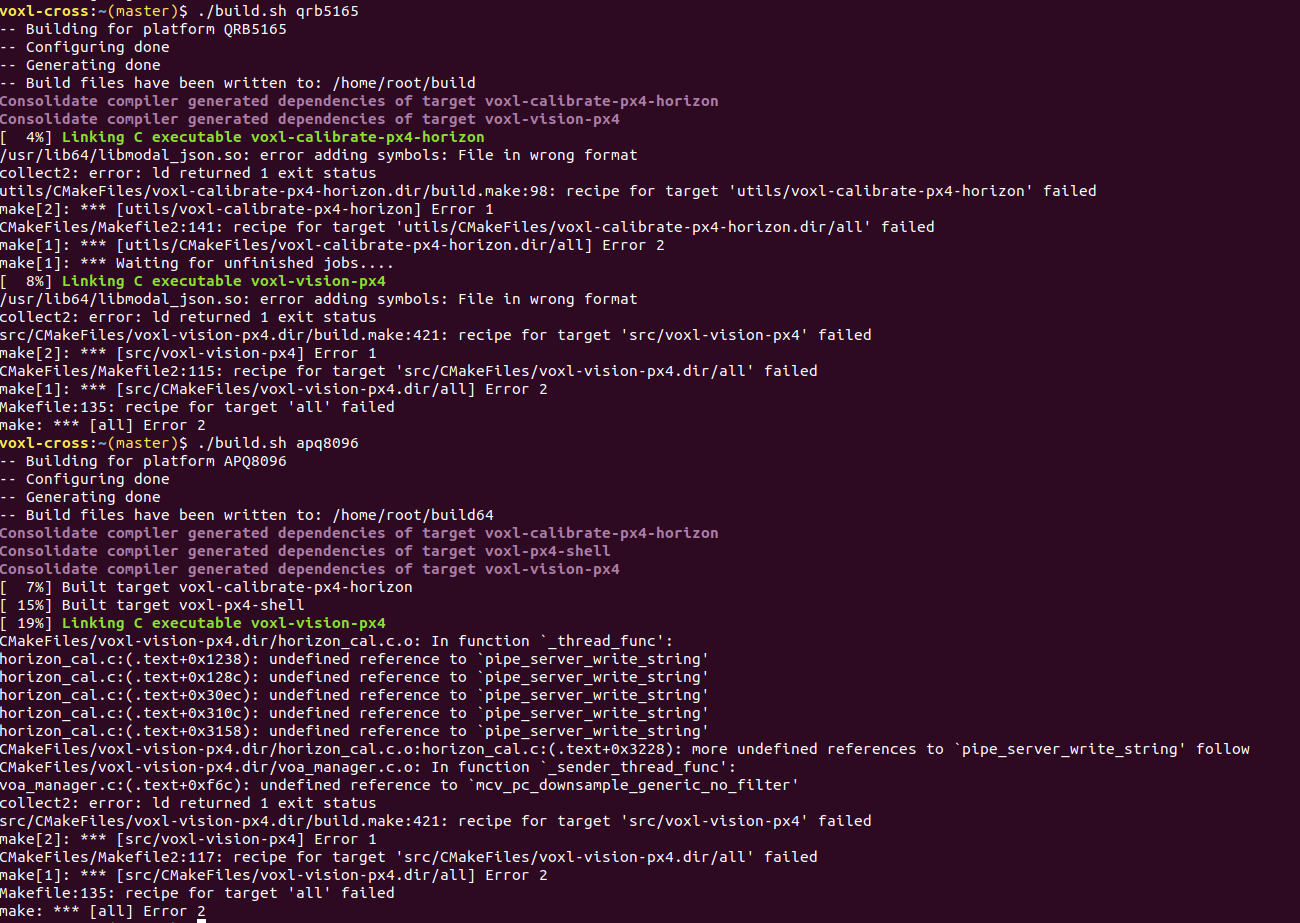
    I'm trying to build the VVPX4 using the voxl-cross image on my desktop but I'm getting the following errors.
    Screenshot from 2022-06-29 15-02-18.png

    Any pointers to what I might be missing?

    1 Reply Last reply
    0
    • ? Offline
      ? Offline
      A Former User
      wrote on last edited by
      #6

      Did you run the install_build_deps script?

      ICI 1 Reply Last reply
      0
      • ? A Former User

        Did you run the install_build_deps script?

        ICI Offline
        ICI Offline
        IC
        Contributor
        wrote on last edited by
        #7

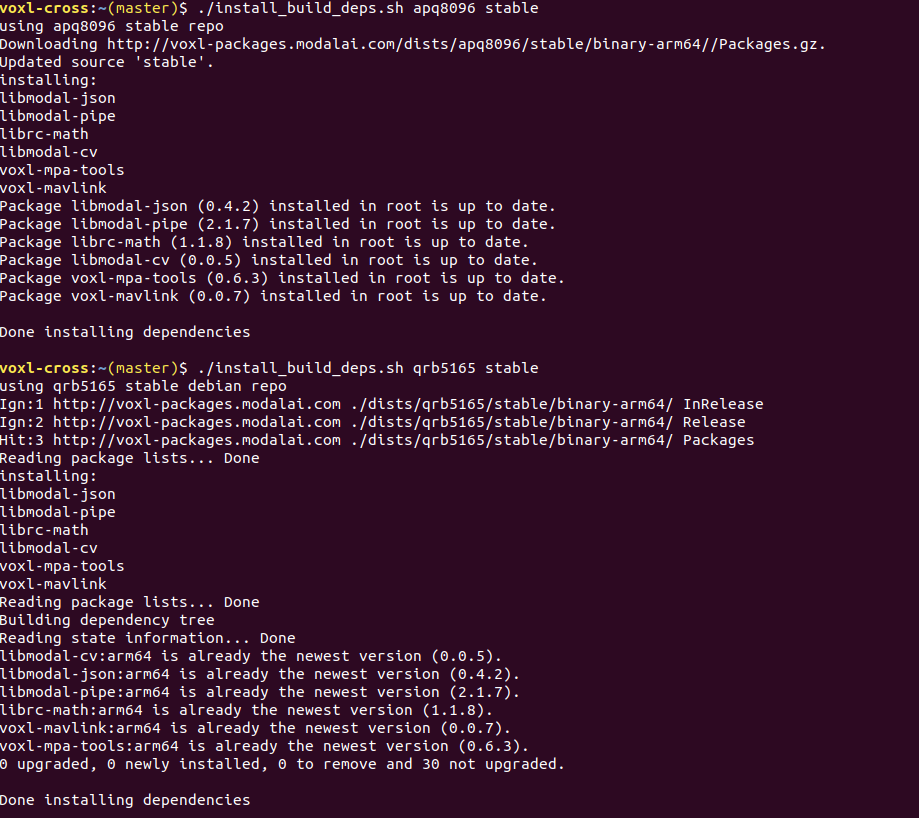
        @Alex-Gardner Yes, I did.

        2nd.png

        1 Reply Last reply
        0
        • ? Offline
          ? Offline
          A Former User
          wrote on last edited by
          #8

          You should only be installing/building for one platform (both in general but especially within a single docker instance). APQ8096 is the processor on VOXL and QRB5165 is the processor on RB5 Flight/VOXL2.

          For this specific issue though, it looks like you need to be pulling from the staging repo, not the stable one since you're building effectively the staging version of vvpx4 (stable would be on the sdk-0.7 tag). The function you're missing was added in libmodal-pipe 2.1.8 but stable has 2.1.7

          ICI 1 Reply Last reply
          0
          • ? A Former User

            You should only be installing/building for one platform (both in general but especially within a single docker instance). APQ8096 is the processor on VOXL and QRB5165 is the processor on RB5 Flight/VOXL2.

            For this specific issue though, it looks like you need to be pulling from the staging repo, not the stable one since you're building effectively the staging version of vvpx4 (stable would be on the sdk-0.7 tag). The function you're missing was added in libmodal-pipe 2.1.8 but stable has 2.1.7

            ICI Offline
            ICI Offline
            IC
            Contributor
            wrote on last edited by
            #9

            @Alex-Gardner Right. Thanks a lot!

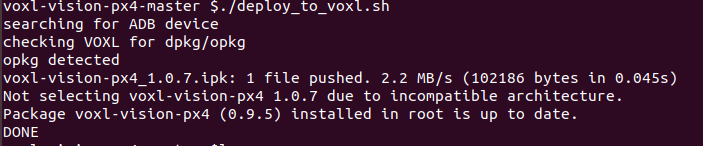
            When deploying to VOXL, I'm getting the following message:
            3.png

            From what I understand the VVPX4 is not overridden by the new VVPX4 package pushed to the VOXL. Do I need to change the VVPX4 version in any of the scripts?

            1 Reply Last reply
            0
            • ? Offline
              ? Offline
              A Former User
              wrote on last edited by
              #10

              Ah that's the last issue, our latest stuff requires a tweak to the opkg environment to allow packages marked arm64 (we're so very close to releasing a new system image with this in it), if you add the line arch arm64 7 to /etc/opkg/arch.conf you'll be able to install the package you just built.

              ICI 2 Replies Last reply
              0
              • ? A Former User

                Ah that's the last issue, our latest stuff requires a tweak to the opkg environment to allow packages marked arm64 (we're so very close to releasing a new system image with this in it), if you add the line arch arm64 7 to /etc/opkg/arch.conf you'll be able to install the package you just built.

                ICI Offline
                ICI Offline
                IC
                Contributor
                wrote on last edited by
                #11

                @Alex-Gardner Apparently not the last for me!

                So now the package is configured but not installed:

                4.png
                And VOXL does not connect to QGC now. I tried reinstalling the unedited package and get the same message and no connection to QGC.

                1 Reply Last reply
                0
                • ? A Former User

                  Ah that's the last issue, our latest stuff requires a tweak to the opkg environment to allow packages marked arm64 (we're so very close to releasing a new system image with this in it), if you add the line arch arm64 7 to /etc/opkg/arch.conf you'll be able to install the package you just built.

                  ICI Offline
                  ICI Offline
                  IC
                  Contributor
                  wrote on last edited by
                  #12

                  @Alex-Gardner And factory resetting it

                  voxl-configure-mpa --factory-reset
                  

                  shows the following:

                  Configuring VOXL Vision PX4
                  
                  wiping old config file
                  voxl-vision-px4: error while loading shared libraries: libmodalcv.so.1: cannot open shared object file: No such file or directory
                  enabling  voxl-vision-px4 systemd service
                  starting  voxl-vision-px4 systemd service
                  Done configuring voxl-vision-px4
                  
                  1 Reply Last reply
                  0
                  • ? Offline
                    ? Offline
                    A Former User
                    wrote on last edited by
                    #13

                    I've uploaded the most recent platform release (3.8.0-0.7) for VOXL with a number of important changes to support our most recent stuff. If you flash this new platform and then deploy your custom VVPX4, there shouldn't be any more issues.

                    ICI 1 Reply Last reply
                    0
                    • ? A Former User

                      I've uploaded the most recent platform release (3.8.0-0.7) for VOXL with a number of important changes to support our most recent stuff. If you flash this new platform and then deploy your custom VVPX4, there shouldn't be any more issues.

                      ICI Offline
                      ICI Offline
                      IC
                      Contributor
                      wrote on last edited by
                      #14

                      @Alex-Gardner Great, thanks!

                      1 Reply Last reply
                      0
                      • ICI Offline
                        ICI Offline
                        IC
                        Contributor
                        wrote on last edited by
                        #15

                        Hi,

                        I've been trying to deploy VVPX4 and still see some dependencies. I am using the VOXL Platform 3.8.0-0.7 and VOXL-Cross-2.1 docker image.

                        voxl-vision-px4-master $./deploy_to_voxl.sh 
                        searching for ADB device
                        checking VOXL for dpkg/opkg
                        opkg detected
                        voxl-vision-px4_1.2.0.ipk: 1 file pushed. 3.4 MB/s (105362 bytes in 0.029s)
                        Reinstalling voxl-vision-px4 (1.2.0) on root.
                        Configuring voxl-vision-px4.
                        Collected errors:
                         * satisfy_dependencies_for: Cannot satisfy the following dependencies for voxl-vision-px4:
                         * 	libmodal-pipe (>= 2.4.0) * 	libmodal-cv (>= 0.1.0) * 
                        DONE


                        Maybe I have to build the following in a specific directory but I am not sure which one:

                        $ mkdir cross-workspace
                        $ cd cross-workspace
                        $ voxl-docker -i voxl-cross:V1.9
                        voxl-cross:~$ git clone https://gitlab.com/voxl-public/voxl-sdk/core-libs/libmodal-json.git
                        voxl-cross:~$ cd libmodal-json/
                        voxl-cross:~$ ./build.sh qrb5165
                        

                        Can I install or source these two dependencies separately?

                        1 Reply Last reply
                        0

                        Hello! It looks like you're interested in this conversation, but you don't have an account yet.

                        Getting fed up of having to scroll through the same posts each visit? When you register for an account, you'll always come back to exactly where you were before, and choose to be notified of new replies (either via email, or push notification). You'll also be able to save bookmarks and upvote posts to show your appreciation to other community members.

                        With your input, this post could be even better 💗

                        Register Login
                        Reply
                        • Reply as topic
                        Log in to reply
                        • Oldest to Newest
                        • Newest to Oldest
                        • Most Votes


                        ModalAI
                        Categories Recent Tags ModalAI.com Docs
                        © 2026 ModalAI® · Accelerating autonomy for smaller, smarter, safer drones · Powered by NodeBB
                        • Login

                        • Don't have an account? Register

                        • Login or register to search.
                        • First post
                          Last post
                        0
                        • Categories
                        • Recent
                        • Tags
                        • Popular
                        • Users
                        • Groups