Skip to content
  • Categories
  • Recent
  • Tags
  • Popular
  • Users
  • Groups
Collapse
Brand Logo

ModalAI Forum

  1. ModalAI Support Forum
  2. VOXL Compute & Autopilot
  3. Flight Core
  4. PWM

PWM

Scheduled Pinned Locked Moved Flight Core
14 Posts 2 Posters 2.4k Views 2 Watching
  • Oldest to Newest
  • Newest to Oldest
  • Most Votes
Reply
  • Reply as topic
Log in to reply
This topic has been deleted. Only users with topic management privileges can see it.
  • Andrew KeefeA Offline
    Andrew KeefeA Offline
    Andrew Keefe
    wrote on last edited by
    #4

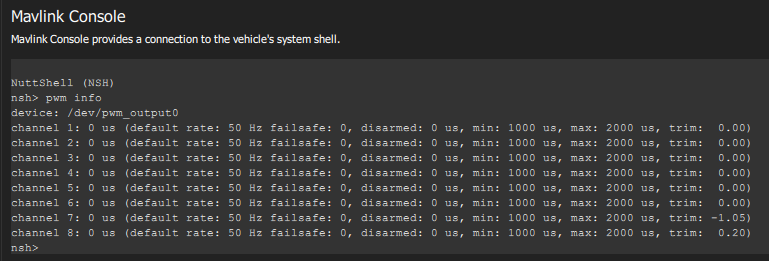
    My plan was to use the pwm.cpp file as a reference, since I was previously able to use it to adjust the PWM output on a channel. See image.
    PWM.png

    However, now that I'm ready for the PWM development I can't seem to access the PWM channels as no PWM device shows up. I have tried this on two Flight Cores, both recently purchased. The Flight Core I used for the initial test shown in the image was put in the field but is being shipped back to me.

    I ran my own firmware, I pulled fresh code from github, and for the second board I ran it without making any changes. None of these show a PWM device.

    Is there some other configuration that is required to enable the PWM driver that I may be missing?

    1 Reply Last reply
    0
    • modaltbM Offline
      modaltbM Offline
      modaltb
      ModalAI Team
      wrote on last edited by
      #5

      Hi @Andrew-Keefe ,

      On the setup that doesn't have a PWM device, have you selected any airframe? I've seen this is the mixer isn't loaded, and the mixer not loading is normally from no airframe (although you are doing some custom stuff, so not positive).

      This is where the output device gets selected:

      Link Preview Image
      File not found · PX4/PX4-Autopilot

      PX4 Autopilot Software. Contribute to PX4/PX4-Autopilot development by creating an account on GitHub.

      favicon

      GitHub (github.com)

      1 Reply Last reply
      0
      • Andrew KeefeA Offline
        Andrew KeefeA Offline
        Andrew Keefe
        wrote on last edited by
        #6

        I'm sure that's it. I remember now that I had selected a different airframe last time, though I'm not really using the airframe for my code.

        Andrew KeefeA 1 Reply Last reply
        0
        • Andrew KeefeA Andrew Keefe

          I'm sure that's it. I remember now that I had selected a different airframe last time, though I'm not really using the airframe for my code.

          Andrew KeefeA Offline
          Andrew KeefeA Offline
          Andrew Keefe
          wrote on last edited by
          #7

          @modaltb I have my PWM code working when I run it manually, but it does not work if I try and run it automatically at startup. I put it in rc.board_sensors even though it's technically not a sensor, it controls PWM actuators.

          What's happening is, the PWM device is not yet available when it tries to run, and it appears to be blocking everything.

          Is there a better way to schedule my module?

          1 Reply Last reply
          0
          • modaltbM Offline
            modaltbM Offline
            modaltb
            ModalAI Team
            wrote on last edited by
            #8

            I'm not 100% sure as I've not tried, but this is where the output device gets set to PWM:
            https://github.com/modalai/px4-firmware/blob/modalai-1.10/ROMFS/px4fmu_common/init.d/rc.interface#L57

            And the device itself gets setup:
            https://github.com/modalai/px4-firmware/blob/modalai-1.10/ROMFS/px4fmu_common/init.d/rc.interface#L160

            Assuming you have a multicopter (mc), perhaps later on in the startup process in here?

            Link Preview Image
            px4-firmware/ROMFS/px4fmu_common/init.d/rc.mc_apps at modalai-1.10 · modalai/px4-firmware

            PX4 Autopilot Software. Contribute to modalai/px4-firmware development by creating an account on GitHub.

            favicon

            GitHub (github.com)

            In rc.mc_apps, things like EKF2 are getting started, which is later in the startup process.

            1 Reply Last reply
            0
            • Andrew KeefeA Offline
              Andrew KeefeA Offline
              Andrew Keefe
              wrote on last edited by
              #9

              Thanks, I'll try that. I actually am running a standard plane, bormatec maja.

              1 Reply Last reply
              0
              • Andrew KeefeA Offline
                Andrew KeefeA Offline
                Andrew Keefe
                wrote on last edited by
                #10

                Yes, that worked. I placed it in rc.fw_apps

                1 Reply Last reply
                0
                • Andrew KeefeA Offline
                  Andrew KeefeA Offline
                  Andrew Keefe
                  wrote on last edited by
                  #11

                  Do you know why the 5V on the J7 PWM connector is for "reference only"? If I need to provide 5V to my PWM logic on the center rail of the 8-channel breakout, then I need to cut into the cable? Or I suppose I can provide 5V power on one of the other channels since I'm currently only using 4 of them, but now I need to find 5V from somewhere.

                  1 Reply Last reply
                  0
                  • modaltbM Offline
                    modaltbM Offline
                    modaltb
                    ModalAI Team
                    wrote on last edited by
                    #12

                    @Andrew-Keefe how much current are you looking to source from it? It's likely OK to use, but we put that message there to prevent trying to drive some heavy load.

                    1 Reply Last reply
                    0
                    • Andrew KeefeA Offline
                      Andrew KeefeA Offline
                      Andrew Keefe
                      wrote on last edited by
                      #13

                      Good question. These servos don't specify the logic power so I'll have to measure it.
                      I'm not seeing 5V at all though on the PWM breakout board. It should be the middle set of pins, correct?

                      1 Reply Last reply
                      0
                      • modaltbM Offline
                        modaltbM Offline
                        modaltb
                        ModalAI Team
                        wrote on last edited by
                        #14

                        Well, we aren't routing the 5V on that little M0022 board to prevent it being used to drive servos (for this concern). But 5V does come down to the connector, so it could be soldered to, and you could create solder bridges on the bottom of the board. Not ideal, but 5V is there, just not routed....


                        1 Reply Last reply
                        0

                        Hello! It looks like you're interested in this conversation, but you don't have an account yet.

                        Getting fed up of having to scroll through the same posts each visit? When you register for an account, you'll always come back to exactly where you were before, and choose to be notified of new replies (either via email, or push notification). You'll also be able to save bookmarks and upvote posts to show your appreciation to other community members.

                        With your input, this post could be even better 💗

                        Register Login
                        Reply
                        • Reply as topic
                        Log in to reply
                        • Oldest to Newest
                        • Newest to Oldest
                        • Most Votes


                        ModalAI
                        Categories Recent Tags ModalAI.com Docs
                        © 2026 ModalAI® · Accelerating autonomy for smaller, smarter, safer drones · Powered by NodeBB
                        • Login

                        • Don't have an account? Register

                        • Login or register to search.
                        • First post
                          Last post
                        0
                        • Categories
                        • Recent
                        • Tags
                        • Popular
                        • Users
                        • Groups