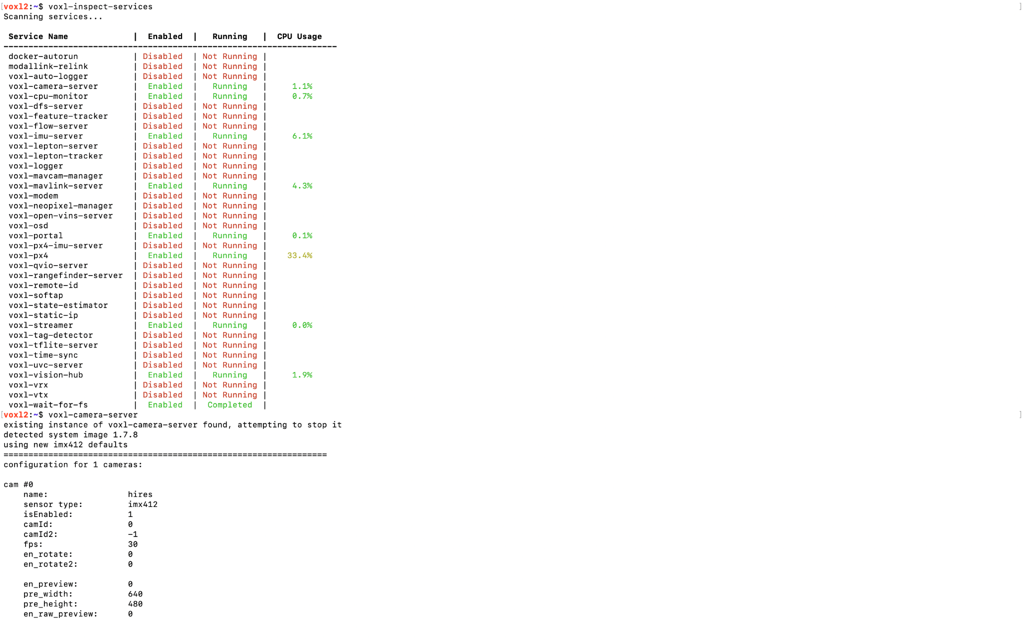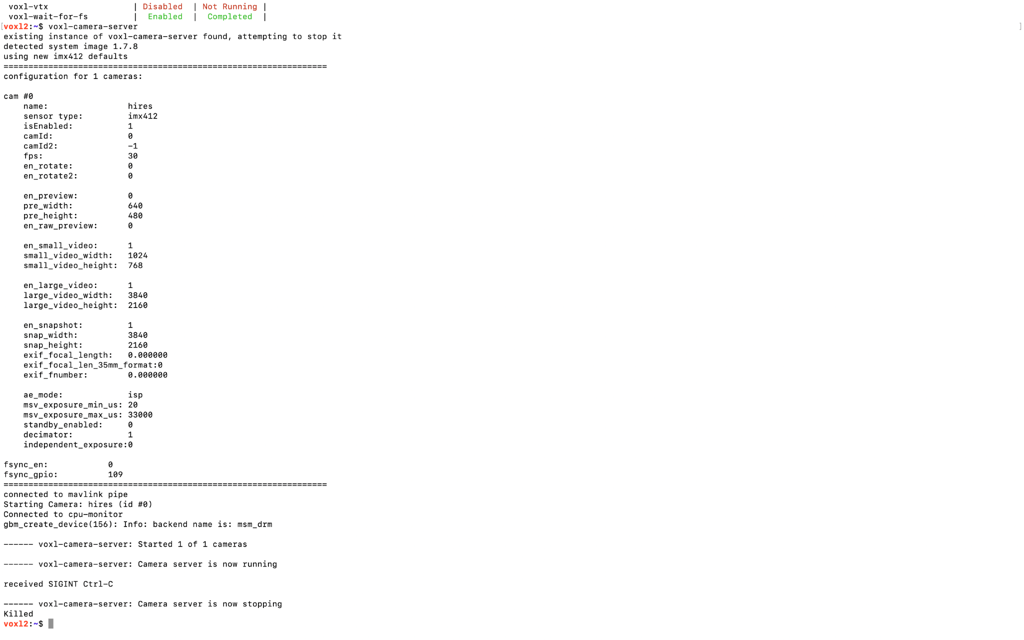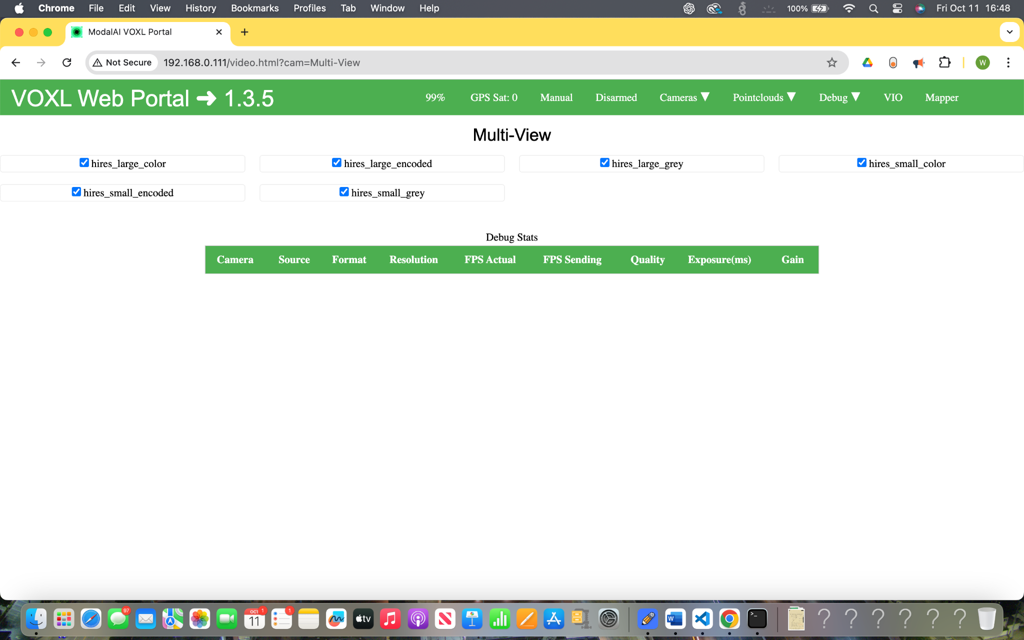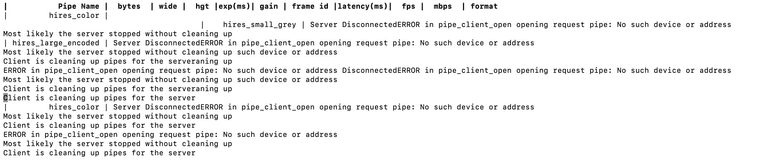
This is after power cycle (poweroff -f, power source off, turn on again)
 W
W
Wesley Gunawan
@Wesley Gunawan
Posts
-
VOXL 2 Camera Connected but Not Feed -
VOXL 2 Camera Connected but Not Feed@Moderator voxl-camera-server -d0
existing instance of voxl-camera-server found, attempting to stop it
detected system image 1.7.8
using new imx412 defaultsconfiguration for 1 cameras:
cam #0
name: hires
sensor type: imx412
isEnabled: 1
camId: 0
camId2: -1
fps: 30
en_rotate: 0
en_rotate2: 0en_preview: 1 pre_width: 640 pre_height: 480 en_raw_preview: 0 en_small_video: 1 small_video_width: 1024 small_video_height: 768 en_large_video: 1 large_video_width: 3840 large_video_height: 2160 en_snapshot: 0 snap_width: 3840 snap_height: 2160 exif_focal_length: 0.000000 exif_focal_len_35mm_format:0 exif_fnumber: 0.000000 ae_mode: isp msv_exposure_min_us: 20 msv_exposure_max_us: 33000 standby_enabled: 0 decimator: 1 independent_exposure:0fsync_en: 0
fsync_gpio: 109DEBUG: Attempting to open the hal module
DEBUG: SUCCESS: Camera module opened on attempt 0
DEBUG: ----------- Number of cameras: 1(Too long, in the end):
------ voxl-camera-server: Camera server is now running
VERBOSE: Entered thread: cam0-request(tid: 2735)
DEBUG: Value of standby_active is: 0received SIGINT Ctrl-C
------ voxl-camera-server: Camera server is now stopping
DEBUG: Stopping Camera: hires
DEBUG: ------ Last request frame for hires: 0
VERBOSE: Leaving hires request thread
DEBUG: ------ Last hires result frame: -1
VERBOSE: Leaving hires result thread
DEBUG: ------ Last frame encoded: -1
DEBUG: OMX_EventCmdComplete
DEBUG: OMX_EventCmdComplete
DEBUG: OMX_EventCmdComplete
DEBUG: ------ Last frame encoded: -1
DEBUG: OMX_EventCmdComplete
DEBUG: OMX_EventCmdComplete
DEBUG: Deleting buffers for hires preview stream
DEBUG: OMX_EventCmdComplete
DEBUG: Deleting buffers for hires small video stream
DEBUG: Deleting buffers for hires large video stream
DEBUG: Deleting buffers for hires snapshot stream
free(): invalid pointer
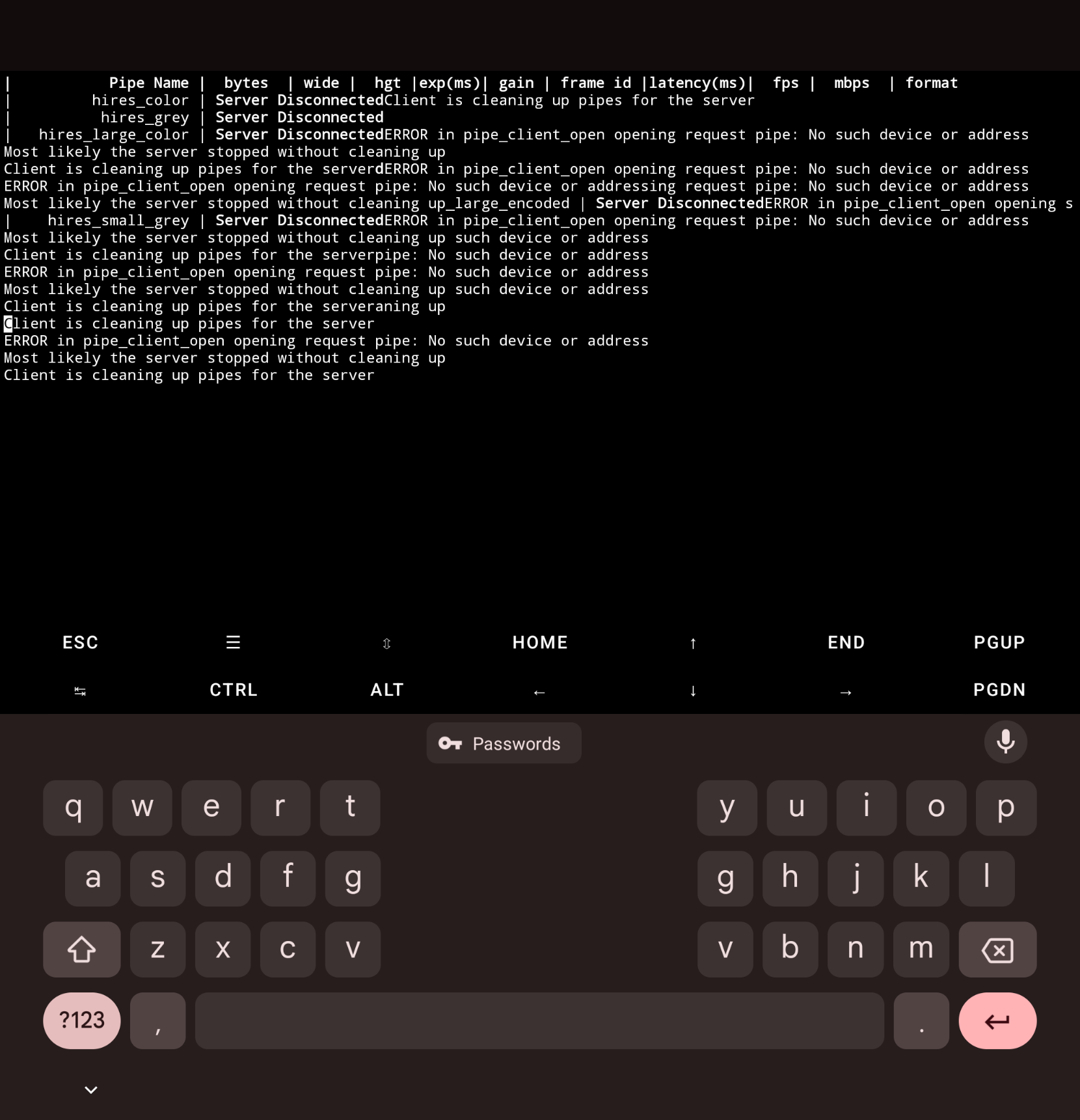
Abortedvoxl-inspect-cam -a output is the picture attached
-
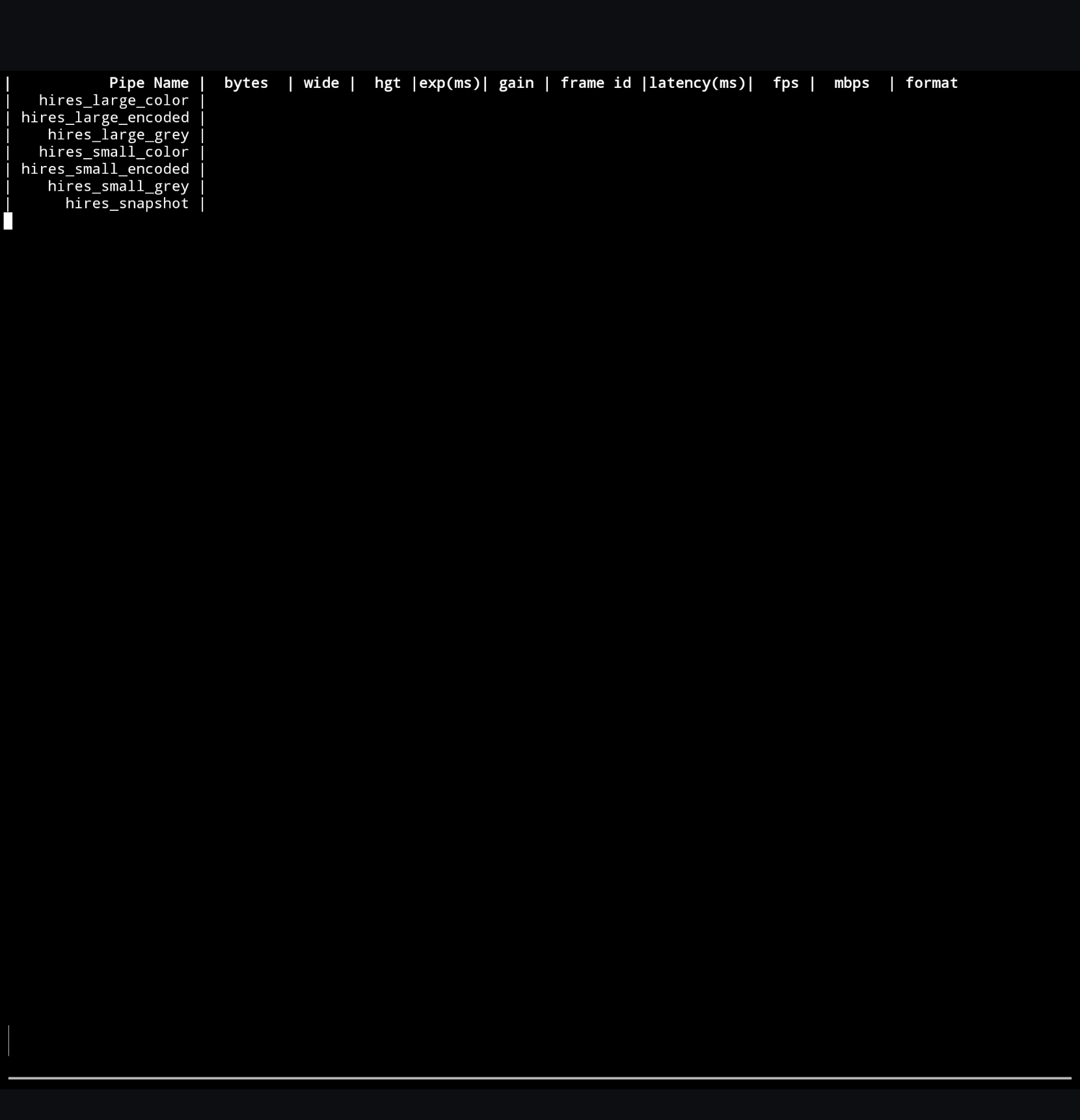
VOXL 2 Camera Connected but Not Feed@Moderator I already tried that in the past, even before I consulted this forum, the output has always been like this
-
VOXL 2 Camera Connected but Not Feed@Moderator It is camera configuration 8, the board wouldn't detect the camera otherwise (tried that before) so I'm assuming the camera configuration is correct.
voxl2:~$ voxl-camera-server -d0
existing instance of voxl-camera-server found, attempting to stop it
detected system image 1.7.8
using new imx412 defaultsconfiguration for 1 cameras:
cam #0
name: hires
sensor type: imx412
isEnabled: 1
camId: 0
camId2: -1
fps: 30
en_rotate: 0
en_rotate2: 0en_preview: 0 pre_width: 640 pre_height: 480 en_raw_preview: 0 en_small_video: 1 small_video_width: 1024 small_video_height: 768 en_large_video: 1 large_video_width: 3840 large_video_height: 2160 en_snapshot: 1 snap_width: 3840 snap_height: 2160 exif_focal_length: 0.000000 exif_focal_len_35mm_format:0 exif_fnumber: 0.000000 ae_mode: isp msv_exposure_min_us: 20 msv_exposure_max_us: 33000 standby_enabled: 0 decimator: 1 independent_exposure:0fsync_en: 0
fsync_gpio: 109DEBUG: Attempting to open the hal module
DEBUG: SUCCESS: Camera module opened on attempt 0
DEBUG: ----------- Number of cameras: 1VERBOSE: cci-direct: using voxl_platform_mod config 0 layout
DEBUG: Cam idx: 0, Cam slot: 2, Slave Address: 0x0034, Sensor Id: 0x0577
connected to mavlink pipe
DEBUG: ------ voxl-camera-server: Starting 1 cameras
Starting Camera: hires (id #0)
DEBUG: Checking Gain limits for Camera: hires
DEBUG: Using gain limits min: 100 max: 1600
DEBUG: cam ID 0 checking for fmt: 35 w: 1024 h: 768 o: 0
DEBUG: ==> option 0: format= 34 width=4056 height=3040 is_input=0
DEBUG: ==> option 4: format= 34 width=4056 height=3040 is_input=1
DEBUG: ==> option 8: format= 35 width=4056 height=3040 is_input=0
DEBUG: ==> option 12: format= 35 width=4056 height=3040 is_input=1
DEBUG: ==> option 16: format= 33 width=4056 height=3040 is_input=0
DEBUG: ==> option 20: format= 34 width=4000 height=3000 is_input=0
DEBUG: ==> option 24: format= 34 width=4000 height=3000 is_input=1
DEBUG: ==> option 28: format= 35 width=4000 height=3000 is_input=0
DEBUG: ==> option 32: format= 35 width=4000 height=3000 is_input=1
DEBUG: ==> option 36: format= 33 width=4000 height=3000 is_input=0
DEBUG: ==> option 40: format= 34 width=3840 height=2160 is_input=0
DEBUG: ==> option 44: format= 34 width=3840 height=2160 is_input=1
DEBUG: ==> option 48: format= 35 width=3840 height=2160 is_input=0
DEBUG: ==> option 52: format= 35 width=3840 height=2160 is_input=1
DEBUG: ==> option 56: format= 33 width=3840 height=2160 is_input=0
DEBUG: ==> option 60: format= 34 width=3264 height=2448 is_input=0
DEBUG: ==> option 64: format= 34 width=3264 height=2448 is_input=1
DEBUG: ==> option 68: format= 35 width=3264 height=2448 is_input=0
DEBUG: ==> option 72: format= 35 width=3264 height=2448 is_input=1
DEBUG: ==> option 76: format= 33 width=3264 height=2448 is_input=0
DEBUG: ==> option 80: format= 34 width=3200 height=2400 is_input=0
DEBUG: ==> option 84: format= 34 width=3200 height=2400 is_input=1
DEBUG: ==> option 88: format= 35 width=3200 height=2400 is_input=0
DEBUG: ==> option 92: format= 35 width=3200 height=2400 is_input=1
DEBUG: ==> option 96: format= 33 width=3200 height=2400 is_input=0
DEBUG: ==> option 100: format= 34 width=2976 height=2976 is_input=0
DEBUG: ==> option 104: format= 34 width=2976 height=2976 is_input=1
DEBUG: ==> option 108: format= 35 width=2976 height=2976 is_input=0(Too much to show, at the end of the output):
VERBOSE: Dumping GBM flags
DEBUG: Found flag GBM_BO_USAGE_CPU_READ_QTI
DEBUG: Found flag GBM_BO_USAGE_CAMERA_WRITE_QTI
DEBUG: Allocated BO with width=25054814 height=1 stride=25054814 aligned_w=25054814 aligned_h=1 size=25054814 flags=0x20003 format=GBM_FORMAT_BLOB fd=226 vaddr=0x7fe8aaae70
DEBUG: Successfully set up pipeline for stream: SNAPSHOT
DEBUG: Started Camera: hires------ voxl-camera-server: Started 1 of 1 cameras
------ voxl-camera-server: Camera server is now running
VERBOSE: Entered thread: cam0-result(tid: 2676)
VERBOSE: Entered thread: cam0-request(tid: 2675)
VERBOSE: added request for small video stream
VERBOSE: Sending request for frame 0 for camera hires for 1 streams
VERBOSE: Received result from HAl3 for frame number 0
VERBOSE: Received 0 buffers from camera hires, partial result:1
VERBOSE: finished sending request for frame 0 for camera hires
VERBOSE: returning from SendOneCaptureRequest for frame 1 for camera hires
VERBOSE: added request for small video stream
VERBOSE: Sending request for frame 1 for camera hires for 1 streams
VERBOSE: finished sending request for frame 1 for camera hires
VERBOSE: returning from SendOneCaptureRequest for frame 2 for camera hires
VERBOSE: added request for small video stream
VERBOSE: Sending request for frame 2 for camera hires for 1 streams
VERBOSE: finished sending request for frame 2 for camera hires
VERBOSE: returning from SendOneCaptureRequest for frame 3 for camera hires
VERBOSE: added request for small video stream
VERBOSE: Sending request for frame 3 for camera hires for 1 streams
VERBOSE: finished sending request for frame 3 for camera hires
VERBOSE: returning from SendOneCaptureRequest for frame 4 for camera hires
VERBOSE: added request for small video stream
VERBOSE: Sending request for frame 4 for camera hires for 1 streams
VERBOSE: finished sending request for frame 4 for camera hires
VERBOSE: returning from SendOneCaptureRequest for frame 5 for camera hires
VERBOSE: added request for small video stream
VERBOSE: Sending request for frame 5 for camera hires for 1 streams
VERBOSE: Received result from HAl3 for frame number 1
VERBOSE: Received 0 buffers from camera hires, partial result:1
VERBOSE: Received result from HAl3 for frame number 2
VERBOSE: Received 0 buffers from camera hires, partial result:1
DEBUG: Value of standby_active is: 0
DEBUG: Value of standby_active is: 0received SIGINT Ctrl-C
------ voxl-camera-server: Camera server is now stopping
DEBUG: Stopping Camera: hires
Killed -
VOXL 2 Camera Connected but Not FeedHi, the camera is connected correctly because when the configuration or installation setup isn't correct, voxl-camera-server wouldn't even detect the camera's connection, in this case it does, but no input from the camera has ever been acquired. Here is the image of the setup:
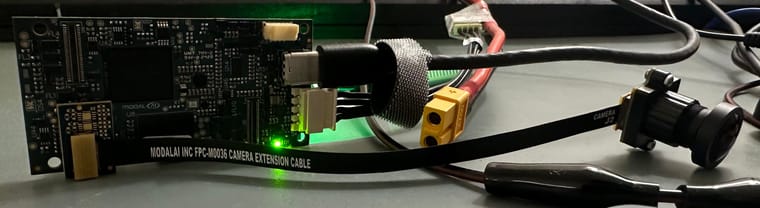
Is there any other information you need to help me debug this issue? It's been over a week and I need it working as soon as possible or else I have to return the whole kit. As for the camera defect possibility suggested by a user in this forum last week, I already tried swapping the camera and it still doesn't work.
-
VOXL 2 Camera Connected but Not Feed@tom ^ (Reminder)
-
VOXL 2 Camera Connected but Not FeedHi Tom, I only have the access to the device several days a week, please let me know the complete information you need if further information is needed. Here is the outputs requested:
voxl2:~$ cat /etc/modalai/voxl-camera-server.conf
/**- voxl-camera-server Configuration File
- Each camera has configurations for up to 4 HAL3 streams:
-
previewstream for raw unprocessed images from CV cameras
-
small_video720p (ish) h264/h265 compressed for fpv video streaming
-
large_video4k (ish) h264/h265 for onboard video recording to disk
-
snapshotISP-processed JPG snapshots that get saved to disk
- on QRB5165 platforms (VOXL2 and VOXL2 mini) you can only have 3 of the 4 enabled
- This file is generated from default values by voxl-configure-cameras.
- Do not expect arbitrary resolutions to work, the ISP and video compression
- pipelines only support very specific resolutions.
- The default video compression mode is cqp or Constant Quantization Parameter
*/
{
"version": 0.1,
"fsync_en": false,
"fsync_gpio": 109,
"cameras": [{
"type": "imx412",
"name": "hires",
"enabled": true,
"camera_id": 0,
"fps": 30,
"en_preview": false,
"preview_width": 640,
"preview_height": 480,
"en_raw_preview": false,
"en_small_video": true,
"small_video_width": 1024,
"small_video_height": 768,
"small_venc_mode": "h265",
"small_venc_br_ctrl": "cqp",
"small_venc_Qfixed": 30,
"small_venc_Qmin": 15,
"small_venc_Qmax": 40,
"small_venc_nPframes": 9,
"small_venc_mbps": 2,
"en_large_video": true,
"large_video_width": 3840,
"large_video_height": 2160,
"large_venc_mode": "h265",
"large_venc_br_ctrl": "cqp",
"large_venc_Qfixed": 38,
"large_venc_Qmin": 15,
"large_venc_Qmax": 50,
"large_venc_nPframes": 29,
"large_venc_mbps": 30,
"en_snapshot": true,
"en_snapshot_width": 3840,
"en_snapshot_height": 2160,
"exif_focal_length": 0,
"exif_focal_length_in_35mm_format": 0,
"exif_fnumber": 0,
"ae_mode": "isp"
}]
}
voxl2:~$ voxl-inspect-skufamily code: TF-M0054 (voxl2-test-fixture)
compute board: 4 (voxl2)
hw version: 1
cam config: 11
modem config: 0 (none)
tx config: 0 (none)
extras config: 0 (none)
SKU: TF-M0054-4-V1-C11 -
VOXL 2 Camera Connected but Not Feed@tom Thank you for replying Tom. I am aware that voxl-camera-server was already running in the background, the reason why I manually run it is just to show that the camera hardware is connected properly. When I do voxl-inspect-cam -a, I don't see any output that indicates the image sensors receive any input information like it's supposed to be based on the documentation. The only thing that I saw was an empty table with hires_large_color, hires_large_encoded, .etc (basically everything in the Multi-View).
-
VOXL 2 Camera Connected but Not FeedWe are experiencing difficulties accessing the IMX412 camera connected to our VOXL 2 (connector 8). While voxl-camera-server successfully detects the camera, we are unable to view the camera feed through the voxl-portal webserver or the RTSP stream. Additionally, camera input is not visible during inspection.
We have attached detailed information about our setup for your review.
This is a time-sensitive project, and we require a prompt resolution to avoid further delays. If the issue cannot be resolved quickly, we may need to consider returning the kit for a refund.
voxl2:~$ voxl-version
system-image: 1.7.8-M0054-14.1a-perf
kernel: #1 SMP PREEMPT Fri May 17 23:29:23 UTC 2024 4.19.125hw platform: M0054
mach.var: 1.0.0voxl-suite: 1.3.5
Packages:
Repo: http://voxl-packages.modalai.com/ ./dists/qrb5165/sdk-1.3/binary-arm64/
Last Updated: 2024-10-11 18:06:54
List:
kernel-module-voxl-fsync-mod-4.19.125 1.0-r0
kernel-module-voxl-gpio-mod-4.19.125 1.0-r0
kernel-module-voxl-platform-mod-4.19.125 1.0-r0
libfc-sensor 1.0.7
libmodal-cv 0.5.11
libmodal-exposure 0.1.1
libmodal-journal 0.2.2
libmodal-json 0.4.3
libmodal-pipe 2.10.2
libqrb5165-io 0.4.6
libvoxl-cci-direct 0.2.3
libvoxl-cutils 0.1.1
modalai-slpi 1.1.19
mv-voxl 0.1-r0
qrb5165-bind 0.1-r0
qrb5165-dfs-server 0.2.0
qrb5165-imu-server 1.0.1
qrb5165-rangefinder-server 0.1.3
qrb5165-slpi-test-sig 01-r0
qrb5165-system-tweaks 0.3.0
qrb5165-tflite 2.8.0-2
voxl-bind-spektrum 0.1.1
voxl-camera-calibration 0.5.7
voxl-camera-server 2.0.1
voxl-ceres-solver 2:1.14.0-10
voxl-configurator 0.8.5
voxl-cpu-monitor 0.4.8
voxl-docker-support 1.3.1
voxl-elrs 0.2.2
voxl-esc 1.4.7
voxl-feature-tracker 0.4.1
voxl-flow-server 0.3.6
voxl-fsync-mod 1.0-r0
voxl-gphoto2-server 0.0.10
voxl-gpio-mod 1.0-r0
voxl-jpeg-turbo 2.1.3-5
voxl-lepton-server 1.2.3
voxl-lepton-tracker 0.0.2
voxl-libgphoto2 0.0.4
voxl-libuvc 1.0.7
voxl-logger 0.4.7
voxl-mavcam-manager 0.5.7
voxl-mavlink 0.1.1
voxl-mavlink-server 1.4.2
voxl-modem 1.1.3
voxl-mongoose 7.7.0-1
voxl-mpa-to-ros 0.3.9
voxl-mpa-tools 1.2.3
voxl-neopixel-manager 0.0.3
voxl-open-vins 0.4.14
voxl-open-vins-server 0.2.75
voxl-opencv 4.5.5-2
voxl-osd 0.0.1
voxl-platform-mod 1.0-r0
voxl-portal 0.7.0
voxl-px4 1.14.0-2.0.84
voxl-px4-imu-server 0.1.2
voxl-px4-params 0.5.3
voxl-qvio-server 1.0.4
voxl-remote-id 0.0.9
voxl-reset-slpi 0.0.1
voxl-state-estimator 0.0.2
voxl-streamer 0.7.4
voxl-suite 1.3.5
voxl-tag-detector 0.0.4
voxl-tflite-server 0.3.4
voxl-utils 1.4.3
voxl-uvc-server 0.1.7
voxl-vision-hub 1.8.9
voxl-vtx 1.1.0
voxl2-io 0.0.3
voxl2-system-image 1.7.8-r0
voxl2-wlan 1.0-r0
--------------------------------------------------------------------------------