
Need help simulating .tflite yolo models on my linux machine.
-
@thomas
Hi thomas,
Did you get a chance to check this issue? I am trying to benchmark the my models but I dont see any output or number I could use to summarize my benchmark or something.Yeah so when you run voxl-logger with -s 5000 you're running it for that many samples and it isn't going to have any printouts. I'm not sure what tables you're talking about with respect to the benchmarks documentation, maybe you could give me a link?
If you just want to collect a voxl-logger log, your commands above should work fine. You can see that it's creating logs in the /data/voxl-logger/ directory which you can replay with the voxl-logger command.
I help with the forum in addition to my work and so I don't have time for calls. If you're interested in setting up a bigger support effort, you can send an email to sales@modalai.com .
Hope this helps!
Thomas
-
Yeah so when you run voxl-logger with -s 5000 you're running it for that many samples and it isn't going to have any printouts. I'm not sure what tables you're talking about with respect to the benchmarks documentation, maybe you could give me a link?
If you just want to collect a voxl-logger log, your commands above should work fine. You can see that it's creating logs in the /data/voxl-logger/ directory which you can replay with the voxl-logger command.
I help with the forum in addition to my work and so I don't have time for calls. If you're interested in setting up a bigger support effort, you can send an email to sales@modalai.com .
Hope this helps!
Thomas
@thomas
Hi thomas,
Yes, so the table I'm referring to is under the benchmark section here: https://docs.modalai.com/voxl-tflite-server-0_9/#benchmarks
So the thing is when I run the voxl-looger with -s 5000 I also expect the code to run for that many samples and output some log, but as you see from my screenshot, it just outputs ... ' samples: 0'And no worries thomas, I do appreciate your time and help here

Regards
-
@thomas
Hi thomas,
Yes, so the table I'm referring to is under the benchmark section here: https://docs.modalai.com/voxl-tflite-server-0_9/#benchmarks
So the thing is when I run the voxl-looger with -s 5000 I also expect the code to run for that many samples and output some log, but as you see from my screenshot, it just outputs ... ' samples: 0'And no worries thomas, I do appreciate your time and help here
Regards
Okay yeah let's back up here - why are we even trying to get a log with IMU samples in it? If you want to benchmark
voxl-tflite-server, you don't need IMU samples to do so. What I had meant by all of this was: you don't have a camera attached to your VOXL if I remember correctly and so instead of attaching one, we could use avoxl-loggerlog which had camera data in it for replaying. This is because when you replay avoxl-loggerlog, it writes over all of the pipes. If we had a log which had camera data in it, you could replay it and your VOXL would "think" it had a camera attached and so then when you runvoxl-tflite-serverit could use the data coming from those pipes.In this case, I probably need to provide you with a log that has camera data in it. No worries though, I have lots of logs and can upload one here. Do you have any preferences of what's in the log? I was just going to take my drone and wave it around for a few seconds but if you'd like something more we can do that. I'll also verify that this log can be used by tflite-server and what steps need to be taken.
If that seems reasonable let me know and I'll get started.
-Thomas
-
Okay yeah let's back up here - why are we even trying to get a log with IMU samples in it? If you want to benchmark
voxl-tflite-server, you don't need IMU samples to do so. What I had meant by all of this was: you don't have a camera attached to your VOXL if I remember correctly and so instead of attaching one, we could use avoxl-loggerlog which had camera data in it for replaying. This is because when you replay avoxl-loggerlog, it writes over all of the pipes. If we had a log which had camera data in it, you could replay it and your VOXL would "think" it had a camera attached and so then when you runvoxl-tflite-serverit could use the data coming from those pipes.In this case, I probably need to provide you with a log that has camera data in it. No worries though, I have lots of logs and can upload one here. Do you have any preferences of what's in the log? I was just going to take my drone and wave it around for a few seconds but if you'd like something more we can do that. I'll also verify that this log can be used by tflite-server and what steps need to be taken.
If that seems reasonable let me know and I'll get started.
-Thomas
@thomas
Oh I understand now. So using your camera data voxl logs. We can simly use those logs(camera data) to benchmark tfliteserver and get the benchmark stats like shown here:
https://docs.modalai.com/voxl-tflite-server-0_9/#benchmarksI would appreciate a lot if you could share them. Since it would be good to use those logs/same camera data to compare stats from diff custom tflite models
Thanks a lot
-
@thomas
Oh I understand now. So using your camera data voxl logs. We can simly use those logs(camera data) to benchmark tfliteserver and get the benchmark stats like shown here:
https://docs.modalai.com/voxl-tflite-server-0_9/#benchmarksI would appreciate a lot if you could share them. Since it would be good to use those logs/same camera data to compare stats from diff custom tflite models
Thanks a lot
Yep exactly! Let me get working on a log right now for you to use and then I'll upload it here and give you instructions on how to use it.
Thomas
-
Yep exactly! Let me get working on a log right now for you to use and then I'll upload it here and give you instructions on how to use it.
Thomas
Here's a link to a .tar with a voxl-logger log that I recorded! https://drive.google.com/file/d/1c-snBLT6mmrwGpKE2WhVR-YQgumN0s6o/view?usp=sharing
You should use ADB to push this file onto VOXL and then use
tar -xvf customlog.tarto unzip the file, it should unpack into/data/voxl-logger/log0009/. Then you should be able tovoxl-replay -p /data/voxl-logger/log0009/. The only other important thing you need to do is editvoxl-tflite-serverto predict from thetrackingcamera in/etc/modalai/voxl-tflite-server.conf.Thomas
-
Here's a link to a .tar with a voxl-logger log that I recorded! https://drive.google.com/file/d/1c-snBLT6mmrwGpKE2WhVR-YQgumN0s6o/view?usp=sharing
You should use ADB to push this file onto VOXL and then use
tar -xvf customlog.tarto unzip the file, it should unpack into/data/voxl-logger/log0009/. Then you should be able tovoxl-replay -p /data/voxl-logger/log0009/. The only other important thing you need to do is editvoxl-tflite-serverto predict from thetrackingcamera in/etc/modalai/voxl-tflite-server.conf.Thomas
@thomas
Hey thomas,
So I have followed your steps and loaded the log0009 data and then ran voxl-replay command while running voxl-tflite-server correctly configured with tracking option. But nothing happens after that it seems.
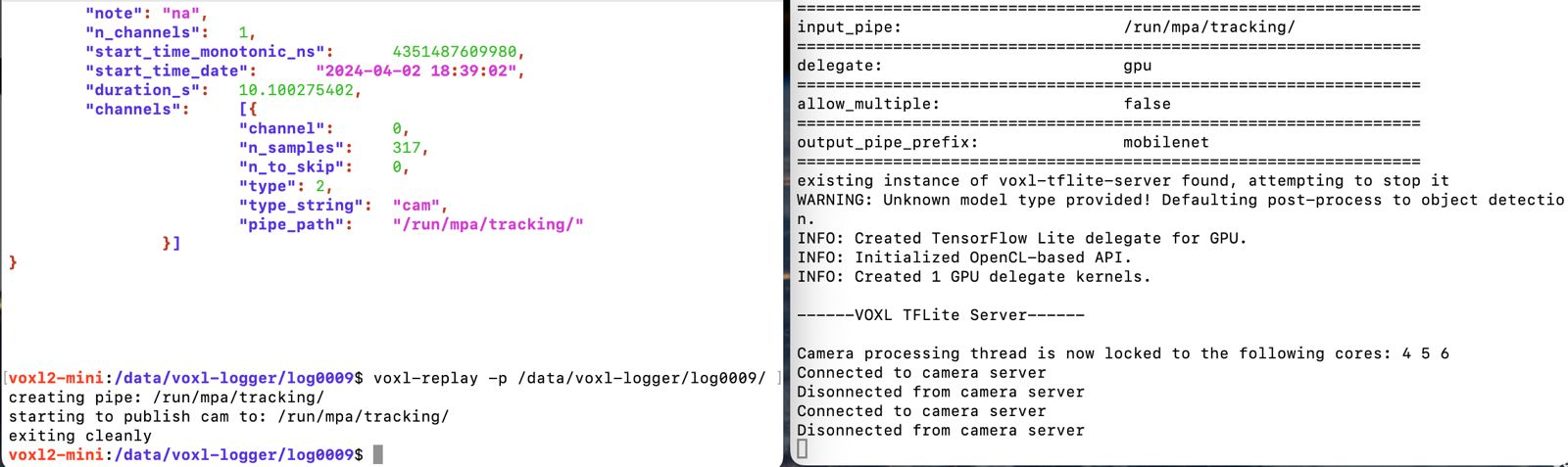
So the output I'm expecting at the end is to be able to have something like
Model Task Avg Cpu Inference(ms) Avg Gpu Inference(ms) Avg NNAPI Inference(ms) Max Frames Per Second(fps) Input Dimensions Source
custom-tflite-model Object Detection 33.89ms 24.68ms 34.42ms 34.86750349 [1,300,300,3]Where can I get such output after running the voxl-replay command. I think I'm missing some steps after that.
Please let me know what I'm missing here.
Thanks -
@thomas
Hey thomas,
So I have followed your steps and loaded the log0009 data and then ran voxl-replay command while running voxl-tflite-server correctly configured with tracking option. But nothing happens after that it seems.
So the output I'm expecting at the end is to be able to have something like
Model Task Avg Cpu Inference(ms) Avg Gpu Inference(ms) Avg NNAPI Inference(ms) Max Frames Per Second(fps) Input Dimensions Source
custom-tflite-model Object Detection 33.89ms 24.68ms 34.42ms 34.86750349 [1,300,300,3]Where can I get such output after running the voxl-replay command. I think I'm missing some steps after that.
Please let me know what I'm missing here.
ThanksYeah, so my default all of our services don't print anything out when run. Do
voxl-tflite-server -tfor timing printouts.This won't give you a super organized printout like what you are writing. But it will give you out data on the per-iteration callback times and the breakdown per function. You'll then need to modify
/etc/modalai/voxl-tflite-server.confin different ways to get different timing printouts in order to build up a table of benchmarks.Thomas
-
Yeah, so my default all of our services don't print anything out when run. Do
voxl-tflite-server -tfor timing printouts.This won't give you a super organized printout like what you are writing. But it will give you out data on the per-iteration callback times and the breakdown per function. You'll then need to modify
/etc/modalai/voxl-tflite-server.confin different ways to get different timing printouts in order to build up a table of benchmarks.Thomas
@thomas
Okay, So i did run voxl-tflite-server -t alongside voxl-replay command but am still not getting anything.
For yolov5 I get no output after running voxl replay. it just outputs this:
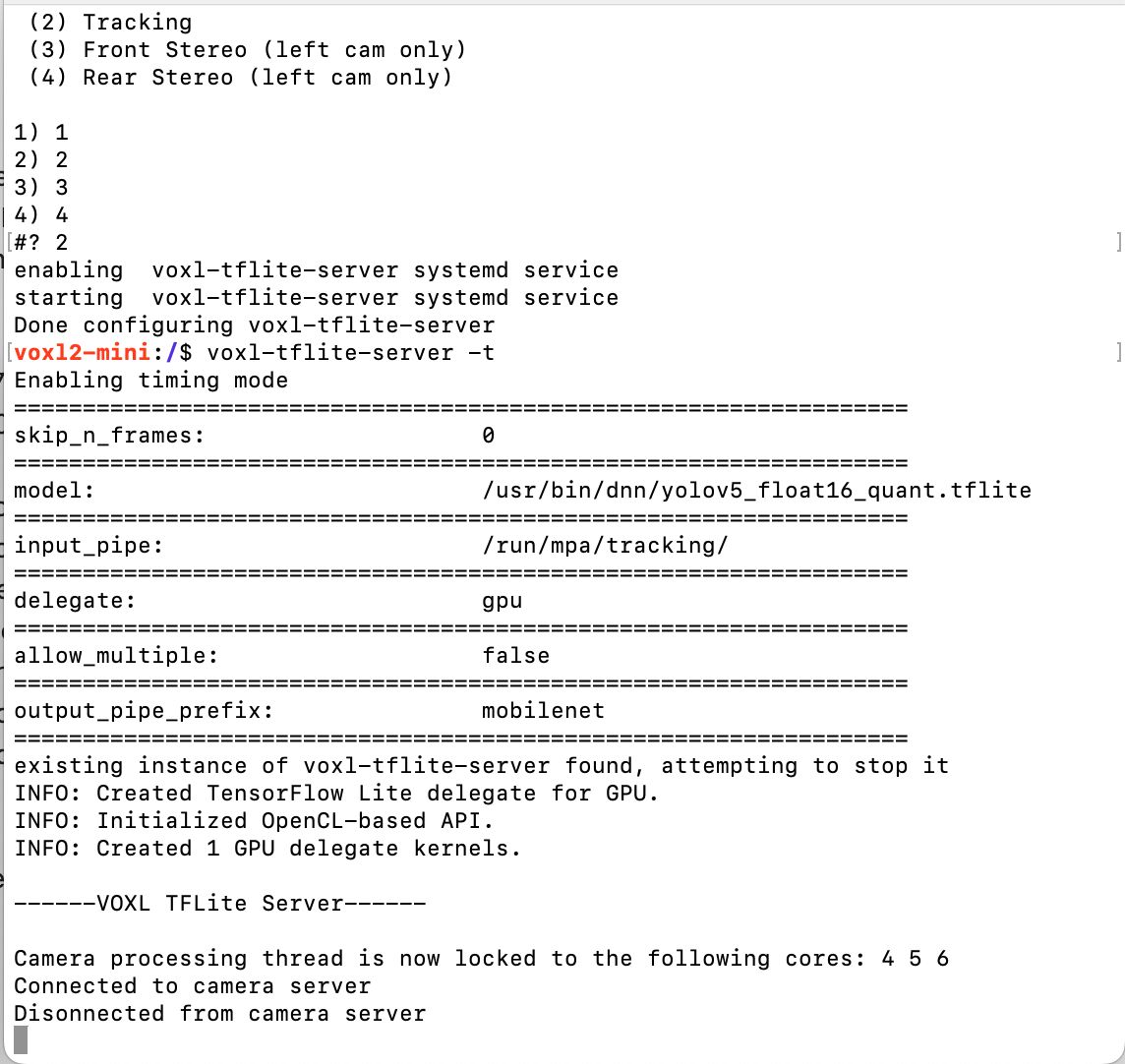
For my custom yolov7 nd yolov8 I get these errors:
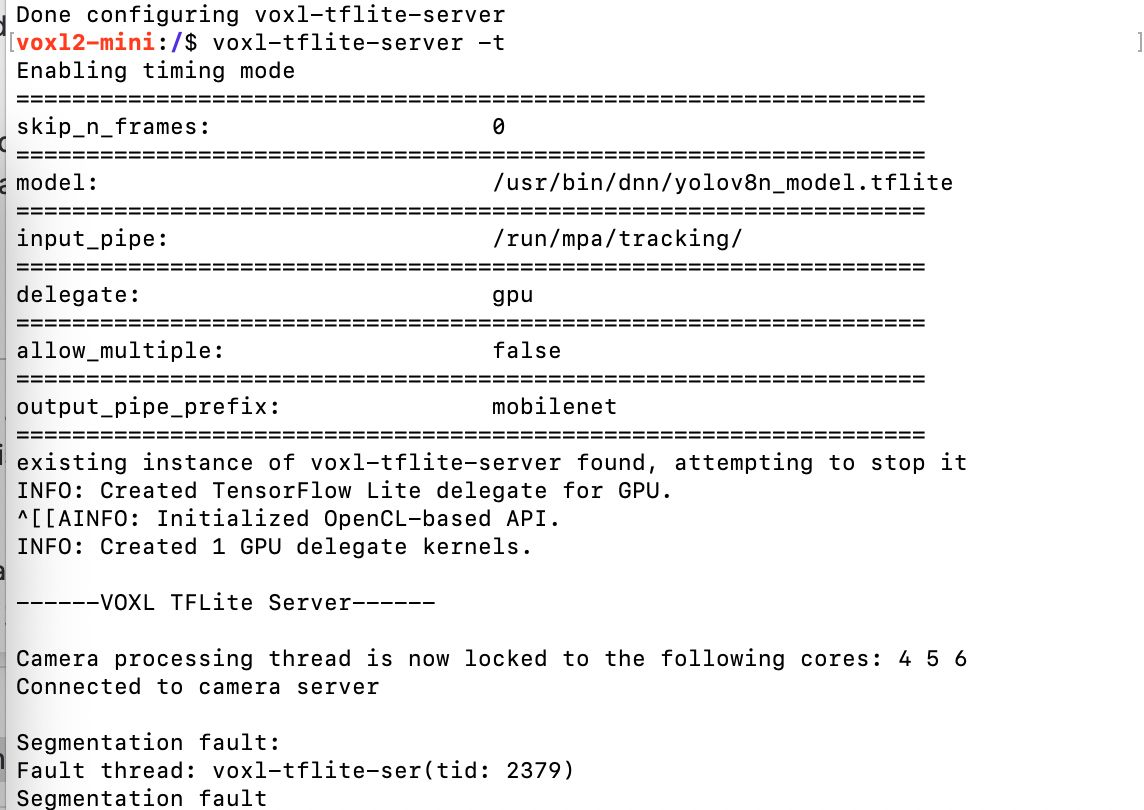
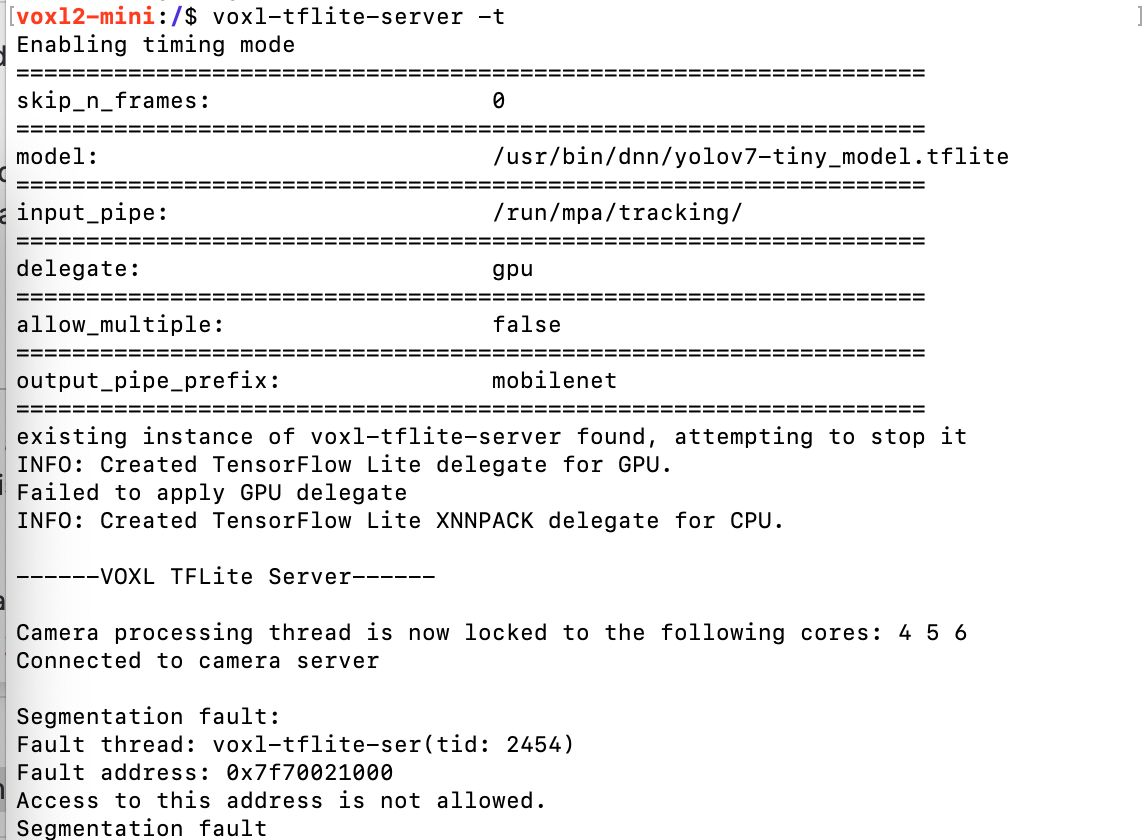
I even referred to this thread https://forum.modalai.com/topic/2997/can-anyone-recommend-a-tflite-colab-notebook-for-voxl2-training/3
and configured the main.cpp file by adding if else statement for custom model to use YOLO model instead of OBJECT_DETECTION as the default one before even running the above commands.
I'm not sure why am I still not getting any output.
Thanks -
@thomas
Okay, So i did run voxl-tflite-server -t alongside voxl-replay command but am still not getting anything.
For yolov5 I get no output after running voxl replay. it just outputs this:
For my custom yolov7 nd yolov8 I get these errors:
I even referred to this thread https://forum.modalai.com/topic/2997/can-anyone-recommend-a-tflite-colab-notebook-for-voxl2-training/3
and configured the main.cpp file by adding if else statement for custom model to use YOLO model instead of OBJECT_DETECTION as the default one before even running the above commands.
I'm not sure why am I still not getting any output.
Thanks@Ajay-Bidyarthy I'll look into it today.
Thomas
-
@Ajay-Bidyarthy I'll look into it today.
Thomas
@thomas @Ajay-Bidyarthy
Sadly I won't have time to look at this today and am out of office tomorrow so I can't fully debug this for you. Let's focus just on YOLOv5 right now since that's the one we have onboard by default and it isn't segfaulting. Make sure you're launching tflite-server in a terminal and then in a separate terminal running the voxl-replay command.
I apologize for this, sorry I didn't have time for it today.
Thomas
-
@thomas @Ajay-Bidyarthy
Sadly I won't have time to look at this today and am out of office tomorrow so I can't fully debug this for you. Let's focus just on YOLOv5 right now since that's the one we have onboard by default and it isn't segfaulting. Make sure you're launching tflite-server in a terminal and then in a separate terminal running the voxl-replay command.
I apologize for this, sorry I didn't have time for it today.
Thomas
@thomas
No worries. Ok, but even for yolov5 I've been running both voxl replay and tflite server commands in separate windows/terminals but still facing the issue.Let me know why is it so and how can we resolve this.
Thanks -
@thomas
No worries. Ok, but even for yolov5 I've been running both voxl replay and tflite server commands in separate windows/terminals but still facing the issue.Let me know why is it so and how can we resolve this.
Thanks -
@thomas @Ajay-Bidyarthy
Okay so I've identified a problem in our timing code and am working on a fix. Here's a short-term solution for you:
- Make sure
/etc/modalai/voxl-tflite-server.confhas"input_pipe"set to"/run/mpa/tracking" - Get your VOXL's IP address with
voxl-my-ipand enter this IP into your web browser to pull up voxl-portal in your browser. - Run
voxl-tflite-serveron VOXL - Run your voxl-logger log as
voxl-logger -p /data/voxl-logger/log0009/or whatever the path is saved as
Now in your web browser, from the "Cameras" dropdown click tflite. You may need to refresh the page to get this to pop up. The permalink to this page is
<YOUR IP>/video.html?cam=tflite(e.g.http://192.168.0.198/video.html?cam=tflite) so you can optionally just go there. This overlay shows the ML model running and in the upper left of the frame shows a framerate. You can use this to estimate for the time being.Am working on the fix now, will let you know when it's released.
Thomas
- Make sure
-
@thomas @Ajay-Bidyarthy
Okay so I've identified a problem in our timing code and am working on a fix. Here's a short-term solution for you:
- Make sure
/etc/modalai/voxl-tflite-server.confhas"input_pipe"set to"/run/mpa/tracking" - Get your VOXL's IP address with
voxl-my-ipand enter this IP into your web browser to pull up voxl-portal in your browser. - Run
voxl-tflite-serveron VOXL - Run your voxl-logger log as
voxl-logger -p /data/voxl-logger/log0009/or whatever the path is saved as
Now in your web browser, from the "Cameras" dropdown click tflite. You may need to refresh the page to get this to pop up. The permalink to this page is
<YOUR IP>/video.html?cam=tflite(e.g.http://192.168.0.198/video.html?cam=tflite) so you can optionally just go there. This overlay shows the ML model running and in the upper left of the frame shows a framerate. You can use this to estimate for the time being.Am working on the fix now, will let you know when it's released.
Thomas
@thomas @Ajay-Bidyarthy
Okay, I've pushed up a change for our nightly builds to fix the timing printouts with the
-toption. So starting tomorrow you can flash the latest nightly SDK build and have this fix. If you'd like it today let me know and I can push the .deb up to Google Drive so you can flash it directly. Here is the link for the nightly SDK builds.Thomas
- Make sure
-
@thomas @Ajay-Bidyarthy
Okay, I've pushed up a change for our nightly builds to fix the timing printouts with the
-toption. So starting tomorrow you can flash the latest nightly SDK build and have this fix. If you'd like it today let me know and I can push the .deb up to Google Drive so you can flash it directly. Here is the link for the nightly SDK builds.Thomas
@thomas
Hi,
Thanks for this info. So I have tried accessing the portal by running the voxl-my-ip command but found nothing getting printed out when I run that command. I inspected to make sure my voxl-portal service is running perfectly but still cant seem to get the ip for portal.
Also, can you push the latest SDK as well or share the deb with me.
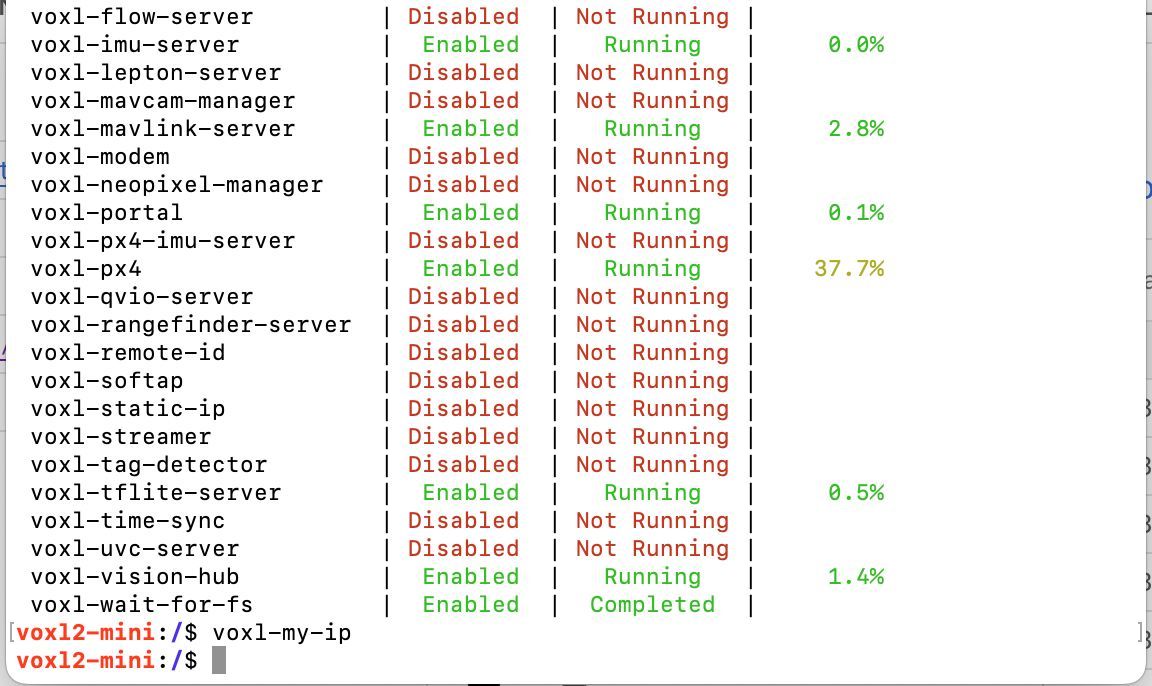 file:///home/bhavya/Downloads/WhatsApp%20Image%202024-04-09%20at%2010.46.27%20AM.jpeg
Thanks
-
@thomas
Hi,
Thanks for this info. So I have tried accessing the portal by running the voxl-my-ip command but found nothing getting printed out when I run that command. I inspected to make sure my voxl-portal service is running perfectly but still cant seem to get the ip for portal.
Also, can you push the latest SDK as well or share the deb with me.
file:///home/bhavya/Downloads/WhatsApp%20Image%202024-04-09%20at%2010.46.27%20AM.jpegThanks
Make sure you set up WiFi on VOXL! Here's the guide: https://docs.modalai.com/voxl-2-wifi-setup/
Thomas
-
Make sure you set up WiFi on VOXL! Here's the guide: https://docs.modalai.com/voxl-2-wifi-setup/
Thomas
@thomas
Hi thomas,
Could you please provide us the latest nightly sdk build for VOXL2 mini if you think we can work with that for now?Regards,
OKSI Team -
@thomas
Hi thomas,
Could you please provide us the latest nightly sdk build for VOXL2 mini if you think we can work with that for now?Regards,
OKSI Team -
@thomas
Hi thomas,
Is this package for voxl2min or voxl2?
Regards

Reading along? Create a free ModalAI Forum account to join in.
With an account you can reply, ask your own question, get an email when a ModalAI engineer answers, and mark the reply that solved it. Your place in each thread is saved between visits.
Questions about VOXL, Flight Core, ESCs and ModalAI drones are answered here by the engineers who build them.
Register Login