
Camera streaming issues
-
Hi,
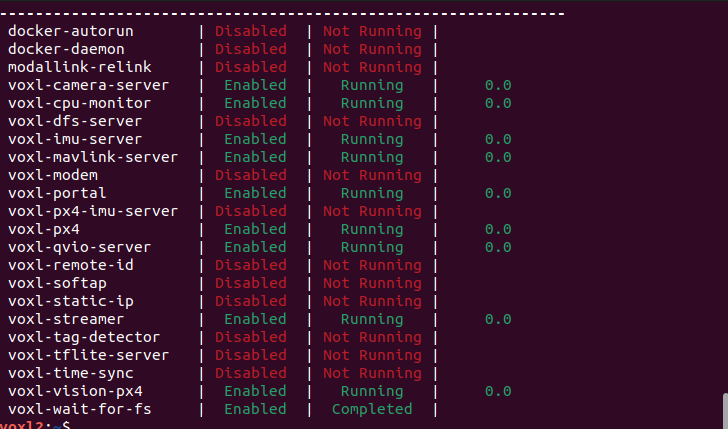
I am trying to stream the cameras from a Sentinel Drone to either VLC or QGroundControl, however, there seems to be a connection problem. I have the following services running and when I open QGC it says waiting for video. I changed the video settings in QGC as advised online and tried UDP and RTSP, but none of them worked. I tried RTSP with VLC and it did not work either.
Could someone tell me if I missed a step or what could be the problem?
-
Hi,
I am trying to stream the cameras from a Sentinel Drone to either VLC or QGroundControl, however, there seems to be a connection problem. I have the following services running and when I open QGC it says waiting for video. I changed the video settings in QGC as advised online and tried UDP and RTSP, but none of them worked. I tried RTSP with VLC and it did not work either.
Could someone tell me if I missed a step or what could be the problem?
@martongonczy There's a few different places to start troubleshooting. To follow the pipeline, first make sure camera data is flowing (
voxl-inspect-cam -a). Ensure the streamer is configured to use the correct pipe (systemctl status voxl-streamer), Ensure the computer running QGC can see the drone over the network, can you ping your VOXL's IP address? Then check QGC settings, are you using the correct URI and port (default port is 8900)?
Reading along? Create a free ModalAI Forum account to join in.
With an account you can reply, ask your own question, get an email when a ModalAI engineer answers, and mark the reply that solved it. Your place in each thread is saved between visits.
Questions about VOXL, Flight Core, ESCs and ModalAI drones are answered here by the engineers who build them.
Register Login