
LidarLite v3 over I2C on Sentinel (VOXL2)
-
We are trying to integrate a Garmin Lidar Lite v3 distance sensor over i2c on our Sentinel. It appears to be available via i2c-detect on /dev/i2c-1, however px4 is not sending mavlink distance_sensor messages. It's unclear if the ll40ls driver from px4 is running.
Currently the sensor i2c is plugged into a 5G modem via the I2C port on J9, although power is coming from the VOXL2 J19 port as it requires 5V. Previous documentation references voxl-i2c, however it doesn't appear to exist on the VOXL2 so I assume this is a VOXL only tool (?). i2c-detect finds a slave on /dev/i2c-1 with address 62, which is correct for the sensor.
The SENS_EN_LL40LS param is set to 2. I'm unsure if the driver is installed, however there is an executable called px4-ll40ls. px4-ll40ls does not seem to ever print, however I can see from echo $? that any command (start, status, start -I, start -X) terminates with value 255 so presumably it always fails.
Via manually writing and reading to the slave, the sensor is confirmed to work.
In this configuration, is there another command or parameter that needs to be set to activate the distance sensor in PX4?
Other details:
We initially tried using the i2c port on J19 on the VOXL2, however the sensor never showed up in i2cdetect. The pins are listed "for future use", and as QUP3. In the documentation for the QUPs, QUP3 is listed as an SPI port for the IMU. -
Hi @pfranklin ,
Sorry for the lag.
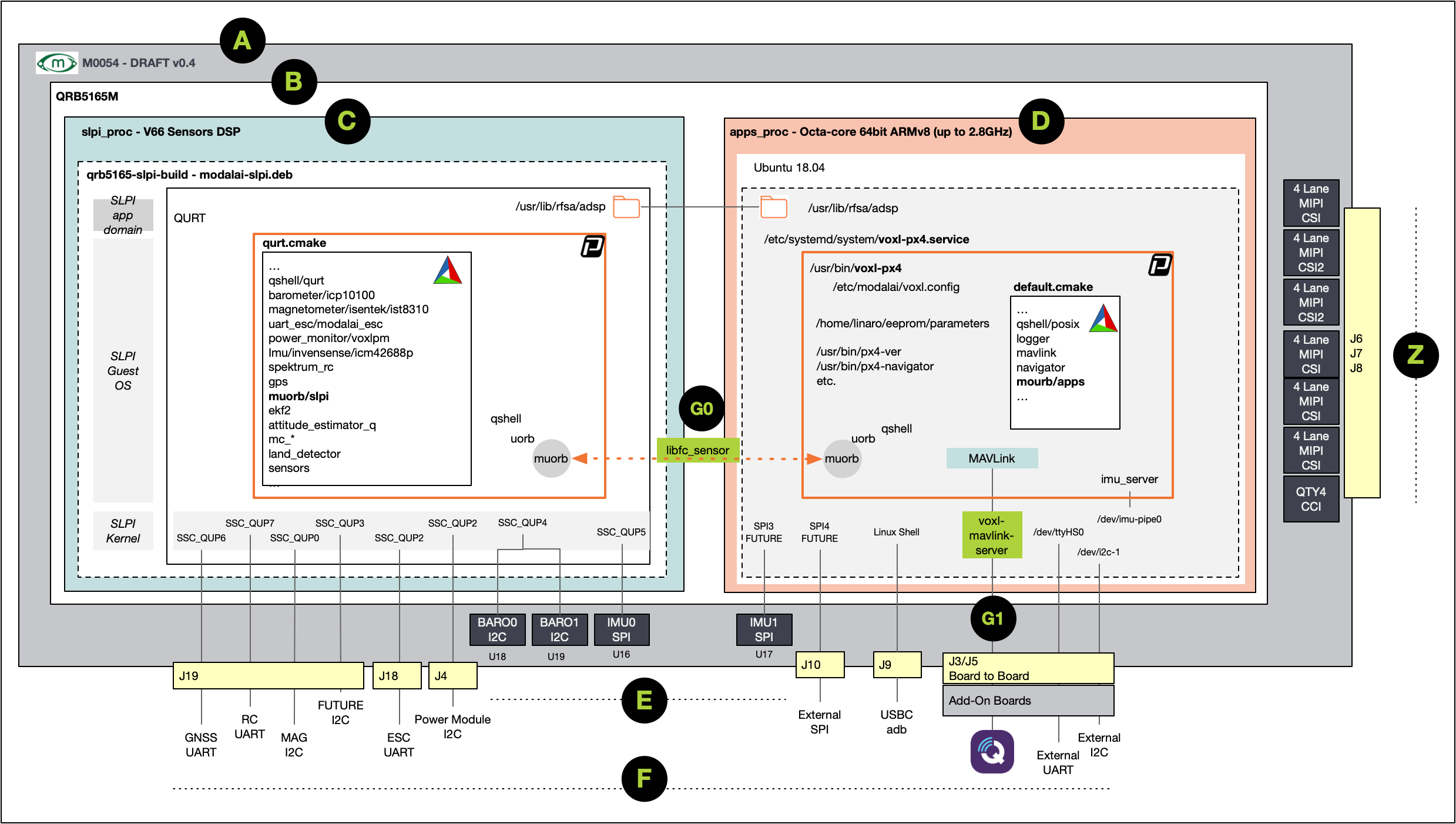
The VOXL 2 architecture has a few processors, the I2C on the 5G modem port is mapped to the applications processor. The I2C we use by default in PX4 is connected to a DSP (image here https://docs.modalai.com/images/voxl2/m0054-px4-block-diagram-0.4.png).
For each driver we've used on the DSP, we've had to make a few small mods to get going. Here's an example of an I2C driver we use on the DSP for talking to a baro:
https://github.com/modalai/px4-firmware/tree/voxl-dev/src/drivers/barometer/icp10100
It's enabled in the build here:
https://github.com/modalai/px4-firmware/blob/voxl-dev/boards/modalai/rb5-flight/qurt.cmake#L55Are you already using J19 pins 3 and 4? If not we could hijack those from the mag driver perhaps and you could use the sensor there.

Hello! It looks like you're interested in this conversation, but you don't have an account yet.
Getting fed up of having to scroll through the same posts each visit? When you register for an account, you'll always come back to exactly where you were before, and choose to be notified of new replies (either via email, or push notification). You'll also be able to save bookmarks and upvote posts to show your appreciation to other community members.
With your input, this post could be even better 💗
Register Login