
custom camera config for imx214
-
Hi!,
I'm currently using a imx214 camera with a voxl2 board. I'm trying to setup the hires imx214 only so I am trying to setup a custom config.
I'm using the latest voxl-suite (1.4.1) which no longer has default configurations for imx214./data/modalai/custom_camera_config.txt
#!/bin/bash

################################################################################
#
# This file allows setting of custom camera configurations by defining what
# sensors are plugged into which port.
#
# There is no guarantee that any arbitrary configuration will work. Only the
# predefined camera configs at https://docs.modalai.com/voxl2-camera-configs/
# are supported.
#
# each slot can be one of the following sensors:
#
# pmd-tof
# pmd-tof-liow2
# ov7251
# ov7251-combo
# ov9782
# ov9782-combo
# ar0144
# ar0144-fsin (for use with m0173 and Starling 2 only)
# ar0144-fsin-combo (for use with m0173 and Starling 2 only)
# ar0144-12bit
# ar0144-12bit-fsin (for use with m0173 and Starling 2 only)
# ar0144-12bit-fsin-combo (for use with m0173 and Starling 2 only)
# imx214
# imx412
# imx412-fpv (low latency mode)
# imx678
#
#
# When using a combo mode pair, you must also add a JX_COMBO_MODE field which
# specifies is the pair is to be set up as either a stereo pair ordered
# left-right, right-left, or treated as two independent cameras. If you are
# using a combo-mode flex but only physically connect one of the two cameras
# then select "single" it does not matter which one you connect.
#
# For example:
# J6_LOWER_COMBO_MODE="left-right"
# J6_LOWER_COMBO_MODE="right-left"
# J6_LOWER_COMBO_MODE="independent"
# J6_LOWER_COMBO_MODE="single"
#
# when running "independent" combo mode, also add a NAME2 field for the second cam
# e.g J6_LOWER_NAME2="tracking_rear"
#
# for all sensors except TOF, you can specify a "rotate" flag to
# rotate the image 180 degrees e.g. J6_LOWER_ROTATE="true" or "false"
# for stereo pairs (e.g. ov7251 combo or ar0144-slave-strereo) you can specify
# "rotate-first-only" or "rotate-second-only" to only rotate one, other wise
# when setting the rotate option to "true" both will be rotated.
#
#
# Once configured, this file should live in /data/modalai/custom_camera-config.txt
# then run voxl-configure-cameras custom to load it in
#
#
# cp /usr/share/modalai/voxl-camera-server/custom_camera_config.txt /data/modalai/
#
# We also suggest changing your /data/modalai/sku.txt file to have a camera
# config term "CC" such as MRB-D0005-4-V2-CC
################################################################################


J6_LOWER_SENSOR=""
J6_LOWER_NAME=""
J6_LOWER_ROTATE="false"


J6_UPPER_SENSOR=""
J6_UPPER_NAME=""
J6_UPPER_ROTATE="false"


J7_LOWER_SENSOR=""
J7_LOWER_NAME=""
J7_LOWER_ROTATE="false"


J7_UPPER_SENSOR="imx214"
J7_UPPER_NAME="hires"
J7_UPPER_ROTATE="false"


J8_LOWER_SENSOR=""
J8_LOWER_NAME=""
J8_LOWER_ROTATE="false"


J8_UPPER_SENSOR=""
J8_UPPER_NAME=""
J8_UPPER_ROTATE="false"
voxl-inspect-services Scanning services... Service Name | Enabled | Running | CPU Usage ------------------------------------------------------------------- docker-autorun | Disabled | Not Running | modallink-relink | Disabled | Not Running | voxl-auto-logger | Disabled | Not Running | voxl-camera-server | Enabled | Not Running | voxl-cpu-monitor | Enabled | Running | 0.0% voxl-dfs-server | Disabled | Not Running | voxl-elrs-startup | Disabled | Not Running | voxl-feature-tracker | Disabled | Not Running | voxl-flow-server | Disabled | Not Running | voxl-imu-server | Enabled | Running | 4.0% voxl-io-server | Disabled | Not Running | voxl-lepton-server | Disabled | Not Running | voxl-lepton-tracker | Disabled | Not Running | voxl-logger | Disabled | Not Running | voxl-mavcam-manager | Disabled | Not Running | voxl-mavlink-server | Enabled | Running | 2.5% voxl-microdds-agent | Disabled | Not Running | voxl-modem | Disabled | Not Running | voxl-open-vins-server | Disabled | Not Running | voxl-osd | Disabled | Not Running | voxl-portal | Enabled | Running | 0.1% voxl-px4-imu-server | Enabled | Running | 1.1% voxl-px4 | Enabled | Running | 34.5% voxl-qvio-server | Enabled | Not Running | voxl-rangefinder-server | Disabled | Not Running | voxl-remote-id | Disabled | Not Running | voxl-softap | Enabled | Completed | voxl-state-estimator | Disabled | Not Running | voxl-static-ip | Enabled | Not Running | voxl-streamer | Disabled | Not Running | voxl-tag-detector | Disabled | Not Running | voxl-tflite-server | Disabled | Not Running | voxl-time-sync | Disabled | Not Running | voxl-uvc-server | Disabled | Not Running | voxl-vision-hub | Enabled | Running | 1.5% voxl-vrx | Disabled | Not Running | voxl-vtx | Disabled | Not Running | voxl-wait-for-fs | Enabled | Completed |when I try to run voxl-camera-server after configuring.
voxl-camera-server
detected system image 1.8.2
using new imx214 defaults
=================================================================
configuration for 1 cameras:

cam #0
    name:                hires
    sensor type:         imx214
    isEnabled:           1
    camId:               0
    camId2:              -1
    fps:                 30
    en_rotate:           0
    en_rotate2:          0

    en_preview:          0
    pre_width:           640
    pre_height:          480
    en_raw_preview:      0

    en_small_video:      1
    small_video_width:   1024
    small_video_height:  768

    en_large_video:      1
    large_video_width:   4208
    large_video_height:  3120

    en_misp:             0
    misp_width:          -1
    misp_height:         -1

    en_snapshot:         1
    snap_width:          4208
    snap_height:         3120
    exif_focal_length:   0.000000
    exif_focal_len_35mm_format:0
    exif_fnumber:        0.000000

    ae_mode:             isp
    msv_exposure_min_us: 20
    msv_exposure_max_us: 33000
    gain_min           : 54
    gain_max           : 8000
    standby_enabled:     0
    decimator:           1
    independent_exposure:0

fsync_en:            0
fsync_gpio:          109
=================================================================
ERROR:   Found zero cameras connected, need at least one.
I have made all connections as per the [C-08 configuration] however the camera is not being detected.
(https://docs.modalai.com/voxl2-camera-configs/#c-08-hires-only)
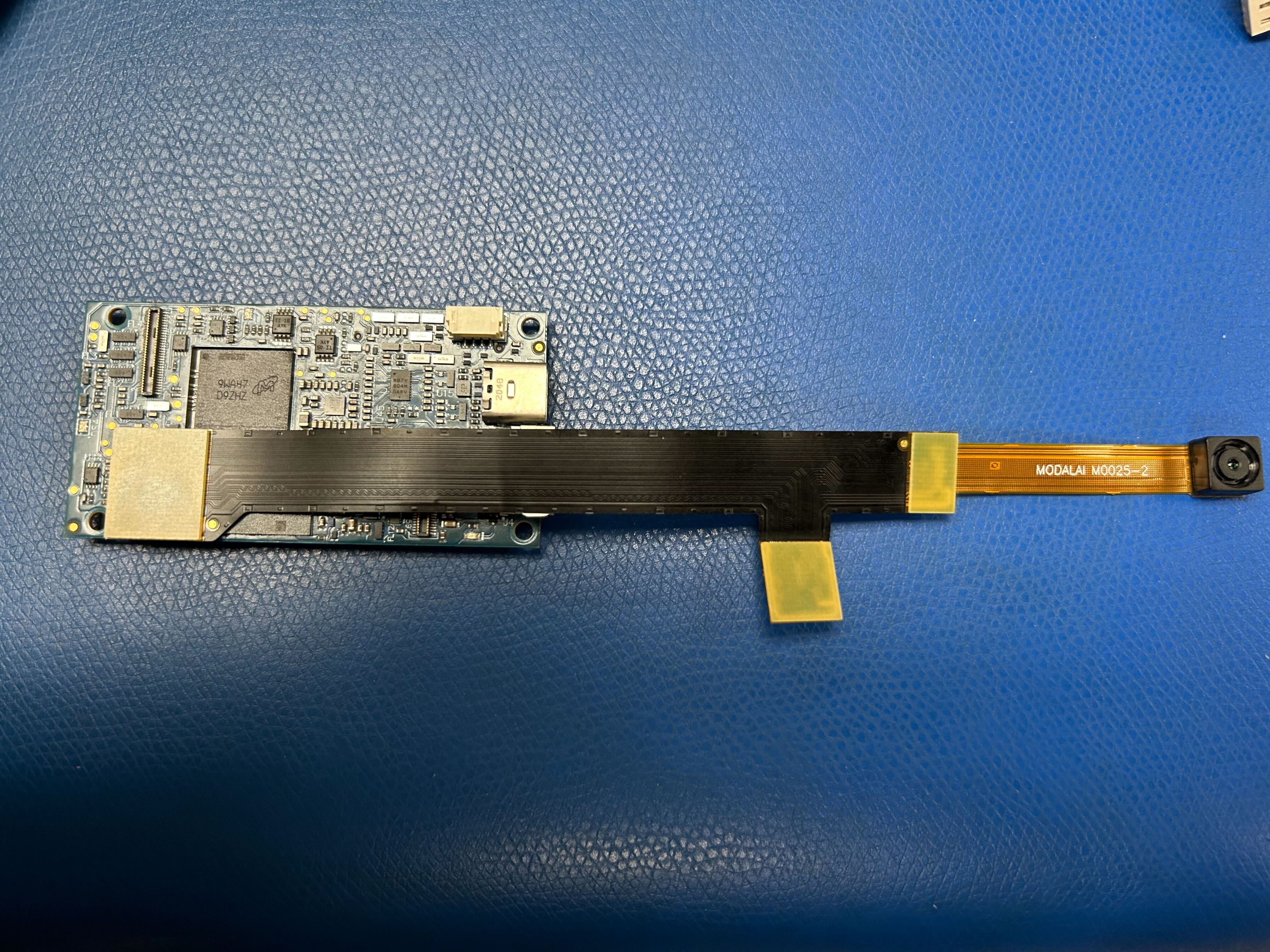
I appreciate any advice that can help me resolve this issue.
Reading along? Create a free ModalAI Forum account to join in.
With an account you can reply, ask your own question, get an email when a ModalAI engineer answers, and mark the reply that solved it. Your place in each thread is saved between visits.
Questions about VOXL, Flight Core, ESCs and ModalAI drones are answered here by the engineers who build them.
Register Login